Want to check your own site? I built a free AI Crawler & llms.txt Checker that tests llms.txt, llms-full.txt, robots.txt, AI crawler user agents, and the links inside the file.
BLUF: I helped a client make their llms.txt setup actually usable by AI crawlers. Cloudflare was blocking major AI crawler user agents, robots.txt had contradictory AI rules, and /llms-full.txt returned 404. I fixed the Cloudflare crawler block, cleaned up the robots policy, published llms-full.txt, preserved the existing llms.txt, and verified live 200 responses for GPTBot, OAI-SearchBot, ChatGPT-User, ClaudeBot, Claude-User, and PerplexityBot.
robots.txt, and missing llms-full.txt.An llms.txt file only helps AI assistants if AI crawlers can actually reach it.
A client came to me with a confusing AI crawler problem. Their site had already published an llms.txt file, but major AI crawlers were still being blocked. At first glance, it looked like a robots.txt issue because the live file had contradictory crawler rules: one section told AI bots not to crawl, while another section appeared to allow them.
The real blocker was Cloudflare.
Cloudflare AI Crawl Control was preventing AI crawler traffic, and Cloudflare’s managed robots.txt behavior had also injected AI-disallow rules that contradicted the intended policy. On top of that, the site referenced the idea of an llms-full.txt file, but the URL returned 404.
Here is how I diagnosed the issue, fixed the file-level problems, adjusted the Cloudflare settings, and proved that the AI crawler user agents could access the site afterward.
Key takeaway: The client did not only have an llms.txt problem. They had an access problem: the right files existed, but the right crawlers could not reliably reach them.
Note on screenshots: the public file screenshots in this draft are direct captures of the live URLs. The Cloudflare dashboard images are privacy-safe callouts recreated from the verified dashboard state so account details are not exposed.
Need this checked on your site? Contact WebDesy with the domain. I can run the same crawler-access checks, show what is blocked, and fix the Cloudflare, robots.txt, llms.txt, or llms-full.txt layer that is causing the problem.
Who This Is For

This case study is for site owners, technical SEOs, and developers who already have llms.txt or robots.txt in place but still see AI crawlers blocked at the edge. It is especially relevant if the site uses Cloudflare and the blocked user agents include GPTBot, ClaudeBot, PerplexityBot, OAI-SearchBot, or ChatGPT-User.
Table of Contents
- Quick Before / After Proof
- What the Client Needed
- Why This Was Worth Fixing
- What the Client Got from the Fix
- How I Verified the Block with Real User Agents
- How I Cleaned Up robots.txt
- How I Stopped Cloudflare from Injecting Conflicting robots.txt Rules
- How I Fixed the Cloudflare AI Crawler Block
- How I Checked Cloudflare Security Rules and WAF Rules
- How I Fixed the llms-full.txt 404
- How I Preserved the Existing llms.txt
- How to Check Whether llms.txt Works Correctly
- How I Proved the Fix Worked
- When to Ask WebDesy to Check This for You
- What I Need Before I Start
- Copy/Paste Verification Script
- What I Fixed for the Client
- What Still Needed a Client Policy Decision
- FAQ
- Checklist I Use on Similar Fixes
- The Takeaway
Quick Before / After Proof

Here is the short version of what I changed for the client:
| Check | Before | After |
|---|---|---|
| AI crawler access | 403 for major AI crawler user agents | 200 for GPTBot, OAI-SearchBot, ChatGPT-User, ClaudeBot, Claude-User, and PerplexityBot |
robots.txt policy | Contradictory AI crawler blocks and allows | One coherent policy with no tested AI crawler both allowed and whole-site disallowed |
/llms.txt | Working file, but crawler access was blocked by Cloudflare | Still working as text/plain; charset=utf-8 |
/llms-full.txt | 404 | 200 as text/plain; charset=utf-8 |
| Cloudflare AI Crawl Control | AI crawler blocking active | Desired AI crawler blocking switched off |
You can inspect the public files directly:
Verification note: on June 20, 2026 at 20:21 +07, GPTBot, OAI-SearchBot, ChatGPT-User, ClaudeBot, Claude-User, PerplexityBot, Googlebot, and a normal browser user agent all returned 200 for /, /llms.txt, and /llms-full.txt. Both llms.txt and llms-full.txt returned text/plain; charset=utf-8.
What the Client Needed

The client wanted a simple outcome:
- Let major AI crawlers access the public site.
- Keep private or system paths blocked, such as
/config/,/api/, and/account/. - Keep
/llms.txtavailable astext/plain; charset=utf-8. - Either publish
/llms-full.txtor remove every reference to it. - Make sure Cloudflare is not returning
403to AI crawler user agents.
The live behavior did not match that intent:
/llms.txtworked for a normal browser.- AI crawlers such as
GPTBot,ClaudeBot,PerplexityBot, andOAI-SearchBotwere getting blocked. robots.txthad contradictory AI crawler instructions./llms-full.txtreturned404.
The key finding was that robots.txt and Cloudflare blocking are separate layers. Fixing robots.txt does not automatically fix a Cloudflare 403.
This is the same kind of technical SEO issue I like to separate from broader prioritization work. If you are deciding which issues deserve attention first, the same thinking applies to a structured SEO audit recovery plan and a practical keyword strategy process. The AI crawler layer is newer, but the discipline is the same: verify the real behavior before changing policy.
Why This Was Worth Fixing

This was not just a neat technical cleanup. The client had made an effort to publish llms.txt, but the crawlers that might use that context were still being stopped before they could access it.
That creates a quiet visibility problem. A site can look ready for AI search and assistant discovery on paper while Cloudflare, a WAF rule, or a contradictory robots policy prevents the actual crawlers from reading the public content.
The value of this kind of fix is not just "robots.txt looks cleaner." The value is that the client gets a verified public setup:
- AI crawlers can reach the pages and files they are supposed to reach.
- Private or system paths remain blocked.
llms.txtstays live and valid.llms-full.txtno longer points to a dead URL.- Cloudflare is not silently returning
403to the crawler user agents the client wants to allow. - The final result is backed by live tests, not assumptions.
Result: The client ended up with an AI crawler setup that could be verified from outside the dashboard, using real user-agent tests and live URLs.
That is the difference between doing a surface-level file edit and doing a technical SEO fix that can be trusted.
What the Client Got from the Fix

For this client, I handled the issue end to end:
- Diagnosed whether the block was coming from robots.txt, Cloudflare, or the origin.
- Cleaned up contradictory AI crawler rules.
- Preserved the existing private-path protections.
- Disabled the Cloudflare settings that were blocking the desired AI crawlers.
- Checked Cloudflare Security/WAF rules for additional user-agent blocks.
- Published a working
llms-full.txtinstead of leaving a404. - Preserved the existing
llms.txtfile and content type. - Verified the result with real AI crawler user agents.
- Documented what was fixed, what was not changed, and what still needed a policy decision.
Service angle: This is the kind of issue where a client does not need another generic audit. They need someone to trace the block through robots.txt, Cloudflare, the origin, and the final HTTP response.
This is the kind of work I like because it removes uncertainty. The client did not just get a recommendation; they got a working fix and proof that the fix worked.
How I Verified the Block with Real User Agents

I started with live HTTP checks. I did not rely on the normal browser view alone, because browsers and crawlers can receive different responses.
Use crawler user agents against the homepage, /llms.txt, and /llms-full.txt.

curl -A "GPTBot/1.0 (+https://openai.com/gptbot)" \
-o /dev/null -w "%{http_code} %{content_type}\n" \
https://www.example.com/llms.txt
curl -A "ClaudeBot/1.0 (+claudebot@anthropic.com)" \
-o /dev/null -w "%{http_code} %{content_type}\n" \
https://www.example.com/llms.txt
curl -A "PerplexityBot/1.0 (+https://perplexity.ai/perplexitybot)" \
-o /dev/null -w "%{http_code} %{content_type}\n" \
https://www.example.com/llms.txt
If Cloudflare is blocking traffic, you will typically see 403.
After the fix, the external verification looked like this:

Proof: The important part is not the exact byte count. The important part is that every tested crawler returned 200, not 403.
How I Cleaned Up robots.txt

Next, I inspected the live robots file:
curl -sL https://www.example.com/robots.txt
The problem pattern looks like this:
User-agent: GPTBot
Disallow: /
User-agent: GPTBot
Allow: /
That is not a coherent policy. Even if a crawler tries to resolve conflicts correctly, you should not make crawlers guess your intent.
Watch out: Contradictory robots.txt rules can make a site look as if AI crawlers are allowed while another layer still blocks them. The policy and the live response both have to agree.
The fixed policy needed to do three things:
- Preserve non-AI private-path rules.
- Remove whole-site AI crawler blocks like
Disallow: /. - Keep the
SitemapandLlms-txtdeclarations.
On the client site, the live robots file after the fix preserved private path blocks and allowed the public AI-relevant files:

A clean pattern looks like this:
User-agent: *
Disallow: /config/
Disallow: /search
Disallow: /account/
Disallow: /api/
Allow: /api/ui-extensions/
Allow: /
Allow: /llms.txt
Allow: /llms-full.txt
User-agent: GPTBot
Allow: /
User-agent: ClaudeBot
Allow: /
User-agent: PerplexityBot
Allow: /
Sitemap: https://www.example.com/sitemap.xml
Llms-txt: https://www.example.com/llms.txt
One caution: Content-Signal needs a policy decision. If the owner does not want AI training, the signal should say that. If the owner wants to allow training, it should say that. Do not leave a signal that contradicts the rest of the policy.
How I Stopped Cloudflare from Injecting Conflicting robots.txt Rules

In Cloudflare, go to:
Website -> AI Crawl Control -> Overview
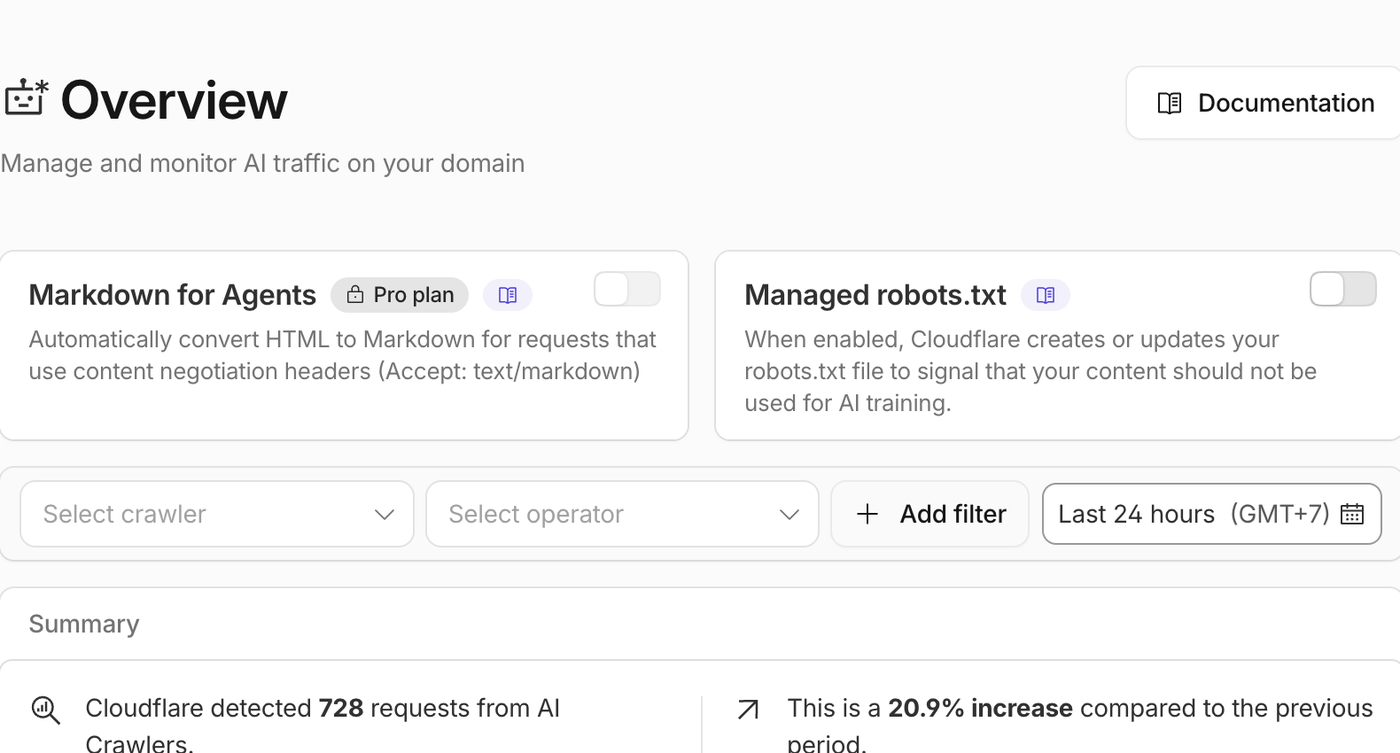
The setting that mattered was Managed robots.txt.
When Managed robots.txt is enabled, Cloudflare can create or modify robots.txt to signal that content should not be used for AI training. That can create a conflict when the site owner actually wants AI crawlers to access public content and llms.txt.
The fixed state:

I switched Managed robots.txt off so Cloudflare stopped injecting the contradictory AI-disallow section.
How I Fixed the Cloudflare AI Crawler Block

Then go to:
Website -> AI Crawl Control -> Security
This is where Cloudflare lists crawlers and whether Cloudflare should block them.
For the desired policy, the Block Crawler switches should be off for the AI crawlers you want to allow.

For this client, the important crawlers included:
GPTBotOAI-SearchBotChatGPT-UserClaudeBotClaude-UserPerplexityBotCCBotMeta-ExternalAgent
The fixed state:

Result: The Cloudflare AI crawler block switches were no longer blocking the user agents the client wanted to allow.
Notice the "Unsuccessful" counts. Those can remain visible after the fix because the dashboard can include historical attempts from the last 24 hours. Do not treat historical unsuccessful counts as proof that current blocking is still active. The live curl checks are the decisive proof.
This matters more now because SEO is not only about classic blue-link rankings. AI assistants, answer engines, and crawler-driven discovery are part of the search surface. That is why I treat this as part of modern AI SEO rather than as a tiny file-hosting cleanup.
How I Checked Cloudflare Security Rules and WAF Rules

Cloudflare AI Crawl Control is not the only place a crawler can be blocked.
You should also check:
Website -> Security -> Security rules

Look for custom rules that match user agents such as:
GPTBotClaudeBotPerplexityBotOAI-SearchBotCCBotBytespiderAmazonbotApplebotmeta-externalagent
In the client’s Cloudflare zone, there were no custom rules:

That means the current crawler access behavior was controlled by AI Crawl Control and the Worker/robots setup, not by a custom WAF rule.
How I Fixed the llms-full.txt 404

The site already had /llms.txt, but /llms-full.txt returned 404.
There are two acceptable fixes:
- Publish
llms-full.txt. - Remove every reference to
llms-full.txt.
For this client, the better fix was to publish it.
Why? Because llms-full.txt is useful when you want to provide AI assistants with a longer, full-content version of the site context. The short llms.txt file can summarize the business, while llms-full.txt can include expanded page text from the priority pages.
The new file was generated from live public site content and served as:
Content-Type: text/plain; charset=utf-8
The live file after the fix:

Result: /llms-full.txt stopped being a dead URL and started returning 200 as text/plain; charset=utf-8.
Because the site was on Squarespace and the existing Cloudflare Worker already handled robots.txt and llms.txt, the practical fix was to extend that Worker to serve /llms-full.txt too.
The Worker pattern is simple:

export default {
async fetch(request) {
const url = new URL(request.url);
if (url.pathname === "/robots.txt") {
return new Response(ROBOTS_TXT, {
headers: { "Content-Type": "text/plain; charset=utf-8" },
});
}
if (url.pathname === "/llms.txt") {
return new Response(LLMS_TXT, {
headers: { "Content-Type": "text/plain; charset=utf-8" },
});
}
if (url.pathname === "/llms-full.txt") {
return new Response(LLMS_FULL_TXT, {
headers: { "Content-Type": "text/plain; charset=utf-8" },
});
}
return fetch(request);
},
};
This is not the only way to publish the file. You could also publish it directly from the CMS, the origin server, or static hosting. The key requirement is that the URL returns 200 as plain text.
How I Preserved the Existing llms.txt

When fixing /llms-full.txt, make sure /llms.txt stays unchanged unless you intentionally update it.
After the fix, /llms.txt stayed valid:
- HTTP status:
200 - Content type:
text/plain; charset=utf-8 - Size:
3,828 bytes - SHA-256 hash stayed the same
The live file:

This matters because fixing one AI crawler asset should not break the asset that was already working.
How to Check Whether llms.txt Works Correctly

When I check an llms.txt file, I do not stop at opening the URL in a browser. A browser check can prove that the file exists for humans, but it does not prove that crawlers can reach it or that the response is being served correctly.
A solid llms.txt check covers four things:
- The URL returns
200, not403,404, or a redirect loop. - The response header is
text/plain; charset=utf-8. robots.txtpoints to the file with the correctLlms-txtline.- Normal browser user agents and AI crawler user agents can access the file.
Start with the headers:
curl -sSI https://www.example.com/llms.txt
The response should include something like this:
HTTP/2 200
content-type: text/plain; charset=utf-8
Then confirm the file is discoverable from robots.txt:
curl -sL https://www.example.com/robots.txt | grep -i '^Llms-txt:'
The expected result is a line that points to the live file:
Llms-txt: https://www.example.com/llms.txt
Finally, test the same file with a real AI crawler user agent:
curl -sL \
-A "GPTBot/1.0 (+https://openai.com/gptbot)" \
-o /dev/null \
-w "%{http_code} %{content_type} %{size_download}\n" \
https://www.example.com/llms.txt
The useful result is:
200 text/plain; charset=utf-8
If the browser returns 200 but an AI crawler user agent returns 403, the problem is usually not the llms.txt file itself. It is usually Cloudflare, a WAF rule, bot protection, or another edge/security layer blocking that user agent.
How I Proved the Fix Worked

After the dashboard and file changes, verify every important user agent against all important URLs.
Use this style of test:
curl -sL \
-A "GPTBot/1.0 (+https://openai.com/gptbot)" \
-o /dev/null \
-w "GPTBot /llms-full.txt %{http_code} %{content_type} %{size_download}\n" \
https://www.example.com/llms-full.txt
At minimum, test:
//llms.txt/llms-full.txt
And test these user agents:
GPTBotOAI-SearchBotChatGPT-UserClaudeBotClaude-UserPerplexityBotGooglebot- a normal browser user agent
The desired outcome is:
200 text/html
200 text/plain; charset=utf-8
If any crawler still gets 403, go back to Cloudflare AI Crawl Control and Security rules.
If any file returns 404, check the CMS/origin route or the Worker route.
If the content type is HTML for llms.txt or llms-full.txt, fix the response headers.
When to Ask WebDesy to Check This for You

You do not need to wait until traffic has already dropped to check this. It is worth ordering an AI crawler accessibility check if any of these are true:
- You use Cloudflare, Akamai, Fastly, Sucuri, or another edge/WAF layer.
- You have published
llms.txt, but you have not tested it with real AI crawler user agents. - Your robots.txt has separate rules for GPTBot, ClaudeBot, PerplexityBot, Google-Extended, CCBot, or other AI crawlers.
/llms-full.txtis referenced anywhere but returns404.- You are not sure whether AI crawlers are allowed for search, assistant retrieval, training, or all of the above.
- You want a technical SEO audit that goes beyond "this file exists" and checks what crawlers actually receive.
When to hire help: If you cannot tell whether the block is coming from robots.txt, Cloudflare, a WAF rule, a plugin, or the origin, this is exactly the kind of technical SEO issue WebDesy can untangle.
This type of project usually fits into one of three WebDesy services:
- AI crawler accessibility audit: I test AI crawler user agents against your important URLs and identify blocks from robots.txt, Cloudflare, WAF rules, plugins, or the origin.
- llms.txt and llms-full.txt implementation: I create or clean up the files, make sure they are served as plain text, and verify that they do not point to dead URLs.
- Technical SEO troubleshooting: I investigate crawl/indexing problems where the browser view looks fine but bots, search engines, or AI crawlers receive something different.
If you are not sure which one you need, contact WebDesy with the domain and I can start with the live crawler checks. The useful first question is simple: "Can the crawlers that matter actually reach the pages and files we want them to reach?"
What I Need Before I Start

For a fix like this, I do not need a vague SEO brief. I need enough access to verify the exact layer where the block is happening and then change only that layer.
For most client sites, the useful starting point is:
- The domain and the preferred canonical version, such as
https://www.example.com. - A list of crawler user agents the business wants to allow.
- Confirmation of the AI training policy, because search/retrieval access and training permission are not always the same decision.
- Cloudflare access that can view and adjust AI Crawl Control, Bots, Security rules, WAF rules, Workers, and routes.
- CMS or origin access only if the files need to be published outside Cloudflare.
- A quick note on private paths that should remain blocked, such as
/account/,/api/, staging URLs, or internal tools.
Client-friendly version: You can send the domain first. I can usually tell from the live responses whether the issue is likely robots.txt, Cloudflare, the origin, or a missing file before asking for deeper access.
Copy/Paste Verification Script

Here is a fuller script you can adapt for your own domain. It checks the homepage, /llms.txt, and /llms-full.txt with the major AI crawler user agents plus Googlebot and a normal browser user agent.
#!/usr/bin/env bash
set -euo pipefail
BASE_URL="${1:-https://www.example.com}"
PATHS=("/" "/llms.txt" "/llms-full.txt")
USER_AGENT_LINES=(
"GPTBot|GPTBot/1.0 (+https://openai.com/gptbot)"
"OAI-SearchBot|OAI-SearchBot/1.0 (+https://openai.com/searchbot)"
"ChatGPT-User|ChatGPT-User/1.0 (+https://openai.com/bot)"
"ClaudeBot|ClaudeBot/1.0 (+claudebot@anthropic.com)"
"Claude-User|Claude-User/1.0 (+https://anthropic.com)"
"PerplexityBot|PerplexityBot/1.0 (+https://perplexity.ai/perplexitybot)"
"Googlebot|Mozilla/5.0 (compatible; Googlebot/2.1; +http://www.google.com/bot.html)"
"Browser|Mozilla/5.0 AppleWebKit/537.36 Chrome/125 Safari/537.36"
)
for LINE in "${USER_AGENT_LINES[@]}"; do
NAME="${LINE%%|*}"
USER_AGENT="${LINE#*|}"
for PATH in "${PATHS[@]}"; do
URL="${BASE_URL}${PATH}"
curl -sS -A "$USER_AGENT" \
-o /dev/null \
-w "${NAME} ${PATH} %{http_code} %{content_type} %{size_download}\n" \
"$URL"
done
done
Run it like this:
bash check-ai-crawlers.sh https://www.example.com
The expected result is 200 for every tested user agent and path. For llms.txt and llms-full.txt, the content type should be text/plain; charset=utf-8.
What I Fixed for the Client

Here is the exact summary of what changed.
Cloudflare AI crawler blocking
Cloudflare was blocking major AI crawlers. I fixed this by turning off crawler blocking in AI Crawl Control for the crawler user agents the client wanted to allow.
Proof:
GPTBotreturned200OAI-SearchBotreturned200ChatGPT-Userreturned200ClaudeBotreturned200Claude-Userreturned200PerplexityBotreturned200
Cloudflare managed robots.txt conflict
Cloudflare Managed robots.txt was disabled so Cloudflare stopped injecting AI-disallow rules into the live robots file.
The live robots file no longer had the Cloudflare Managed Content AI-disallow section.
llms-full.txt 404
I published /llms-full.txt through the existing Cloudflare Worker.
Final state:
https://www.aetos-data.com/llms-full.txt
HTTP 200
Content-Type: text/plain; charset=utf-8
Size: 64,534 bytes
llms.txt preserved
The existing /llms.txt file was not regressed.
Final state:
https://www.aetos-data.com/llms.txt
HTTP 200
Content-Type: text/plain; charset=utf-8
Size: 3,828 bytes
Main site still worked
I checked the homepage, service pages, contact page, and sitemap after the Worker deployment and confirmed they still returned 200.
What Still Needed a Client Policy Decision

Not everything in this type of project is purely technical.
The origin CMS was not changed
The llms-full.txt fix was served through Cloudflare Worker, not by editing the Squarespace origin directly.
That is acceptable because the live URL works. But if the site owner wants all content to live inside the CMS instead of at the edge, the same llms-full.txt content should be added to the origin later.
AI training policy still needs an owner decision
The contradictory Content-Signal issue was removed when Cloudflare Managed robots.txt was disabled. But an explicit client-side business decision may still be needed:
- Should AI training be allowed?
- Should AI crawlers be allowed only for retrieval/search, not training?
- Should the robots policy distinguish between assistants, search bots, and training crawlers?
I would not invent that policy as a technical SEO implementer. It should be confirmed with the site owner.
Historical Cloudflare unsuccessful counts may remain
Cloudflare can continue showing "Unsuccessful" request counts in AI Crawl Control because the dashboard includes historical data. That is not the same as current blocking.
Use live user-agent tests to confirm the current state.
FAQ

Why was GPTBot blocked if robots.txt allowed it?
Because Cloudflare can block a request before the crawler ever gets to act on robots.txt. On this client site, robots.txt was part of the problem because it had contradictory instructions, but the live 403 responses were coming from Cloudflare AI Crawl Control.
Does Cloudflare override robots.txt?
Cloudflare can affect both layers. Managed robots.txt can inject or modify robots instructions, and AI Crawl Control or WAF rules can block the request itself. That means you need to check the robots file and the Cloudflare security layer separately.
Do I need llms-full.txt?
Not always. The acceptance standard is either publish a working /llms-full.txt or remove every reference to it. If the site has enough important page content that AI assistants should understand in full, publishing llms-full.txt is usually the stronger option.
How do I prove ClaudeBot or PerplexityBot can access the site?
Use live HTTP checks with those user-agent strings against /, /llms.txt, and /llms-full.txt. The key proof is a current 200 response for each crawler and URL, not a dashboard count that may include historical blocked attempts.
Should I allow AI training crawlers?
That is a business policy decision, not just a technical SEO decision. You can allow assistant/search access while still deciding separately whether AI training should be allowed. The important thing is that robots.txt, Content-Signal, and Cloudflare settings should not contradict each other.
Checklist I Use on Similar Fixes

This is the checklist I use when fixing AI crawler access for a site using Cloudflare:
/robots.txtreturns200./robots.txthas no AI crawler that is both allowed and whole-site disallowed./robots.txtkeeps non-public paths blocked./robots.txtincludes the correctSitemapline./robots.txtincludes the correctLlms-txtline./llms.txtreturns200./llms.txtreturnstext/plain; charset=utf-8./llms-full.txteither returns200or has no references pointing to it.- Cloudflare AI Crawl Control is not blocking the desired AI crawlers.
- Cloudflare Managed robots.txt is off unless its generated policy matches the owner decision.
- Cloudflare Security rules/WAF do not contain custom user-agent blocks.
- GPTBot, OAI-SearchBot, ChatGPT-User, ClaudeBot, Claude-User, and PerplexityBot all return
200for/,/llms.txt, and/llms-full.txt. - Googlebot and normal browser user agents still return
200.
The Takeaway

The big mistake would have been treating this as only a robots.txt problem.
For modern sites behind Cloudflare, AI crawler accessibility has at least three layers:
- The public files:
robots.txt,llms.txt, and optionallyllms-full.txt. - Cloudflare AI Crawl Control and managed robots settings.
- Cloudflare Security/WAF rules that may block user agents before the request reaches the origin.
The fix was to make all three layers agree.
By the end of the project, the final live state was correct: AI crawlers could access the site, llms.txt stayed valid, llms-full.txt stopped returning 404, and Cloudflare was no longer returning 403 for the tested AI crawler user agents.
If you want this checked on your own site, send WebDesy the domain. I can test the live crawler responses, review robots.txt, verify llms.txt and llms-full.txt, and check whether Cloudflare or another edge layer is quietly blocking AI crawlers before they ever reach the origin.
What you get: You will get a clear answer, not a vague audit note: what is blocked, what is allowed, what should be changed, and how we can prove the fix after it is done. That is the standard I use for AI crawler accessibility, technical SEO audits, and crawl/indexing troubleshooting in general.
