Tag: Cloudflare

  • How to Use Cloudflare for SEO: Speed, Security, Crawlers, and AI Search

    How to Use Cloudflare for SEO: Speed, Security, Crawlers, and AI Search

    Cloudflare is often treated as just a CDN, but for SEO it can do much more than cache static files. Once a website is behind Cloudflare, requests pass through Cloudflare before they reach the origin server. That gives site owners practical control over speed, HTTPS, caching, redirects, bot access, security, and even AI crawler visibility.

    Cloudflare will not replace good content, internal links, technical cleanup, or search intent work. But it can support the technical foundation that helps users, Google, Bing, and AI search systems access a website more reliably.

    In a real Cloudflare account review, I saw the kinds of tools that make this platform useful for SEO: DNS, SSL/TLS, Security, Speed, Caching, Rules, Workers Routes, analytics, and AI Crawl Control. Some features were available on the Free plan, while others, such as deeper Cache Analytics and Markdown for Agents, were marked as paid or Pro-level features. That mix is important because you can get meaningful SEO value from Cloudflare without assuming every account has every advanced feature.

    Who this is for: This guide is for website owners, WordPress users, SEO consultants, and marketing teams who already use Cloudflare, or are considering it, and want to know which Cloudflare features actually matter for SEO.

    Why Cloudflare Matters for SEO

    Cloudflare SEO tools overview for speed security AI crawlers caching and rules
    Cloudflare gives SEO teams one place to review performance, security, crawler access, and edge rules.

    Technical SEO is partly about making a site easier to crawl, faster to load, safer to visit, and more consistent for search engines. Cloudflare sits in front of the site, so it can influence all of those areas.

    Cloudflare can help with:

    • Serving assets from a global network instead of relying only on the origin server.
    • Improving HTTPS coverage and redirecting insecure requests.
    • Reducing load on the origin server through caching.
    • Monitoring traffic from search engines and AI crawlers.
    • Creating cleaner redirects and response-header rules.
    • Protecting the site from malicious traffic without blocking legitimate crawlers.
    • Measuring performance problems through Speed tools and real-user data.

    Cloudflare has its own guide on SEO performance benefits here: Cloudflare: Improve SEO.

    Cloudflare SEO Settings I Would Check First

    Cloudflare SEO settings to check first for caching HTTPS crawlers AI bots speed and rules
    The best Cloudflare SEO review starts with the settings that affect crawling, indexing, speed, and edge behavior.

    Before changing anything, I would review these areas in read-only mode and document what is already enabled. That gives you a safe baseline before you adjust Cloudflare for SEO.

    • Caching and Cache Rules: Check what Cloudflare can cache, which URLs are excluded, and whether important templates need path-specific behavior. Start with the Cloudflare Cache Rules documentation.
    • HTTPS and redirects: Confirm HTTP requests resolve cleanly to HTTPS, with no mixed content or redirect loops. Cloudflare documents this under Always Use HTTPS.
    • Search crawler access: Review security events and bot traffic before tightening rules, so Googlebot, Bingbot, and other legitimate crawlers are not blocked by accident.
    • Crawler Hints: Use Crawler Hints when the site publishes or updates content regularly and indexing freshness matters.
    • AI crawler visibility: Review AI Crawl Control and its AI traffic reports before deciding whether to allow, block, or segment AI crawlers.
    • robots.txt and AI directives: Check whether managed robots.txt is appropriate, then confirm that normal search crawling is still allowed.
    • Rules and headers: Use Cloudflare Redirect Rules and Response Header Transform Rules for edge-level fixes that do not need an origin-code change.
    • Speed monitoring: Use Cloudflare Observatory to separate real performance problems from one-off test noise.
    • Workers: Keep Cloudflare Workers for cases where simple dashboard rules are not flexible enough.

    1. Use Cloudflare to Improve Page Speed

    Cloudflare caching overview for improving SEO page speed
    Cloudflare caching can reduce repeat origin requests and help important pages respond faster.

    Site speed matters for users, conversions, crawl efficiency, and Core Web Vitals. Cloudflare can improve speed by caching files closer to visitors and reducing how often the origin server has to respond directly.

    Cloudflare caching can store copies of static assets such as images, CSS, JavaScript, fonts, and other files at the edge. Instead of every request going back to the web server, Cloudflare can serve cached assets from its network. You can read more in the Cloudflare Cache documentation.

    For SEO, the practical caching areas to review are:

    • Caching Level
    • Browser Cache TTL
    • Cache Rules
    • Tiered Cache
    • Cache Reserve
    • Cache purge behavior

    The goal is not to cache everything blindly. The goal is to cache the right files, avoid caching personalized or admin pages, and reduce slow repeat requests. On a WordPress site, for example, static theme assets, images, and public content often benefit from caching, while admin URLs, cart pages, checkout pages, and logged-in views need careful exclusions.

    2. Use HTTPS Correctly

    Cloudflare security and bot traffic overview for HTTPS and crawler access checks
    Cloudflare security and traffic reports help confirm that protection does not accidentally block search engines.

    HTTPS is a basic trust signal for users and a confirmed search ranking signal. Cloudflare SSL/TLS helps encrypt traffic between visitors, Cloudflare, and the origin server. Cloudflare explains its SSL/TLS options here: Cloudflare SSL/TLS documentation. For redirect behavior, also see Cloudflare’s Always Use HTTPS documentation.

    For SEO, the important checks are:

    • The HTTPS version of the site loads correctly.
    • HTTP redirects to HTTPS.
    • There are no redirect loops.
    • There are no mixed-content warnings.
    • The origin certificate is valid.
    • The selected SSL mode matches the origin setup.

    Broken HTTPS, redirect loops, and mixed content can hurt trust and crawl consistency. Cloudflare makes HTTPS easier to manage, but the setup still needs to be tested after changes.

    3. Use Crawler Hints to Help Search Engines Crawl Smarter

    Cloudflare Crawler Hints setting for search engine crawl efficiency
    Crawler Hints can make Cloudflare cache signals more useful to search engines that support them.

    Crawler Hints is one of the most SEO-specific Cloudflare features. It uses Cloudflare signals to help search engines understand when content has changed, so crawlers can visit at better times instead of guessing. Cloudflare explains the feature here: Cloudflare Crawler Hints.

    This matters because crawl budget is not unlimited. If search engines waste too much time revisiting unchanged pages, they may be slower to discover important updates. Crawler Hints can help reduce wasted crawling and lower unnecessary load on the origin server.

    Before enabling it, make sure the site’s indexing rules are clean. Pages that should not be indexed should still use proper controls such as meta robots tags, X-Robots-Tag headers, or a noindex rule. Crawler Hints is useful, but it is not a replacement for clean indexing logic.

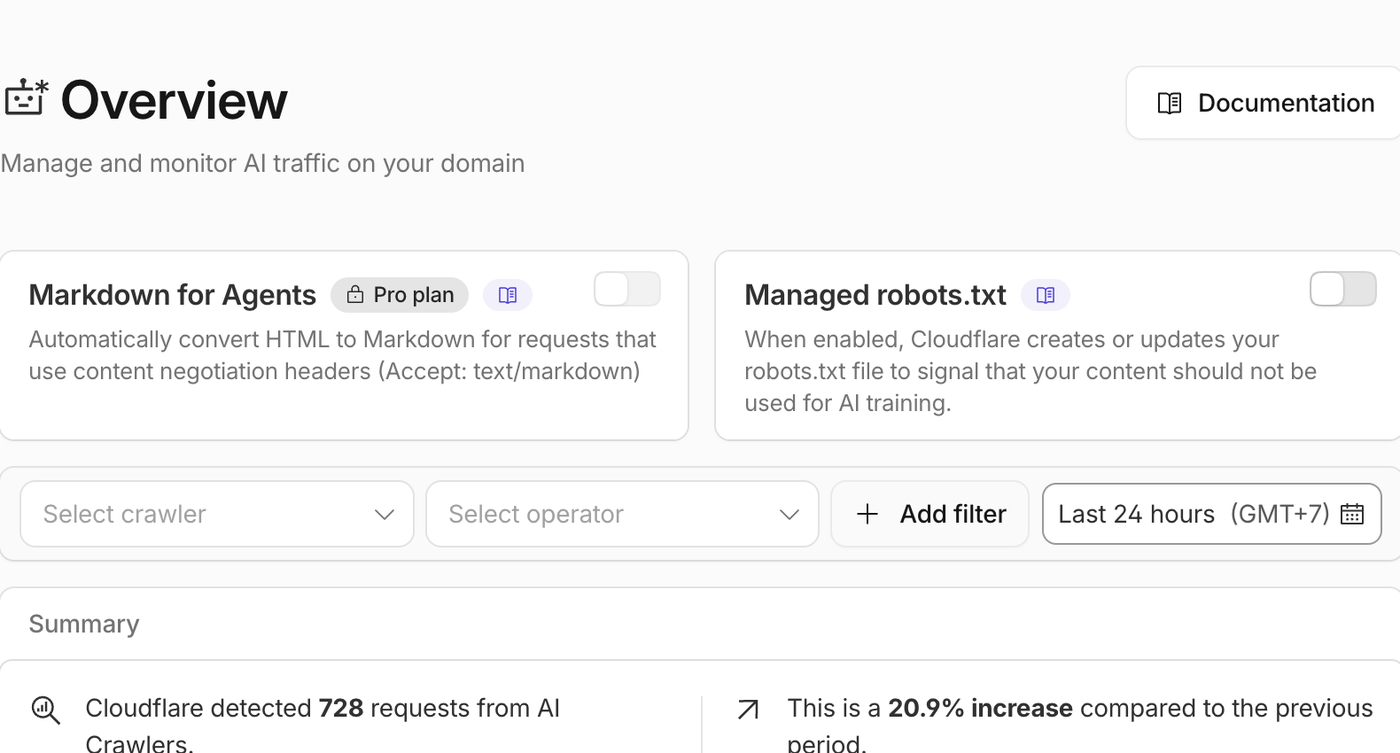
    4. Monitor AI Crawlers Separately From Search Crawlers

    Cloudflare AI Crawl Control overview for AI crawler monitoring
    AI Crawl Control helps separate AI bot activity from traditional search crawler behavior.

    Modern SEO is no longer only about Googlebot and Bingbot. AI search systems and AI assistants are now part of how content is discovered, summarized, cited, and reused.

    In the Cloudflare account I reviewed, AI Crawl Control showed crawler activity from systems such as OpenAI, Anthropic, Perplexity, Meta, Google, Bing, and others. This is valuable because it lets a site owner see which crawlers are requesting content, how often they visit, whether requests are allowed, and whether requests fail.

    For a real example of why this matters, see this case study on fixing AI crawlers blocked by Cloudflare and llms.txt.

    I also helped AETOS Data with its llms.txt file using Cloudflare, which is the same kind of edge-level AI crawler access issue this article is about.

    The practical takeaway from that work was that Cloudflare can be part of the AI search visibility stack, especially when a site needs llms.txt to stay reachable, crawlable, and easy to maintain at the edge.

    Cloudflare’s AI crawler documentation is here: Cloudflare AI Crawl Control.

    The SEO point is simple: do not block everything by default. Some AI search crawlers may help your content appear in AI answers, search summaries, or citation-based discovery. Others may not align with your content strategy. Cloudflare helps you make that decision based on data instead of guessing.

    5. Use Managed robots.txt Carefully

    Cloudflare AI Crawl Control metrics for robots.txt and AI crawler checks
    AI crawler metrics are a useful cross-check before changing robots.txt or managed crawler controls.

    Cloudflare also has a Managed robots.txt feature for AI crawlers. When enabled, it can update robots.txt to signal that content should not be used for AI training. Cloudflare documents the feature here: Cloudflare Managed robots.txt.

    There is one important limitation: robots.txt is a signal, not a security control. Good crawlers respect it, but it does not technically stop a crawler from accessing a URL. If enforcement is needed, Cloudflare bot controls, WAF rules, or AI Crawl Control settings are stronger options.

    For SEO, robots.txt should always be handled carefully. Accidentally blocking important pages, CSS files, JavaScript files, or search bots can create crawl and rendering problems.

    If you are handling crawl directives on WordPress, this guide to using robots.txt with WordPress explains what to watch for before changing rules.

    6. Use Rules for Redirects, Headers, and Edge-Level SEO Fixes

    Cloudflare Rules overview for redirects headers and edge SEO fixes
    Cloudflare Rules are useful for SEO fixes like redirects, headers, and edge behavior.

    Cloudflare Rules can control how Cloudflare handles traffic before it reaches the origin. Rules can redirect URLs, rewrite requests, adjust headers, and apply behavior to specific paths or hostnames. Cloudflare documents the system here: Cloudflare Rules documentation. For SEO-specific redirect work, review Cloudflare’s Redirect Rules documentation and Response Header Transform Rules.

    For SEO, Rules can help with:

    • HTTP to HTTPS redirects.
    • WWW to non-WWW redirects, or the reverse.
    • Legacy URL redirects.
    • Header fixes.
    • X-Robots-Tag rules.
    • Cache behavior by path.
    • URL pattern normalization.

    Rules are powerful, so they should be documented and tested. A bad redirect rule can create loops, chains, soft 404s, or accidental deindexing.

    I would treat edge redirects and header changes as part of a broader SEO audit recovery plan, because small technical changes can affect crawlability quickly.

    7. Use Speed Monitoring to Prioritize Real Problems

    Cloudflare Speed Observatory Core Web Vitals dashboard for SEO prioritization
    Speed Observatory connects Cloudflare performance data with Core Web Vitals.

    Cloudflare Speed tools can help you measure performance instead of guessing. Cloudflare Observatory, Real User Monitoring, Origin Analytics, and Synthetic Monitoring can help reveal whether users are actually experiencing slow pages. Cloudflare’s Observatory docs are here: Cloudflare Observatory.

    This matters because a single PageSpeed test does not always show the whole story. Mobile users, international visitors, slow origin responses, JavaScript-heavy pages, and cache misses can all produce different performance problems.

    A practical workflow is:

    1. Check the most important landing pages.
    2. Compare mobile and desktop performance.
    3. Look for slow templates, not just one slow URL.
    4. Review image weight, third-party scripts, caching, and server response time.
    5. Re-test after changes.

    8. Use Workers When SEO Needs More Flexibility

    Cloudflare edge rules overview for flexible SEO workflows
    When simple rules are not enough, edge logic can support more flexible SEO workflows.

    When deciding which templates or landing pages to fix first, connect Cloudflare speed findings with the keyword strategy questions that matter before prioritizing SEO work.

    Cloudflare Workers can run code at the edge. In the account I reviewed, a Worker was present, which shows how Cloudflare can go beyond basic DNS and caching.

    Workers can be useful for SEO when a site needs fast edge-level handling, such as custom redirects, header logic, lightweight routing, or special handling for crawlers. Cloudflare describes Workers here: Cloudflare Workers documentation.

    Workers should be used carefully. If a Worker changes HTML, status codes, canonical tags, headers, redirects, or robots directives, it can affect crawling and indexing.

    Cloudflare SEO Checklist

    Cloudflare SEO checklist covering speed security crawlers AI bots and rules
    A practical Cloudflare SEO setup usually touches speed, security, crawler access, AI bots, and rules.

    Download the checklist: Keep a copy of the Cloudflare SEO Checklist PDF for future Cloudflare reviews, AI crawler checks, redirect cleanup, and speed audits.

    If you are using Cloudflare for SEO, start with this checklist:

    • Confirm the site is loading correctly on HTTPS.
    • Redirect HTTP to HTTPS cleanly.
    • Check that Googlebot and Bingbot are not blocked.
    • Review AI crawler activity before blocking AI bots.
    • Check caching level and Browser Cache TTL.
    • Create Cache Rules for important path patterns.
    • Keep Development Mode off unless you are actively testing.
    • Use selective cache purges when possible instead of purging everything.
    • Review redirect rules for loops and chains.
    • Use X-Robots-Tag rules only when you are certain they match the right URLs.
    • Monitor Core Web Vitals and real-user performance.
    • Document every rule that affects crawling, indexing, redirects, or caching.

    Cloudflare SEO Mistakes to Avoid

    Cloudflare bot traffic overview for avoiding SEO crawler blocking mistakes
    Review bot traffic and security behavior before tightening rules that could affect crawling.

    Cloudflare can help SEO, but the wrong configuration can create problems. Watch out for these common mistakes:

    • Blocking verified search crawlers. Aggressive security or bot settings can accidentally block Googlebot, Bingbot, or other legitimate crawlers.
    • Caching the wrong pages. Do not cache admin pages, checkout pages, cart pages, account pages, or personalized content unless you know exactly what you are doing.
    • Creating redirect loops. Redirect rules should be tested with HTTP, HTTPS, WWW, non-WWW, trailing slash, and key URL patterns.
    • Using Purge Everything too often. Full purges can temporarily reduce performance and increase origin load.
    • Relying on robots.txt as enforcement. robots.txt is a signal. It is not a security layer.
    • Turning on security features without testing crawlers. Always verify that important bots can still access key pages and assets.
    • Forgetting about JavaScript and CSS. If search engines cannot access resources needed to render the page, indexing quality can suffer.

    FAQ: Cloudflare and SEO

    Cloudflare AI Crawl Control overview for Cloudflare SEO FAQ topics
    Cloudflare crawler and AI crawler controls can answer many common SEO implementation questions.

    Does Cloudflare improve SEO?

    Cloudflare can improve SEO indirectly by making a site faster, more secure, more reliable, and easier to crawl. It is not a ranking shortcut, but it can improve the technical conditions that search engines care about.

    Can Cloudflare hurt SEO?

    Yes, if it is misconfigured. Cloudflare can hurt SEO if it blocks search bots, creates bad redirects, caches the wrong pages, serves incorrect headers, or prevents search engines from rendering key resources.

    Should I block AI crawlers?

    Not automatically. Review AI crawler activity first. Some AI search crawlers may help with visibility, while others may not be useful for your business. Cloudflare AI Crawl Control can help you make a more informed decision.

    Does Cloudflare help Core Web Vitals?

    It can. Cloudflare can improve load times by caching assets, reducing origin requests, and serving content closer to visitors. However, Core Web Vitals also depend on images, JavaScript, CSS, layout shifts, hosting, theme quality, and third-party scripts.

    Is the Cloudflare Free plan enough for SEO?

    For many sites, the Free plan is enough to get basic CDN, DNS, HTTPS, caching, and security benefits. Paid plans can add deeper analytics, more advanced controls, and extra optimization features. The right plan depends on the site’s traffic, risk level, and technical needs.

    Final Takeaway

    Cloudflare SEO overview for speed security crawler access and AI search
    Cloudflare is most valuable for SEO when speed, security, and crawler access are managed together.

    Cloudflare is beneficial for SEO because it improves the technical layer that users and crawlers interact with every day. It can make a site faster, more secure, more resilient, easier to monitor, and better prepared for AI-driven discovery.

    The best Cloudflare SEO setup is not about turning every feature on. It is about using the right features intentionally:

    • Use HTTPS correctly.
    • Cache what should be cached.
    • Keep important pages crawlable.
    • Monitor search and AI crawlers.
    • Use Rules carefully for redirects and headers.
    • Measure speed with real data.
    • Avoid security settings that accidentally block legitimate bots.

    Handled carefully, Cloudflare becomes a technical SEO control center, not just a CDN.

    Need help reviewing your Cloudflare setup? WebDesy can audit your Cloudflare, caching, crawler access, redirects, and technical SEO settings to make sure speed and security improvements do not hurt indexing.

    Need help checking whether Cloudflare is helping or hurting your SEO? I can review your Cloudflare setup, crawler access, cache behavior, redirects, AI crawler visibility, and llms.txt implementation without changing live settings first.

Sitemap