 This is the second and the last part of my web page design tutorials. If you’ve got to our blog for the first time, I suggest checking my previous tutorials because they just give you a basic understanding and really necessary skills to proceed with your HTML endeavors. In this particular tutorial, you will learn how to set a color, size and font for text (for those who think that size actually matters :)), add images to your web page and layout them properly, and decorate your web page design with a background image. All these elements are really essential for any up-to-date site. And you want that because it’ll blow your customers’ minds when they behold such a top-notch piece of art. Let’s get the party started! (more…)
Tag: XHTML
-
Web page design – HTML Tutorial 14 (part 2)
-
Web page design – HTML tutorial 14
 In this HTML tutorial I will share some web-page design techniques and you will learn how to create web-pages with a perfect layout.
A web page design is similar to the design of usual documents for print except for a few differences. The main difference is the ability to use links. Using links (or URLs) website visitors can easily jump from one page to another looking for information that seems to be interesting. We can be so fascinated by clicking the links that we can easily get lost in cyber-space 🙂 (more…)
-
Object in HTML – HTML tutorial 12
 In the HTML tutorial 11 – HTML audio, we have learned how to add audio files and music to our HTML-pages. Now it’s time to expand the horizons of our knowledge. The Object in HTML tutorial will teach you how to add different objects to your HTML-page such as: video, flash animation and java-applet. (more…)
 -

HTML audio – HTML tutorial 11
This tutorial will teach you how to add audio files to your HTML page. It could be a simple music track or a background HTML audio file. We will go through all the settings, tags, and attributes related to HTML audio and compare the default audio players in different browsers. You’ll learn about the obligatory and optional tags that you might wanna use in some cases. The bottom line is that you’ll be an online audio guru after reading the post. 🙂 So, let’s rock! (more…)
-
HTML form – HTML tutorial 10
 This HTML tutorial will teach you how to create an HTML form so that you can receive information from your website visitors. Browsing the Internet you may see different kinds of HTML forms. However you probably do not even suspect how easy it can be to create such an HTML form. It’s like Sunday morning, or like 1 2 3 , or like a piece of cake. Or even like a piece of pizza. OK, you got the idea, right? 🙂 (more…)
 -
HTML frames – HTML tutorial 9
 In this HTML tutorial, you will learn how to create HTML frames, why some web-developers (and SEOs) do not like HTML frames and how to use HTML frames effectively. Currently HTML frames are not used too often. However you need to be able to recognize HTML frames and be able to work with them. So this HTML tutorial will give you a good practice. In the nearest future HTML frames can completely disappear. In this case you would be proud of yourself because you are part of the HTML history. 🙂 (more…)
 -
HTML image map – HTML Tutorial 8
 In this HTML tutorial we will learn how to use an HTML image map. In other words, you will get the knowledge on how to divide an image into parts and assign a unique URL to each part. This may be useful when assigning links to parts of a regular map (for example, states or cities) or even galaxy stars 🙂 Also you will get some basic knowledge on using Photoshop to determine coordinates within an image. (more…)
 -
HTML Tutorial 7 – Image in HTML
 In this HTML tutorial you will learn how to decorate a web-page by adding an image in HTML. If your web-page consists of text only, it may be interesting to somebody (not sure who can like such a site though 🙂 ) however it will be hardly attractive. It is very easy to add images and graphics to a web-page. All this knowledge is gathered in the following “Image in HTML” tutorial. Let’s start, boys and gals 🙂 (more…)
 -
HTML Tutorial 6 – Table in HTML
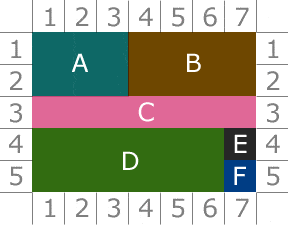 In this HTML tutorial you will learn how to create a table in HTML. Tables can be simple and advanced. We will get familiar with both kinds. HTML table formatting, attributes and CSS involved are used to make your HTML table look better. All these interesting stuffs will be explained in a short and simple manner in the following HTML tutorial. And one more thing, you may lay the table and put your laptop on it for better understanding 😉 (more…)
 -
HTML Tutorial 5 – HTML list
 In our everyday life we often use lists of different types: to-do lists, purchase lists and step by step instructions. If you hate lists in the real life (yes, there is a life out of the Internet too :)) do not worry – you will love to create lists in HTML. It is the most easy part of our HTML studying course! In this HTML tutorial you will learn how to create ordered, unordered and definition lists in HTML to organize textual information. (more…)
 -
HTML Tutorial 4 – CSS Code
 In this HTML Tutorial I will teach you to create Cascading Style Sheets or CSS code and apply it to web-pages. You will learn to make outstanding styles and apply it to your website text and images. Consistent use of CSS code will save you hours or even days of your time while creating websites. Besides, when you become a real master of this technique you will amaze website visitors with the power of your imagination and skills. (more…)
 -
HTML Tutorial 3 – HTML URL and MailTo

In this HTML Tutorial I will teach you how to create an HTML URL (previously known as Hyper-Link). I’ll use HTML URL and HTML link (or just link) interchangeably, because they are different names for the same thing. We’ll also pay special attention to the Mailto function, which allows you to start your default email client to send an email message. Hopefully you got some crackers to eat while reading the post. My studies show it works best that way. (more…)
-
HTML Tutorial 2 – HTML tags
In the tutorial, you will learn how to add basic HTML tags (headings, special characters, metatags, etc) to your web-pages. Also, we will learn how to use a few languages in one HTML file, redirection and refreshing (no, not when you’re tired, it’s something different). Plus, I’ll show you some basic tricks on text formatting in HTML. -
HTML Tutorial 1
Introduction
This HTML tutorial is going to teach you HTML which is a language used to create websites and unlike complex programming languages studying of which may take months or even years, HTML is simple and an easy to learn markup language. Being able to code in HTML will help you increase your company’s income or even better (more…)