Blog

  • Travel Tour Theme Review

    Travel Tour Theme Review

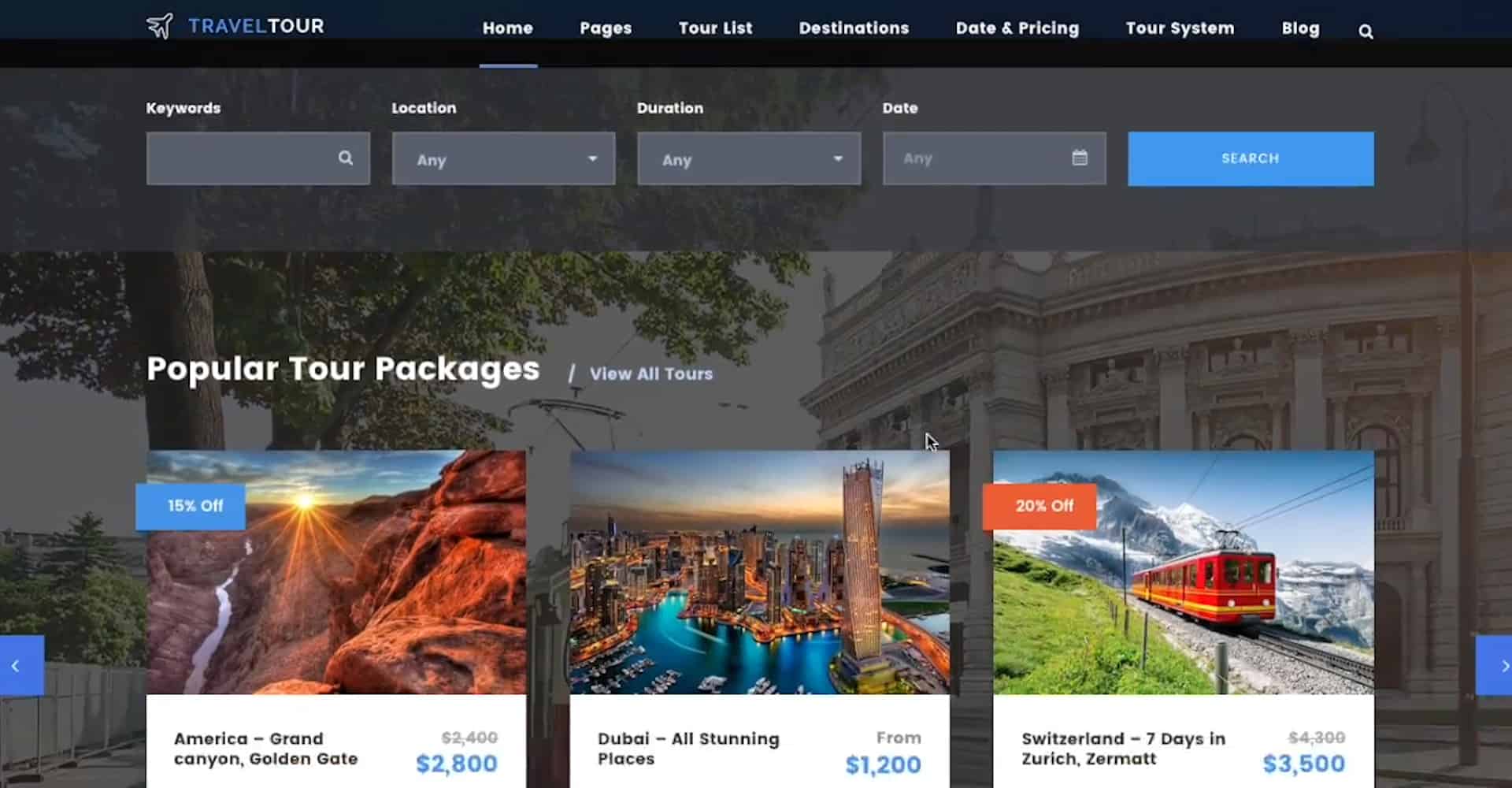
    Travel Tour is a special WordPress theme that allows you to get the dashboard that is perfectly suitable to the needs of the tour industry. You can check out the video below to get a quick idea about what you can do with the theme.

    Quick Travel Tour Theme Video Review

    And now a few screenshots and text from the video above.

    How to Easily Create Tour with the Travel Tour Theme
    Setting the Parameters

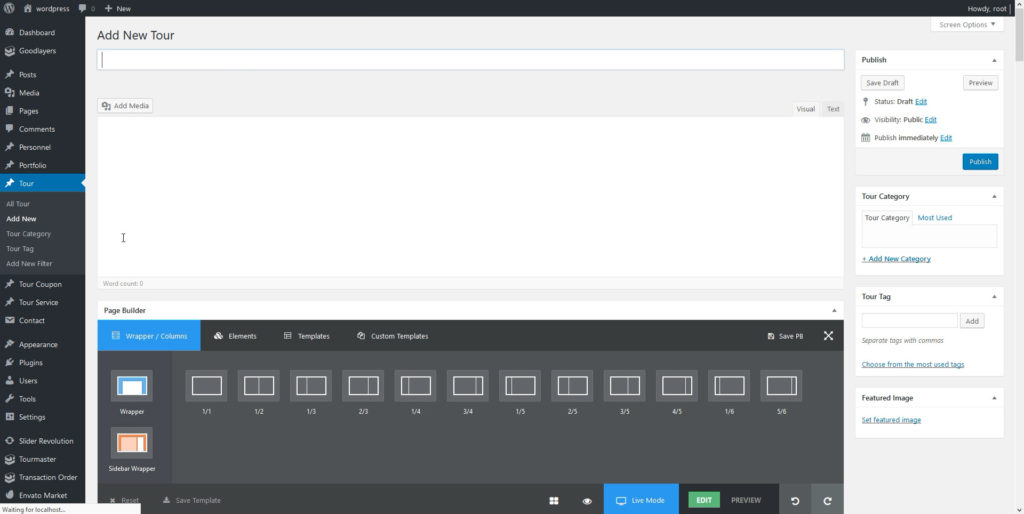
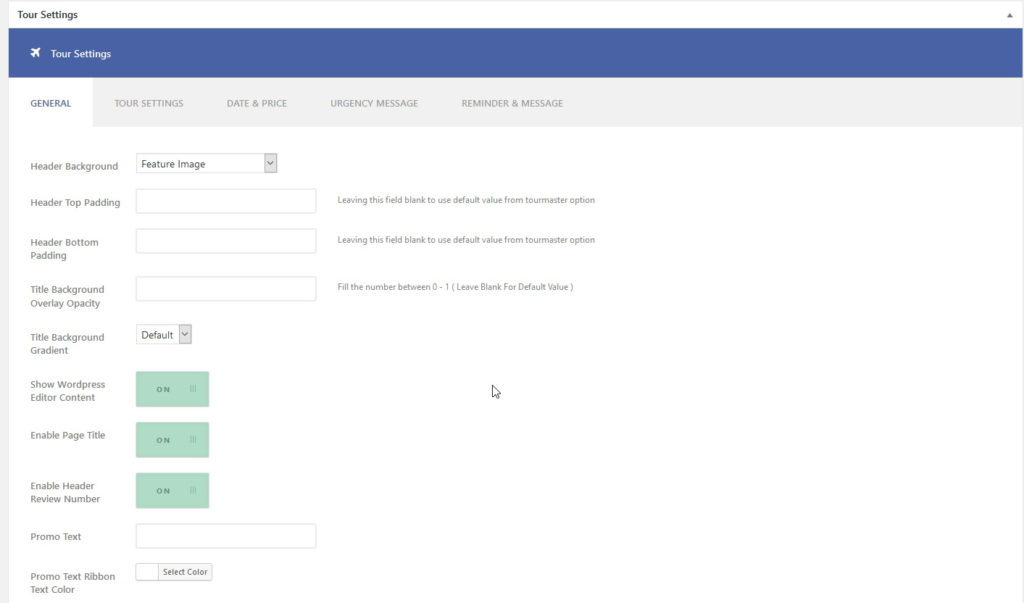
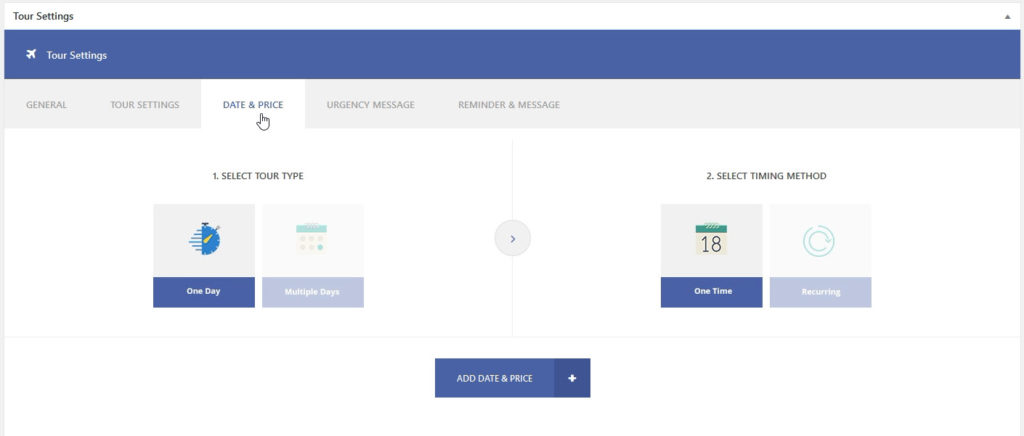
    At the bottom of the page, you’ll see the tour settings section. You can set the tour type/date/price at the “DATE & PRICE” tab. You can set an extra tour information at “TOUR SETTINGS” tab, such as one day, multiple days, recurring, one time, room-based pricing and so on.
    Variable Prices

    As for the prices, you can set not only a fixed price for the tour but also a seasonal one. Other than that, a ‘Group’ discount can be enabled in the single tour setting > Date & Price.
    Making Customize Search

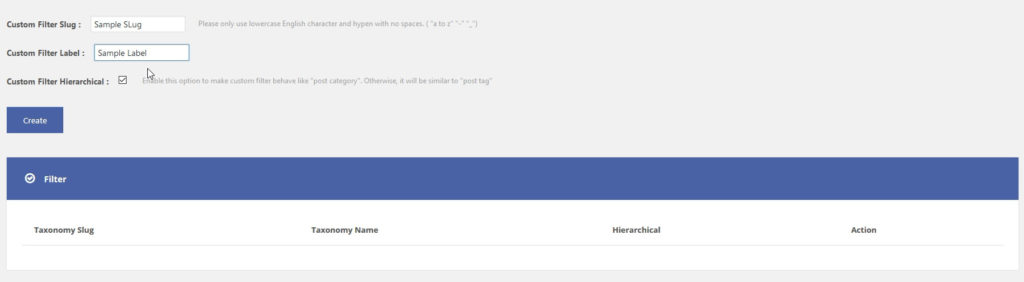
    Make the searching for users as comfortable as possible by customizing searching filters. Go to Tour > Add New Filter and then create a new filter. You can assign your tours to a new filter in the single tour editor page. Then you can also enable the filter in the search bar from search item setting(page builder).
    Custom package

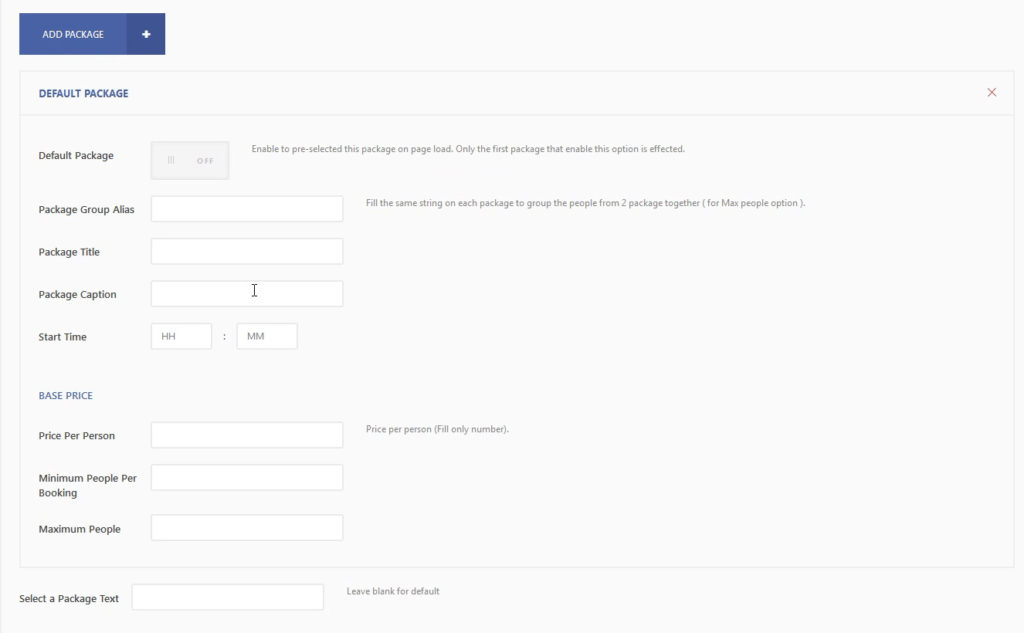
    In the tour settings, you can find Creating Custom Package options, where you can set all the parameters like title, caption, base price etc to be used in many circumstances.
    Tourmaster Tab

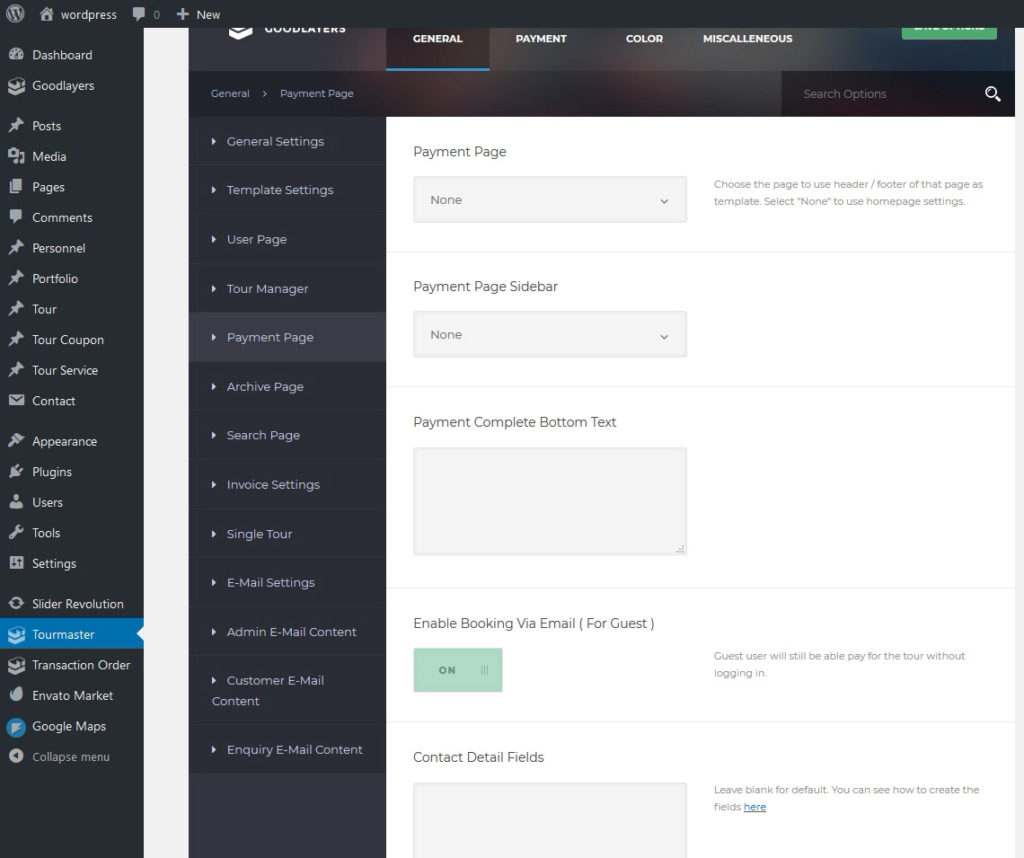
    All the transaction can be easily set up in the Tourmaster tab. Go to “Tourmaster Plugin Option > General > Payment Page” to set up your payment template and sidebar. At “Payment > Payment Settings Tab”, select the payment method you want. You can learn more about how to obtain the payment API key in the next section.

    The ‘Deposit’ payment can be configured in Tour Master option. Payments and also the feature that allows a customer to upload payment receipt and admin will be able to approve or reject (for manual money transfer purpose.) You can find features like ‘approve’, ‘cancel’, ‘reject’ and so on in the ‘Tourmaster’ tab.
    Creating Login and Registration Page

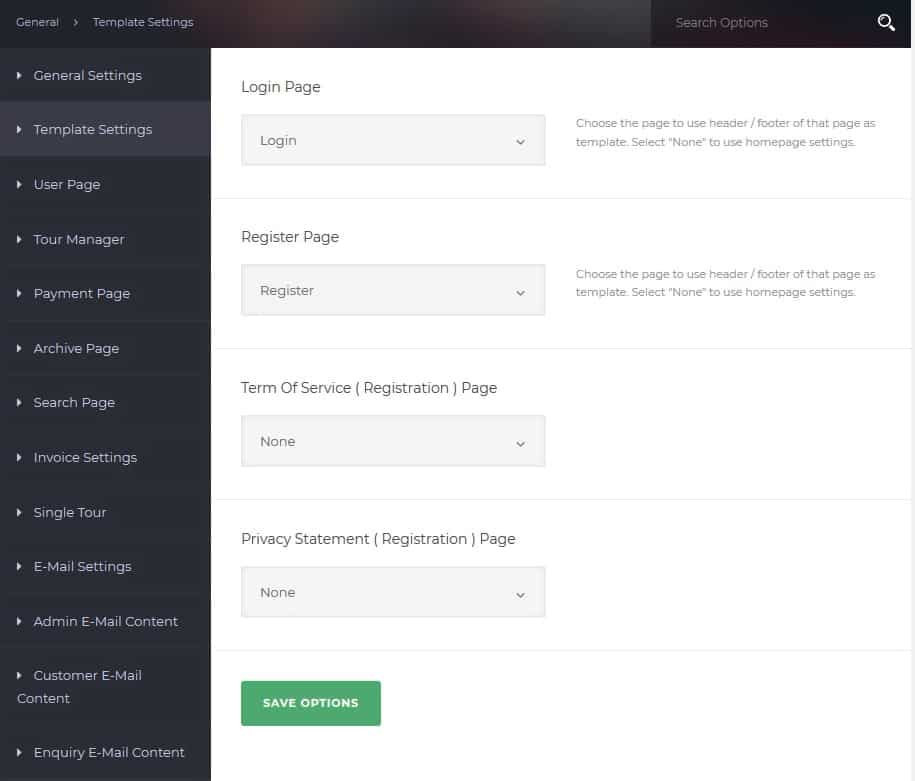
    You also need to set your ‘Creating Login/Registration’ page. First, you have to create two blank pages (‘Login’ page and ‘Register’ page in this case.) Go to the ‘Tour Master’ option > ‘Template Setting’ and choose your pages. In case you need setting up a social login you have to install the ‘Next End Social Login’ plugin.
    Nextend Social Login

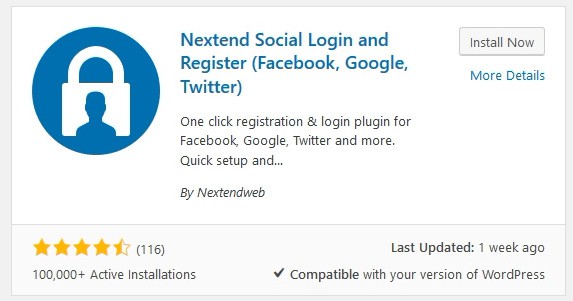
    Nextend Social Login is a professional, easy to use and free WordPress plugin that lets your visitors register and login to your site using their social profiles instead of forcing them to spend valuable time to fill out the registration form.

    They don’t need to wait for validation emails or keep track of their username and password. You can install Nextend Social Login through Plugins > Add New interface. Just search for the plugin’s name, then hit ‘Install’ and ‘Activate’.
    Customer’s Dashboard

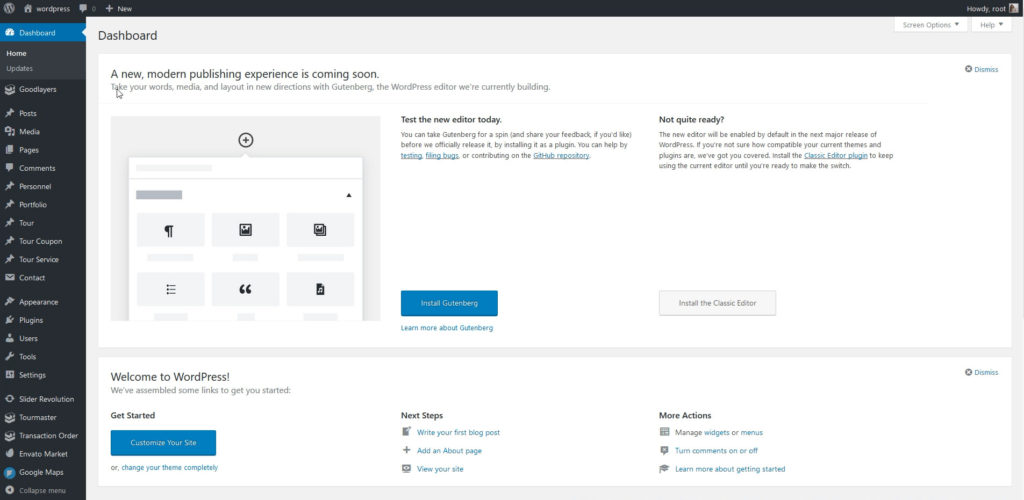
    As a result of creating a site with this theme, you are getting comfortable to use the customer’s dashboard that specially created for the tour industry. Just take a look at the tabs where you can perform all that you need to manage the users’ activity like viewing booked tours, booking status, invoice, rating tour and so on.
    This was just a short preview what is possible with Travel Tour Theme, many more settings are available to make your tour site extremely great.
  • Squarespace vs WordPress SEO Review

    Squarespace vs WordPress SEO Review

    This article compares Squarespace vs WordPress when it comes to search engine optimization. In case you’re on the fence which way to go from an SEO standpoint, you’re in the right place because you’ll get to know all the pros and cons in the Squarespace vs WordPress situation. If you’re not familiar with Squarespace and WordPress, you may want to check this video from Jake Jorgovan. The video gives a general idea about how Squarespace and WordPress work so that you can make an educated choice between the two. To get to know more about where each of the CMSs stand in terms of SEO, keep on reading. (more…)

  • How to Track Banner Ads with LinkAssistant

    How to Track Banner Ads with LinkAssistant

    I already explained how you can monitor links with the help of LinkAssistant. Taking into account that Google is starting to punish for paid links even more, site owners are more willing to promote their sites with banner ads. Sure thing, you can nofollow a text link for just driving traffic to your site and Google won’t have a problem with that. That said, high-quality banner ads can attract more attention and consequently pass along more traffic to your site. Once you put up your banner ad, you need to make sure that it’s actually up and unchanged without prior notice. You can do that with the help of LinkAssistant. Now, you’ll see how exactly that works. (more…)

  • Country Domains and SEO

    Country Domains and SEO

    Country domains are very crucial for every company that wants to rank its site high enough in country specific search results. Thing is, Google often prioritizes sites that are optimized for local search results. Using a country domain name emphasizes that your company and brand are relevant to that particular location and serious about doing business in the country. This post is going to show what kind of options you have in order to make use of Google’s local bios and outrank your competitors in a specific country’s local search. Before we go any further about actual options, you may want to learn more about country domain benefits. (more…)

  • SEO Friendly URLs for WordPress

    SEO Friendly URLs for WordPress

    One of the crucial things that you need to do for on-page SEO is to use your keyword in the url of your page. WordPress makes it really easy. You just need to make sure that your WordPress uses SEO friendly URLs instead of just a bunch of all sorts of characters that look like a dog’s breakfast. Other than not being cool for SEO (because such urls don’t contain your keyword), it’s also hard to memorize such links. Especially when numbers in those IDs get by a long shot bigger. So, you most def need to change that. (more…)

  • Video SEO Ultimate Guide

    Video SEO Ultimate Guide


    In our day and age, people take it for granted that you should have a video on your site. Most startups that emerge now have explainer videos on their homepages. Plus many bloggers create all sorts of video tutorials that show either how to work with their products or services. Google really likes pages with different types of content, such as text, imagery and video. Though WordPress made it really easy to add your YouTube videos, you still need to do a thing or two to your video to make sure that it does its best. Since YouTube.com is the most affordable and well-known video platform, you need to know how to optimize videos on this service first and foremost. (more…)

  • 3 Ways Going to University Can Help Your Entrepreneurial Career

    3 Ways Going to University Can Help Your Entrepreneurial Career

    Sometimes, we all face mishaps, false-starts, and dead-ends in our professional lives. This is the case for pretty much everyone, regardless of how conventional or unconventional their job might be.

    For entrepreneurs, however — and perhaps especially for those who work primarily through the web — the issue is magnified several times over.

    It turns out that even the best entrepreneurs have to deal with the occasional setback — as the multiple failed businesses of Richard Branson can attest to, being skillful is no guarantee that you’ll be met with smooth sailing and endless success in every endeavor.

    The fact is that entrepreneurs have to take more risks than conventional workers, on average, because they are responsible for blazing their own trail, often through unknown terrain.

    But what should you do if your career seems to have hit a dead-end and you’re not sure where to go from here? Well, going to, or back to, University might be one solution. Here are a few ways that signing up for a University degree can help you get out of that professional rut.

    By deepening your skill-set

    Sometimes, the reason for your professional mishaps might be the fact that you lack certain vital skills, or that the skills you do have, have not been developed and deepened substantially enough for you to thrive in your chosen field.

    On-the-job experience will, of course, go a long way towards developing various skill-sets, but there’s a good argument to be made that studying a University degree can help to give you specialist insight you might otherwise have been lacking.

    Studying an Online Marketing Masters degree, for example, will give you a well-rounded overview of the best ways to reach out to clients via the web.

    By making your resume more impressive

    When it comes to being an entrepreneur, the experience is king, and the success of your business will, to a large degree, speak for itself. It is also the case, however, that — particularly in certain fields — your prospective customers or clients might be looking for a degree in your resume to feel fully confident in using your services.

    If having a particular degree is a rite of passage in your field, getting the degree may well go a long way to helping you step out of a rut.

    If having a particular degree is a rite of passage in your field, getting the degree may well go a long way to helping you step out of a rut

    By helping you to re-train or otherwise adjust your direction

    It’s a bitter pill to swallow, but sometimes an entrepreneurial venture is just doomed to failure, for one reason or another. This doesn’t mean that you have to throw in the towel and abandon your dreams of being a successful entrepreneur — in fact, it’s almost a rite of passage for entrepreneurs to get a few failed business ventures under their belts on the road to success.

    Nonetheless, re-training and adjusting your professional direction may, at times, be necessary.

    Going to University can be an excellent way of re-training and helping you to move from one dead-end career path to another, much more fruitful one.

  • How to Enable the Associated Website Annotations Feature

    How to Enable the Associated Website Annotations Feature


    This post explains how to enable the Associated Sites feature for your YouTube.com channel. Back in the day, you could not assign links to external sites from your YouTube videos. Now you can do it with the help of the Associated Website Annotations feature. Though you still can’t assign a link to ANY site, you can set links pointing to your site if you verified ownership for your site. With that in mind, it’s a very powerful tool because now you can just drive users from your YouTube videos (before they jump over to other vids) to your products’ or services’ landing pages. With the right incentive, this approach can work wonders before you know it. (more…)

  • Correct Grammar and SEO

    Correct Grammar and SEO


    Does correct grammar help your SEO rankings or not? Since the major search engines primarily base their rankings on text-related data, it would make sense that Google uses grammar as one of its 200+ ranking factors. However, this is actually not the case. So, should content marketers take the time to follow grammar rules for better keyword rankings? According to Google’s head of SPAM, Matt Cutts, proper grammar is not a ranking factor that Google currently uses. However, Cutts also mentioned that high-quality sites tend to include proper spelling and correct grammar. (more…)

  • 3 Fundamentals of Online Marketing for New Entrepreneurs

    3 Fundamentals of Online Marketing for New Entrepreneurs

    Marketing is the lifeblood of every business, and this is no less true of online businesses, and online marketing, than it is for more conventional formats. (more…)

  • How to Optimize Images Like a Pro

    How to Optimize Images Like a Pro

    This post is going to explain how to optimize images before you upload them to your WordPress dashboard and what you’re supposed to do after that. You may be tempted to just click the Add Media button in your WordPress and use your images as is. It’s a total no-no guys. (more…)

  • Bulk PR Checker

    Bulk PR Checker


    Bulk PR Checker??? Yeah, I know that PR is not a primal SEO metric anymore, but you still may need to check it from time to time. You may use it if you get an email from an SEO who offers you cheap links on high PR sites, blah-blah-blah … Sure thing, it’s Ok to just delete that sort of messages right off the bat in most cases. Should you get a hunch that that person offers you something worth your while, you need a tool that can quickly check PR. It goes without saying that it’s just the first step of doing due diligence, but you do want to make it happen as soon as possible and in bulk. That’s exactly what the tool is perfect for. (more…)

  • What the New MozBar Brings to the Table

    What the New MozBar Brings to the Table


    If you’re a serious SEO guy (in the best sense of the word), you totally need the new MozBar. In case you have it installed on your browser, you should have the newest version because it automatically updates which is a good thing in this case. Though some features are available to paid subscribers only, the new MozBar is still worth installing because it makes your SEO life by far easier. You’ll be able to easily perform page analysis (on-page elements, general attributes, inbound links, markup and http statuses), highlight certain type of links, quickly analyze SERPs (with custom search profiles) and even assess keyword difficulty. (more…)

  • How to Check Links Manually

    How to Check Links Manually


    You may be like,” Why check links manually?” It goes without saying that you need to automate whenever possible if it does not jeopardize your link profile and online reputation. That said, you still need to do some stuff manually. For example, check links pointing to your site from third party ones. It may even sound like or actually be a really menial work, but there are times when you need to do it just because you can’t outsource that sort of activities for either security or reliability reasons. Some things are just of too high importance for a third party assistance. One of such things would be a manual backlink checkup. (more…)

  • How to Manually Detect a Link Network

    How to Manually Detect a Link Network

    As you probably know Google got really unhappy with link networks. Especially free and low-quality ones. If you need to track down link networks manually, you need to know what factors are taken into account while doing so. Plus it’s always a good idea to double-check any automatically-generated result that claims the need to remove your link from a specific site. It can just be downright wrong. To be on the safe side, you actually need to be absolutely sure that the presumably link network is actually one. Now, let’s get your hands dirty with all the nitty gritty factors that make a bad link network. (more…)