
The aim was to take care of everything on-page SEO that can help rank higher for “compression garments for lymphedema“. It goes without saying that it’s not the only thing that you want to do to boost your keyword rankings, but it’s still crucial to make sure that all on-page SEO factors are in place. (more…)
Category: SEO
-
How many backlinks are good for a website?
In a nutshell, you need to know what keyword you’d like to rank for because that will help you figure out what domains (sites) you need backlinks from and how many backlinks you need. (more…)
-

6 Free Tools To Support Your SEO Strategy
Whether you’re a solopreneur or a larger business you need an excellent SEO strategy. With so much competition great marketing helps you to get seen online, build your audience and increase engagement.
(more…) -
My Interview for Freestand.com
I was recently interviewed by Matthew Abt. He started Freestand.com out of his love for small businesses and working independently. Here’s the original post with the interview Vitaliy Kolos – Freelance SEO Expert, Web Designer and Online Course Creator
-

Shopify SEO: Brand New Video Course on Udemy.com
Are you running your online store on Shopify but you’re not doing that good in terms of SEO? Guess what? Today is your lucky day! I’ve launched a Shopify SEO course on Udemy.com (more…)
-

6 Writing Tips for Shopify Product Descriptions That Sell
Whether you’re a small-scale retailer with a local target audience or an international distributor, online product descriptions for your goods matter quite a bit. According to Shopify, 16.1% of all retail sales are expected to shift to online platforms by the end of 2020. Subsequently, by 2021, 53.9% of all online sales will happen via mobile devices, given their accessibility.
This makes writing proper product descriptions for your online storefront a must, especially given the fierce competition in the wake of COVID-19 and social distancing. That being said, what makes a good Shopify product description attract the right audience? What are the benefits of carefully writing and curating your product descriptions going into 2021?
Why Writing Proper Product Descriptions Matters
Let’s take it from the top and consider the “why” behind writing product descriptions in tandem with using Shopify for your online store. According to the Hosting Tribunal, 20% of eCommerce platforms use Shopify, with the platform achieving a 90% satisfaction rate from customers who engage with stores using Shopify.
Your product descriptions are effectively the first and last line of defense when it comes to a convincing cold lead to convert into a customer. As such, you should pay close attention to how you write, edit, and format each product’s description.
Bridgette Hernandez, Head of Content Writing and Development at Supreme Dissertations, said that: “It doesn’t matter how good your back-end CMS is if your product descriptions are poorly written. Create a uniform system of writing and formatting descriptions of each of your products to create a cohesive user experience. Doing so properly will elevate your platform’s reputation and SEO ranking while also giving it a competitive edge.”
If we were to break down the practical reasons how proper product description writing can help your business, the list would include the following:
- Create and maintain a professional brand image for existing and new customers
- Humanize your brand and build a stronger emotional connection with customers
- Increase your website’s global SEO ranking due to structured writing and formatting
- Attract more retailers and distributors who may want to collaborate with your brand
Writing Tips for Product Descriptions that Sell
1. The Basics of – What is the Ideal Product Description Length?
Let’s discuss the technical aspects of a product description before we delve into more practical tips. What’s the ideal length of a Shopify product description? To keep things simple and to-the-point, your product descriptions should be within 150-200 words, depending on what you’re selling. Writing such as product title, specifications, benefits as well as any social proof or testimonial should fit into that length.
Content that goes over 300 words is already considered to be a small article and doesn’t constitute a product description anymore. We will discuss SEO and keyword stuffing in the following paragraphs, so this is also something to keep in mind for the description’s length. Remember that eCommerce shops are driven by multimedia just as they are by product descriptions – make your writing complement the visuals for each product.
When it comes to formatting, that’s up to you. A legible formatting practice is to separate your information into bullet points and keep each point to a single sentence in length. Alternatively, 2-3 paragraphs with 2-3 sentences each will do the job just as well.
2. Assemble your Content Stack
The writing tools you use to write product descriptions for your Shopify platform will dictate their formatting going forward. As such, you should start the process of writing your descriptions by settling for several reliable platforms you will use for the foreseeable future.
Marie Fincher, Content Writer and Chief of Content Editing at Trust My Paper, said that: “Your writing will only be as good as the software and services you use to back it up. This is especially true if you are not a native speaker and aim to translate or localize your eCommerce platform later on. Explore the writing tools available online and create a group of reliable platforms you will reference ad infinitum.”
You can write your descriptions through tools such as MS Office and Google Docs to get a feel for your tone of voice and style. Subsequently, more specialized platforms such as Evernote and Grammarly can help you edit and format the descriptions to better fit your website’s design.
3. Adopt a Keyword-Driven Writing Approach
Writing product descriptions for your eCommerce platform is somewhat different from traditional content marketing due to its sales-centric nature. This is why you should adopt an SEO strategy from the get-go and ensure that your online storefront is as visible to customers as possible. Platforms such as Google Keyword Planner and SEM Rush can help you find the right keywords for your product categories quite efficiently.
Make it a habit to check these and other platforms periodically for changes in keyword trends and update your writing accordingly. While it may seem contrary to creative writing, a keyword-driven approach will allow you to reach a much wider audience than you otherwise would. This is especially true if you translate content into multiple languages since you will need to use keywords specific to those languages to rank locally.
4. Benefits over Features
If you focus on B2C audiences, you should focus on the benefits over the features of your products. Average customers rarely want to find out the technical specifications of a product before they figure out how the product can help them personally.
Writing the benefits down before going into technical features will ensure higher engagement on your platform. Not every lead you acquire will be versed in IT, mechanics, electronics, and other fields that find their way into eCommerce features lists. Open your product descriptions with benefits, and your efforts will pay off consistently.
In addition, you should pay close attention to your product description formatting, as many customers will likely visit your storefront via mobile. This will help you create more appealing, user-friendly product descriptions that users can quickly scan to find out what they want to know.

5. Combine Writing with Multimedia
While not strictly related to writing, multimedia can elevate your product descriptions and ensure better reach. Original images, videos, and demonstrations of your products’ functionality can do wonders for engagement.
These elements can also boost your SEO ranking significantly, especially if you offer subtitles and transcripts in other languages as a bonus. Tools such as Canva and Easil are great for DIY multimedia design, which can help improve your product descriptions’ presentation. Coupled with previously written descriptions, multimedia elements will make your online storefront shine and become more appealing to a wider range of customers.

6. Engage via Calls to Action
Lastly, your product descriptions should always entice the reader to perform a certain action. The so-called “calls to action” can help improve your engagement and gain more customers as a result of their inclusion. Product descriptions without calls to action will fall on deaf ears and fail to generate the interest your store deserves.
Calls to action can range from simple “Let us know what you think” to “Buy now and receive a discount” messages. You can combine calls to action with branded messages and phrases unique to your business to make the writing more memorable. Write different calls to action for different product categories and parts of your website to make the content more dynamic in the customers’ eyes.

Cater to your Target Audience (Conclusion)
Writing product descriptions for your Shopify-based online storefront is all about appealing to your target audience. For example, if you sell children’s toys and apparel, you should target parents and grandparents. The same rule applies to any other product category, as generalized writing will rarely help you sell more products.
Develop your writing style and tone of voice through product description writing. Make sure that all of your product descriptions are written and formatted in the same manner to create a uniformed customer experience.
-
Google’s People Also Ask: How to Get There
This post explains what you need to do to get a People Also Ask box (PAA box) for your snippet in search engine results. You want to do that because you can get in position 0 even if you don’t rank near top 3. That’s a great additional opportunity to stand out of the crowd in Google search results.
As a rule of thumb, you want to do the same things you do for featured snippets if you also want to appear in People Also Ask (PAA). Here’s what I mean in more details:
1. Questions and answers
You want to do research on the questions that people ask about the topic (search for) you want to write about. Basically, you need to create a list of questions and give high-quality correct answers to those questions (fully answer each question). You want to answer those questions concisely and factually (+ free from plagiarism).
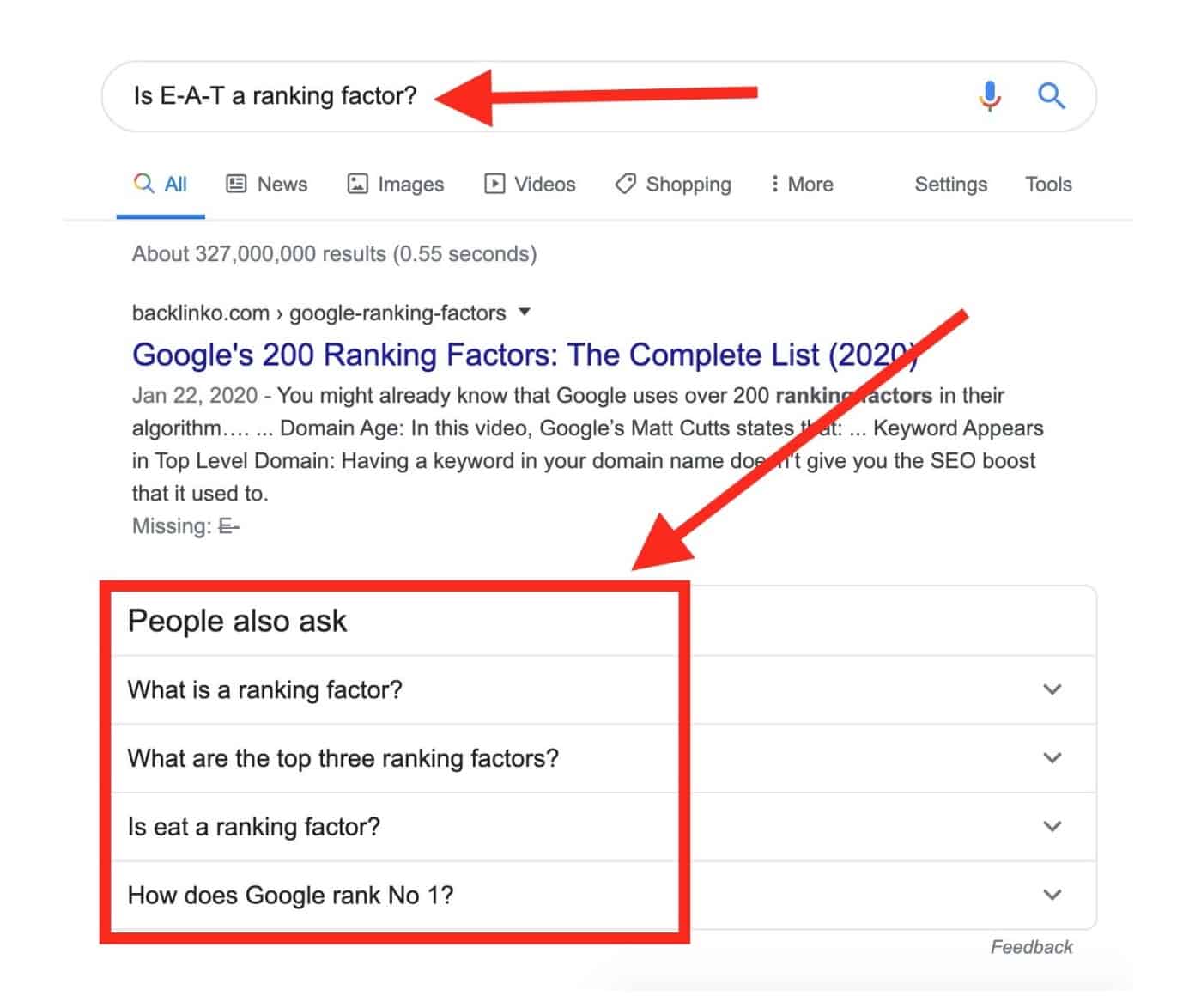
You can use PAA for brainstorming on what questions you actually need to answer in your post or page that you’d like to prep for your own PPA:
2. Use Jump Links
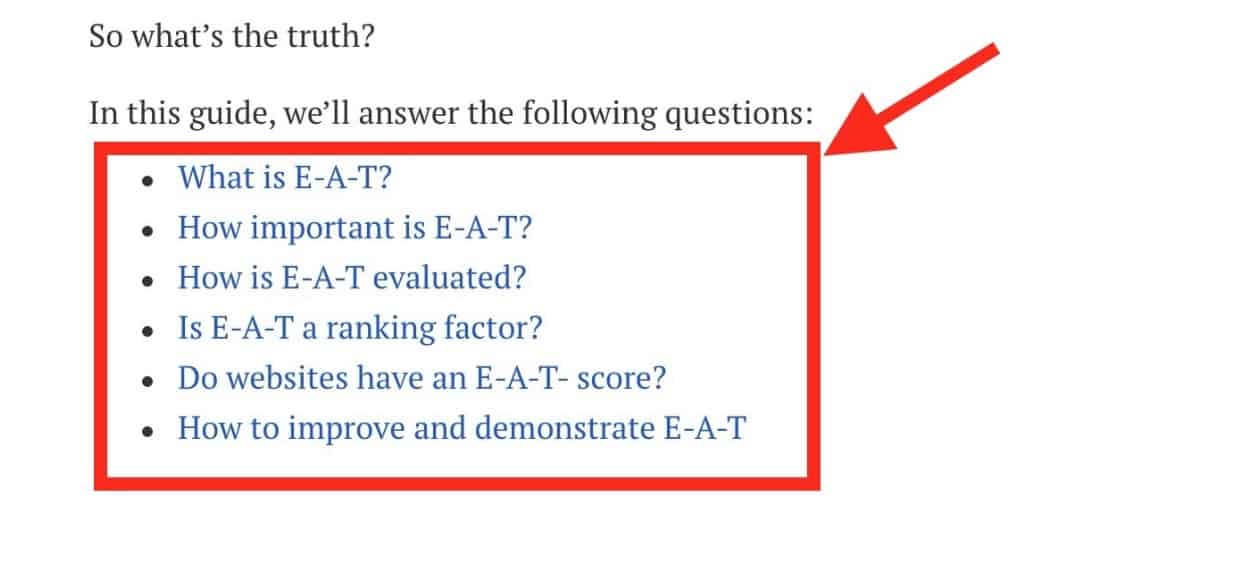
You want to use jump links that bring the person that clicks the link right to the section of the post that answers the question. The blog at Ahrefs.com https://ahrefs.com/blog/ is using jump links.
For example, this post https://ahrefs.com/blog/eat-seo/ has a contents section at the very top of the page:
If you click, say, “Is E‑A-T a ranking factor?”
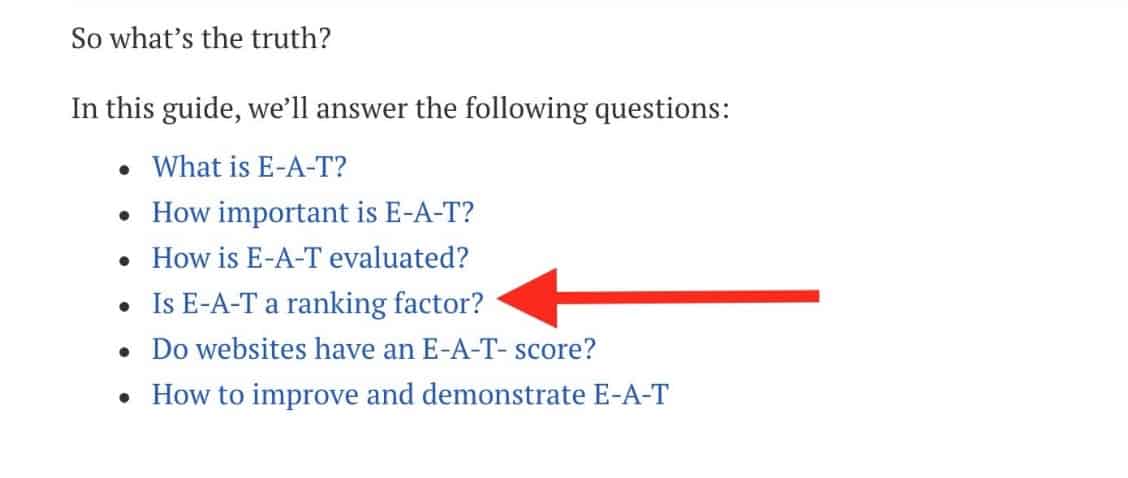
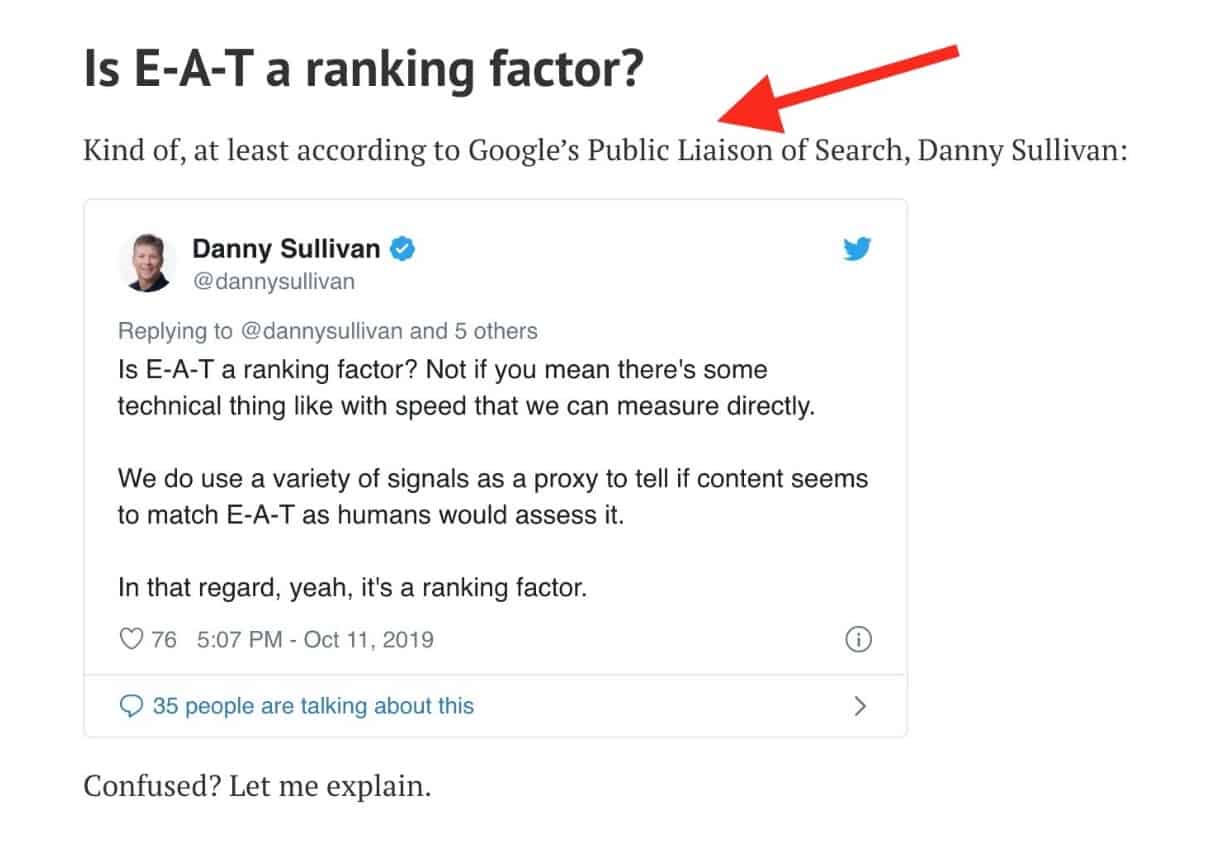
It’ll bring you to the section of the post that answers exactly that question. This method allows you to get a jump link within the search snippet taking you to the answer of the question within the page (on your site).
3. Use Plain Language
You want to use plain language while answering questions because it’s going to increase the odds of getting into PAA (People Also Ask). Your answers need to be correct and easy-to-understand.
4. Avoid Sales Language
If you create a piece of content with too much sales language, you can rest assured that you won’t get to PAA because it makes no sense to Google to advertise your ad copy for free. So you most definitely need to avoid excessive promotional language if you want to gear up your page or post for PAA.
5. Add semantic-rich search terms
In a nutshell, you want to mention your keyword in the question and use the same keyword (or its SEO synonym) right below the question in your answer. In other words, you want to Include the complete questions and answers in a tightly themed web page.
6.Use Q&A Schema
Though it’s not a guarantee but using the Q&A schema (https://schema.org/FAQPage) won’t hurt and can also increase the chances of getting into PAA.
Useful links
- Google’s “People Also Ask” (Related Questions): What They Are, and Why You Should Care (Updated)
- Infinite “People Also Ask” Boxes: Research and SEO Opportunities
- How to Use Google’s New “People Also Ask” Feature 101
- Targeting featured snippet and ‘People also ask’ SERP features
- The explosion of PAA: Answering questions is the new way to dominate search
- How to Target, Optimize and Track Rankings for ‘People Also Ask’ (PAA)
- People Also Ask Boxes and Related Questions
- Scraping ‘People Also Ask’ boxes
- How To Appear In The People Also Ask Box
-
Squarespace SEO for Really Awesome Sites Out There
If you have a Squarespace site and you’d like to know how to improve your SEO on Squarespace, read on and get to know all the basics of Squarespace when it comes to SEO. It’s best if you already have an active Squarespace account because in that case you can really follow through and learn by example, but if you don’t have an account, that’s ok as well. So let’s see how to SEO Squarespace. (more…)
-
5 Tips to finding a reputable SEO professional
SEO is critical to the success of any website. That’s because it is the only way that people get to know of your website, and what your business is all about. In essence, the SEO partner you choose can make all the difference between success and failure in business. To help you make the most of your business, here are 5 tips to finding a reputable SEO professional.
1. Go for their track record
You can always tell how someone will handle your work, based on how they have handled similar tasks in the past. To ensure that you get the best out of an SEO professional, go for one that has a history of success, such as Scott Keever SEO Scott Keever SEO. Scott Keever has been in the SEO business for long, and has helped lots ofbusinesses increase traffic to their websites. You can expect the same for your business.
2.Have a clearly defined SEO goal
In order to find a reputable SEO professional that can help you achieve your objectives, you need to be clear on what exactly you want. SEO is wide, and only by narrowing down on what you want, can you get a professional that matches your needs. For instance, if your website is new, it is best to go for an SEO professional who has experience in lead generation. Without a clear goal on what you are aiming for, it will be difficult for you to make anything out of your SEO endeavors.
3. Research on the price
Before you settle for an SEO professional, do your research on pricing. Talk to different SEO professionals and get to know the average cost of the services you are seeking. Once you get an average price of the service, don’t go for the cheapest. Sometimes cheap service providers are cheap because the quality of their work is wanting. However, that doesn’t mean that you go for overly expensive service. Aim for a mix of price and value, and select a professional that gives you this value. SEO should help your business grow, not drain it of resources.
4. Ask about their strategy execution
There are certain proven and tested SEO strategies that are always guaranteed to give good results. Use these as a benchmark when looking to engage an SEO professional. Ask every SEO professional that you interact with, about how they intend to go about maximizing the visibility of your website through SEO. Go for a professional who has a clear path to strategy execution. Such a professional is most likely experienced, and is guaranteed to give you a good return on your investment.
5. Enquire about results reporting
The only way to determine whether an SEO activity is successful or not, is by looking at the traffic flow to your website. That’s why when looking to hire an SEO professional, it is important that you make sure that they have a real-time reporting mechanism, to help you measure the success or failure of the activity. The faster the results reporting mechanism, the better the success rate of an SEO professional.
-
The Top 4 Reasons SEO is Critical to Business Development
In today’s digital world, a lot of business now sees the importance of digitizing their businesses. While more and more people are gearing towards social media, businesses still need to make use of their website in order to gain more potential clients and customers. (more…)
-

How to Delete Duplicate Domains in Google Sheets (Video)
You may need to delete duplicate domains when you do competitor research and your competitors have backlinks from the same domains or the same competitor has multiple backlinks from the same domain. This article will walk you through the whole process step-by-step so that you get a list of backlinks (one link per unique domain). (more…)
-

A Web Designer’s Guide for Selecting Website Background Images
Often at times, one of the most important aspects of a business’s website, the background, is neglected. Luckily enough, it’s easy to fix your site using a wide variety of things to clean it up. In this guide, we will be talking about how to choose the best website background images for websites to spice it up and make it more presentable.
How to Choose the Right Website Background Images
It’s important to choose the right image that will connect with your target audience. This image will help set the mood and communicate what you’re trying to sell. These types of images can be your product, location, staff, etc. Generally speaking, you want to choose large website background images that will leave a lasting impression on your audience. Which is why it’s so important to choose the right image. However, if you can’t decide on one image to show on your site, you can always go with a slideshow instead.
Solid Colors
Current graphic design trends for popular websites usually stick to a single color, usually white, for a cleaner, more modern appeal. However, you shouldn’t hesitate to make your site more colorful and vibrant, especially if it connects to what you’re selling. However, not everyone feels the same about multi-colors, so make sure you do plenty of research before implementing them into your site.
Patterns and Textures
If you’re planning on using a website background images, you shouldn’t tile it. Although some businesses see success in repeating the same small image in the background over and over again, it often looks busy and unappealing. Instead, you should set a large, single image as the background.
However, if you use tile a bright pattern in the background of your site and keep the number of colors you use to a minimum, you could end up tiling your site nicely. However, we suggest fooling around with a few pattern and textures as your site’s website backgrounds to see which best suits your needs.
If you’re looking for some premium textures and patterns, then this bundle of 500 backgrounds will help you find some extremely attractive designs across 36 different categories ranging from brick walls to galaxy. Apart from website backgrounds, these backgrounds can also be used as social media banners/cover photos, wallpapers, and be printed on merchandise, greeting cards, invitations, etc.
Video Backgrounds
Although finding the proper video to use in the background of your site can be challenging, it may work if you choose subtle motion. When you implement a good video to your site, you may even achieve a “wow” factor over your competition. However, make sure you do plenty of market research to see if it will work, you don’t want to lose clients over a distracting video in the background. You also should avoid choosing a video to place in the background that goes on too long or loops too quickly. This can make your site seem like an eyesore.
Searching for Images Online
If you want to compete in the digital marketplace, you need a website that stands out. Grainy, obscure or unattractive images are no longer acceptable. You need clean, good-looking images and correspond with your text. To do this, you’ll need access to either a good digital camera or a trove of non-copyrighted images that you can draw from. Not a photographer? Don’t worry; there are many great resources on the web that you can use to find professional quality images to use as the background of your website.
Check out UnSplash, and Pixabay for some great website background images. These websites are full of stock images that you can use legally without paying any fees or royalties. If you copy from the web, be aware that you might be snagging copyrighted images and you could get in trouble. It’s better to use directories of images that are high-resolution and copyright free. You can also get some premium stock photos bundle that can be used for commercial and personal projects.
Your images should be high resolution, but make sure they’re not so big that they weigh down your website. Your sweet spot is 795 × 300 pixels. Also, for the best results make sure you’re using JPEGS and not PNGs. Today’s consumers expect to see stunning visuals on websites so don’t disappoint them!
How to Optimize Your Website Background Images for Better Design and SEO
When it comes to optimizing their website for SEO, most people spend a lot of time working on meta descriptions and making sure their tags are in place. What many people don’t think too much about is their image SEO, which can really make or break how well your website does in Google Search rankings. Fortunately, image optimization can be accomplished in a few simple steps.
We’ll teach you how to optimize images for the web, so your website is perfectly search-engine optimized and as user-friendly as possible. In addition to choosing the right image, you should also ensure it meets the proper technical specifications. First, try to pick an image that is horizontally oriented, not vertically. This way, they will fit most computer and device screens which have a widescreen format.
You should also consider the size of the image, too. The majority of computer screens support a minimum resolution of 1024 by 748 pixels. This means that your website backgrounds should be that large at the least. Ideally, your image should be at least 1200 pixels wide. Another smaller than that may appear blurry or pixelated. This will make your website look unprofessional and thrown together.
When using a photo editing program on your computer, you will be able to see the pixel size of your chosen image. If you are not editing the image, you can view the size directly on your computer. On a PC, right click on the image file. Then select “properties” and then click the “summary” tab. If you have a Mac, you can right-click on the file of the image, then click “get info” and select “more info.”
Loading Speed Is Key
One of the best ways to optimize images is to pay attention to your loading speed. Search engines like Google and Bing will penalize websites for really slow loading speeds. The consumer experience is partially what Google and Bing use to determine search engine rankings.
Hence, it’s important that you pay close attention to your loading speeds. Don’t make the mistake of thinking that the bigger the image, the better it is. Huge images will make impatient potential customers leave your website immediately.
For optimal loading speed, keep your files at 120KB (kilobytes) or less. Check the properties (right click on the image) to see what its pixel size. Make sure it’s under 1000 pixels for the best loading speed.
Fill Out Every Field For The Best SEO
In order to learn how to optimize images for web, you need to understand the basics of SEO. Search engines will crawl information that your end-user doesn’t see, like Alternative Tags and Image Captions. This helps to understand the purpose of an image and how it fits in with the overall web content.
Many people put up images on their websites without adequately or accurately filling out all of the information that speaks to search engines. Don’t make this mistake. Part of image optimization is filling out all information on the “back end”.
When naming your images, don’t use something generic like “image one”. Give it some thought. Believe it or not, images names are crawled by search engines and used in SEO rankings. While doing your best to optimize images will certainly help your SEO, you want to be careful of keyword stuffing. For example; if you had an image of an apple you would name it “Red Apple”, not “Apple Apple Apple”.
Keyword stuffing is widely discouraged by Google and Bing and might even get you shoved down in the rankings, or in the worst case scenarios, banned. Keyword stuffing is considered Black or Grey Hat SEO and is a way to manipulate the search engines into thinking that your image or content is more relevant than it actually is.
In addition to filling out everything on the back end as comprehensively as possible, you’ll want to make sure that your image corresponds to the page that it appears on. So, using our image of an apple as an example, you’ll want to put in on a page with a farmer’s market or perhaps a story about healthy eating. This way, the text echoes and reinforces the SEO of the image and vice versa.
Conclusion
There is more competition than ever before in the digital space. With every company having a website, and an attractive online presence, you need to make sure your SEO is on point. Having attractive images that load automatically is the first step in attracting your customers. Making sure all of the back end text, like captions and alternative text is filled in appropriately is critical to making your images Google and Bing search engine friendly. Lastly, naming your image something that corresponds logically with what it is, will help the search engines find it. With a few steps, great SEO is easy!
-
SEO for eBay: How to Make it Work for Your Shop
Search engine optimization (SEO) has long been used by businesses to improve the visibility of their websites in the search engines. As a result of SEO, companies attract relevant visitors who have either an interest in or a need for their products and services. Although you might think of SEO in the context of an independent website, its concepts and tactics can also support stores on hosted shopping sites such as eBay. Originally known for its auctions and ‘Buy it now’ listings, the site now hosts thousands of e-commerce stores alongside individual sellers. And with SEO, they can attract new customers. Let’s see how.
Among its other changes, eBay has also developed an advanced search engine that connects shoppers with relevant products and content on the eBay website. With this in mind, SEO takes on a dual role for eBay stores. To maximize the performance of your store, you must optimize your eBay store both for eBay’s search engine and external search engines such as Google. When you do this, you can rise above your competitors and attract eBay shoppers who want to get great products at fantastic prices from a top-rated seller.
Below, we’ll go through what you need to know about using SEO to boost your new or existing eBay store.
Base your keywords on your store name

Before naming your eBay store, think of it’s most important products – that’s where you will find relevant keywords. Choose a name for your store that contains your most important keyword or phrase. If you already have a store, begin your SEO effort by finding keywords connected to your store name. Okay, if you discover that the name of your store does not have relevance to your keywords, you could change it.
To get the most benefit from keyword optimization, use third-party tools. Google Keyword Planner and eBay Listing Analytics can help you build a strategy. Now is a good time to go through marketing basics with a focus on digital, whether you have to learn something completely new, or just to refresh your knowledge. The time you spend researching and planning will continually pay off once your strategy is in full force.
Implement keywords into your Profile Page section

While you’re creating your profile page, prior to its launch, stop and focus on SEO. Your brand has a story. Tell it. Make sure you accurately describe your business and brand mission. At all times, apply relevant keywords. Also, you should add a link to your store on your profile page. This increases its accessibility to search engine spiders.
Use keywords in the descriptions of your listings

Every product that you list represents a vital opportunity for SEO optimization. Include keywords in the title of each listing. Distribute relevant search terms throughout your 200-word description. Add keywords in the ‘item specifics’ part of your listings.
Link back to your store in emails

When you interact with shoppers, remember to promote your store by including a link to it as part of your signature. You’re sending emails to shoppers? Definitely include a link to your store in that email. When it comes to managing work online, using methods that are free can only improve your business. Furthermore, you should also naturally use your chosen keywords and phrases whenever possible.
Some of your recipients might not know that you operate an eBay store, so a simple reminder at the end of your messages can spread brand awareness. Also, having the right keywords in your emails can help recipients locate your information when they search for related information.
Don’t underestimate the power of blogging

Give your eBay store a shot in the arm by developing a content marketing strategy. For example, try publishing articles, graphics and videos that introduce, discuss and demonstrate the products that you sell. Also, make sure that you add value by providing ‘how to’ articles, answering questions and solving problems.
Make sure you post content to your blog on a regular basis and naturally include your keywords in your content along with relevant links to your store, individual product pages and your eBay profile page. When you do this, you increase the number of opportunities that Google has to discover your eBay store and include it in search results.
Publish articles on eBay

Did you know this? You can publish content on eBay that can get your store publicity both on the site and in search engines? For example, you could publish product guides. Over time, that can build up your brand authority. Also, you can use eBay to publish recommendations and problem-solvers.
Also, use your blog. That’s where you can publish guides, for example. People love tutorials, especially free ones. Why not share what you know about running an eBay store? Everything you publish should include your keywords and phrases along with links that lead readers to your eBay store. Make them check out your store and products, subtly.
For safest SEO, pay for advertising

You can promote your store by advertising it via pay-per-click (PPC) services such as Google AdWords. When you do this, you get to set a budget and choose how much you want to spend on each ad. In exchange, your ads will appear on search engine results pages for queries that pertain to your eBay store.
Optimize for mobile

More than half of internet traffic comes from mobile users. That pattern holds true on eBay. Mobile shoppers dramatically outnumber their desktop counterparts. What does that mean to you? You should make sure that all your store’s content, including images, properly displays on mobile screens. It’s up to you to ensure that mobile users can easily find, navigate and view your store.
In addition to your eBay content, make sure that your off-site content such as your blog is optimized for mobile users. That means that your pages quickly load and your buttons and navigation controls are easy to tap.
It’s time to get to work
Your choice to operate a store on eBay gives you access to a popular shopping platform and millions of dedicated users. Of course, the presence of competitors on the site means that you cannot expect spontaneous success. That’s why you need to leverage SEO.
Developing a plan for your store and support it with sound SEO principles that include relevant keywords, mobile-first optimization, backlinks and valuable content, really does drive shoppers to your store. Your sales will increase. Of course, that’s if you have a plan and stick to it.
What do you think – could these basic SEO methods work for your eBay shop?
-

Shopify SEO
The other day I had a chance to try out the Shopify platform that I heard a lot of but never had the opportunity to get my hands dirty and see what the fuss is all about. Shopify.com is an awesome (now I can say that) tool for those of you guys who wants to start selling stuff online, but at the same time you’re not really excited by the necessity of dealing with hosting options, FTP uploadings and all that jazz. Long story short, you can set up your online store within seconds. Being an SEO, I was mostly interested to find out how they treated SEO needs that their users will definitely want to satisfy. Here’s what I found out. (more…)
-

3dcart: Best Online Store Platform for SEO
From my experience, 3dcart is the most feature-rich platform when it comes to SEO. If you want your online store to be as SEO optimized as possible, your best choice is 3rdcart. This post breaks down all the jaw-dropping built-in search engine optimization features the ecommerce store builder comes with. Let’s dive right in! (more…)