
Are you running your online store on Shopify but you’re not doing that good in terms of SEO? Guess what? Today is your lucky day! I’ve launched a Shopify SEO course on Udemy.com (more…)
Blog
-

6 Writing Tips for Shopify Product Descriptions That Sell
Whether you’re a small-scale retailer with a local target audience or an international distributor, online product descriptions for your goods matter quite a bit. According to Shopify, 16.1% of all retail sales are expected to shift to online platforms by the end of 2020. Subsequently, by 2021, 53.9% of all online sales will happen via mobile devices, given their accessibility.
This makes writing proper product descriptions for your online storefront a must, especially given the fierce competition in the wake of COVID-19 and social distancing. That being said, what makes a good Shopify product description attract the right audience? What are the benefits of carefully writing and curating your product descriptions going into 2021?
Why Writing Proper Product Descriptions Matters
Let’s take it from the top and consider the “why” behind writing product descriptions in tandem with using Shopify for your online store. According to the Hosting Tribunal, 20% of eCommerce platforms use Shopify, with the platform achieving a 90% satisfaction rate from customers who engage with stores using Shopify.
Your product descriptions are effectively the first and last line of defense when it comes to a convincing cold lead to convert into a customer. As such, you should pay close attention to how you write, edit, and format each product’s description.
Bridgette Hernandez, Head of Content Writing and Development at Supreme Dissertations, said that: “It doesn’t matter how good your back-end CMS is if your product descriptions are poorly written. Create a uniform system of writing and formatting descriptions of each of your products to create a cohesive user experience. Doing so properly will elevate your platform’s reputation and SEO ranking while also giving it a competitive edge.”
If we were to break down the practical reasons how proper product description writing can help your business, the list would include the following:
- Create and maintain a professional brand image for existing and new customers
- Humanize your brand and build a stronger emotional connection with customers
- Increase your website’s global SEO ranking due to structured writing and formatting
- Attract more retailers and distributors who may want to collaborate with your brand
Writing Tips for Product Descriptions that Sell
1. The Basics of – What is the Ideal Product Description Length?
Let’s discuss the technical aspects of a product description before we delve into more practical tips. What’s the ideal length of a Shopify product description? To keep things simple and to-the-point, your product descriptions should be within 150-200 words, depending on what you’re selling. Writing such as product title, specifications, benefits as well as any social proof or testimonial should fit into that length.
Content that goes over 300 words is already considered to be a small article and doesn’t constitute a product description anymore. We will discuss SEO and keyword stuffing in the following paragraphs, so this is also something to keep in mind for the description’s length. Remember that eCommerce shops are driven by multimedia just as they are by product descriptions – make your writing complement the visuals for each product.
When it comes to formatting, that’s up to you. A legible formatting practice is to separate your information into bullet points and keep each point to a single sentence in length. Alternatively, 2-3 paragraphs with 2-3 sentences each will do the job just as well.
2. Assemble your Content Stack
The writing tools you use to write product descriptions for your Shopify platform will dictate their formatting going forward. As such, you should start the process of writing your descriptions by settling for several reliable platforms you will use for the foreseeable future.
Marie Fincher, Content Writer and Chief of Content Editing at Trust My Paper, said that: “Your writing will only be as good as the software and services you use to back it up. This is especially true if you are not a native speaker and aim to translate or localize your eCommerce platform later on. Explore the writing tools available online and create a group of reliable platforms you will reference ad infinitum.”
You can write your descriptions through tools such as MS Office and Google Docs to get a feel for your tone of voice and style. Subsequently, more specialized platforms such as Evernote and Grammarly can help you edit and format the descriptions to better fit your website’s design.
3. Adopt a Keyword-Driven Writing Approach
Writing product descriptions for your eCommerce platform is somewhat different from traditional content marketing due to its sales-centric nature. This is why you should adopt an SEO strategy from the get-go and ensure that your online storefront is as visible to customers as possible. Platforms such as Google Keyword Planner and SEM Rush can help you find the right keywords for your product categories quite efficiently.
Make it a habit to check these and other platforms periodically for changes in keyword trends and update your writing accordingly. While it may seem contrary to creative writing, a keyword-driven approach will allow you to reach a much wider audience than you otherwise would. This is especially true if you translate content into multiple languages since you will need to use keywords specific to those languages to rank locally.
4. Benefits over Features
If you focus on B2C audiences, you should focus on the benefits over the features of your products. Average customers rarely want to find out the technical specifications of a product before they figure out how the product can help them personally.
Writing the benefits down before going into technical features will ensure higher engagement on your platform. Not every lead you acquire will be versed in IT, mechanics, electronics, and other fields that find their way into eCommerce features lists. Open your product descriptions with benefits, and your efforts will pay off consistently.
In addition, you should pay close attention to your product description formatting, as many customers will likely visit your storefront via mobile. This will help you create more appealing, user-friendly product descriptions that users can quickly scan to find out what they want to know.

5. Combine Writing with Multimedia
While not strictly related to writing, multimedia can elevate your product descriptions and ensure better reach. Original images, videos, and demonstrations of your products’ functionality can do wonders for engagement.
These elements can also boost your SEO ranking significantly, especially if you offer subtitles and transcripts in other languages as a bonus. Tools such as Canva and Easil are great for DIY multimedia design, which can help improve your product descriptions’ presentation. Coupled with previously written descriptions, multimedia elements will make your online storefront shine and become more appealing to a wider range of customers.

6. Engage via Calls to Action
Lastly, your product descriptions should always entice the reader to perform a certain action. The so-called “calls to action” can help improve your engagement and gain more customers as a result of their inclusion. Product descriptions without calls to action will fall on deaf ears and fail to generate the interest your store deserves.
Calls to action can range from simple “Let us know what you think” to “Buy now and receive a discount” messages. You can combine calls to action with branded messages and phrases unique to your business to make the writing more memorable. Write different calls to action for different product categories and parts of your website to make the content more dynamic in the customers’ eyes.

Cater to your Target Audience (Conclusion)
Writing product descriptions for your Shopify-based online storefront is all about appealing to your target audience. For example, if you sell children’s toys and apparel, you should target parents and grandparents. The same rule applies to any other product category, as generalized writing will rarely help you sell more products.
Develop your writing style and tone of voice through product description writing. Make sure that all of your product descriptions are written and formatted in the same manner to create a uniformed customer experience.
-

ImageEngine Magento Extension
Do you have a Magento site that looks awesome and has all the features you need, but there’s still something that’s holding you back in terms of page load speed? More often than not, images are to blame in such situations because they take up a considerable amount of your page size and consequently result in your site taking forever to load… (more…)
-

Bridge Rectifier Case Study: How to Rank in the Top 10 on Google
This post is about a link building (off-page SEO) campaign I recently did for one of my clients. It allows you to better understand what approach I use when it comes to SEO and link building in particular. You’ll be able to get a better feel of both the method I used and the results I achieved.
(more…) -

Healthcare IT Support Site Tear-Down
In this post, I’d like to tear down a site that provides healthcare IT support. Firstly, I’m going to share what first reactions and impressions I got on the positive site (what the site is doing really right) and then I’m going to mention what can potentially be improved on the site from a usability standpoint. Well, let’s get the ball rolling 🙂 (more…)
-
Case Study: Local SEO
One of my previous clients needed to increase their keyword rankings for a location-specific keyword and I suggested the following:
- optimize their pages for their target keywords (on-page SEO)
- use Moz Local to increase specifically their local SEO search results
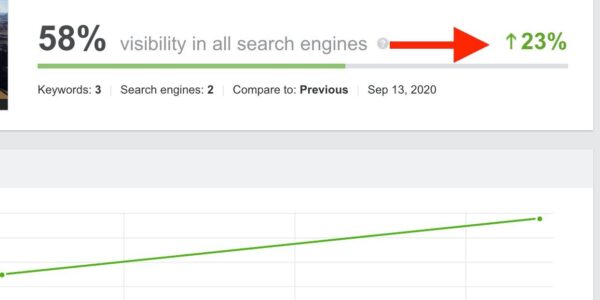
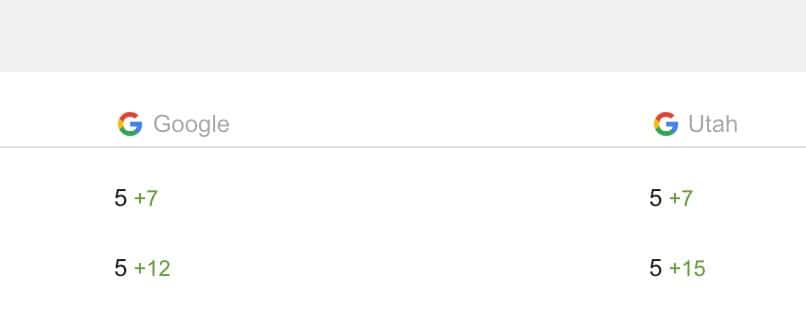
The client had agreed to my suggestions and I implemented both the suggestions. As a result, their keywords got higher rankings (by 7-15 positions):
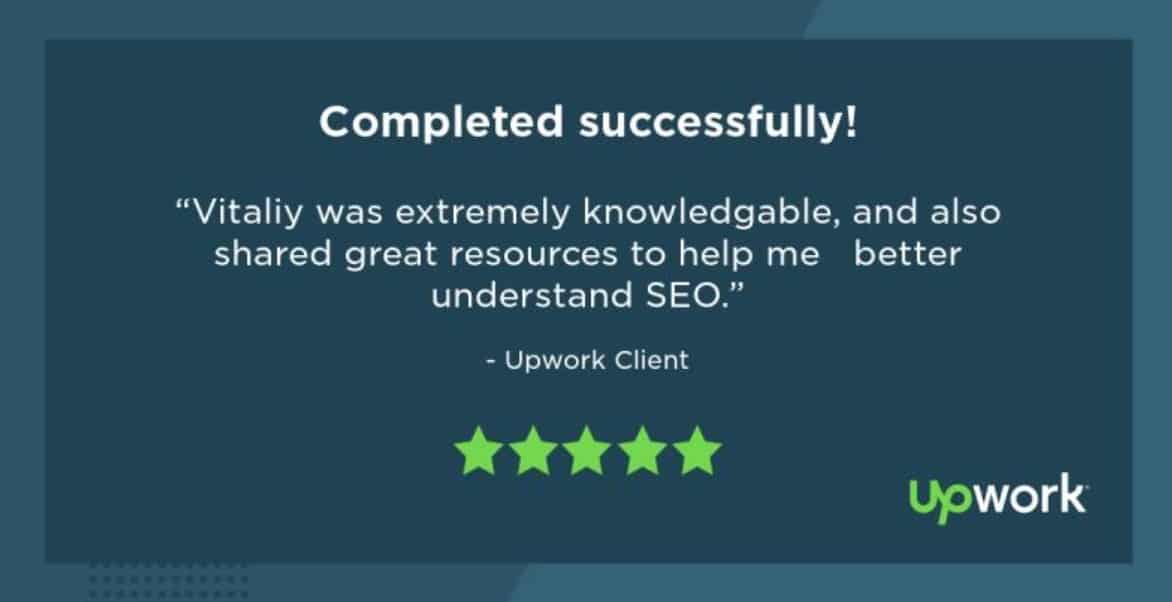
And here’s a testimonial I got from this happy client 🙂
If you need to bump up your local SEO rankings, I’m here to help 🙂
-

Google’s People Also Ask: How to Get There
This post explains what you need to do to get a People Also Ask box (PAA box) for your snippet in search engine results. You want to do that because you can get in position 0 even if you don’t rank near top 3. That’s a great additional opportunity to stand out of the crowd in Google search results.
As a rule of thumb, you want to do the same things you do for featured snippets if you also want to appear in People Also Ask (PAA). Here’s what I mean in more details:
1. Questions and answers
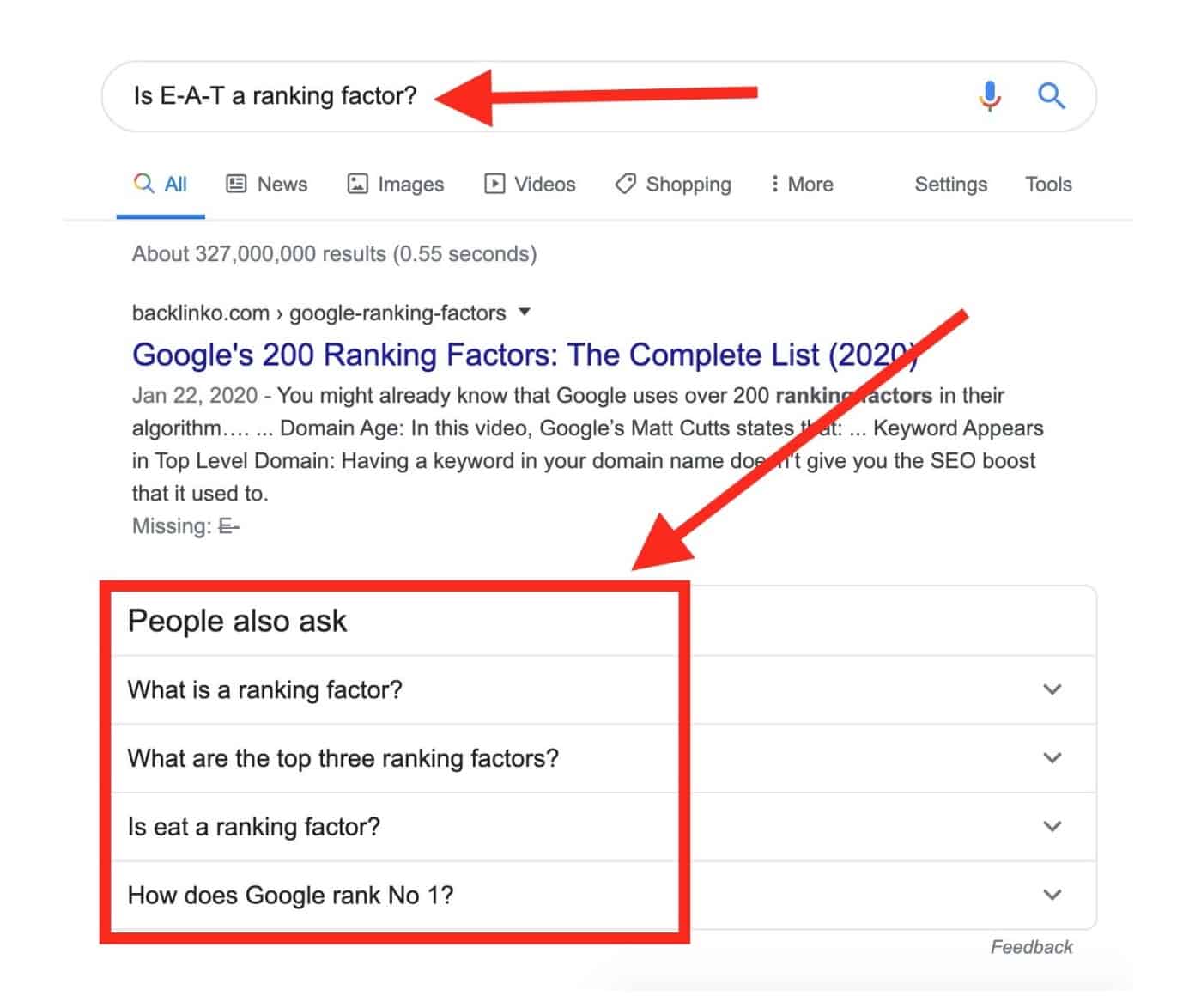
You want to do research on the questions that people ask about the topic (search for) you want to write about. Basically, you need to create a list of questions and give high-quality correct answers to those questions (fully answer each question). You want to answer those questions concisely and factually (+ free from plagiarism).
You can use PAA for brainstorming on what questions you actually need to answer in your post or page that you’d like to prep for your own PPA:
2. Use Jump Links
You want to use jump links that bring the person that clicks the link right to the section of the post that answers the question. The blog at Ahrefs.com https://ahrefs.com/blog/ is using jump links.
For example, this post https://ahrefs.com/blog/eat-seo/ has a contents section at the very top of the page:
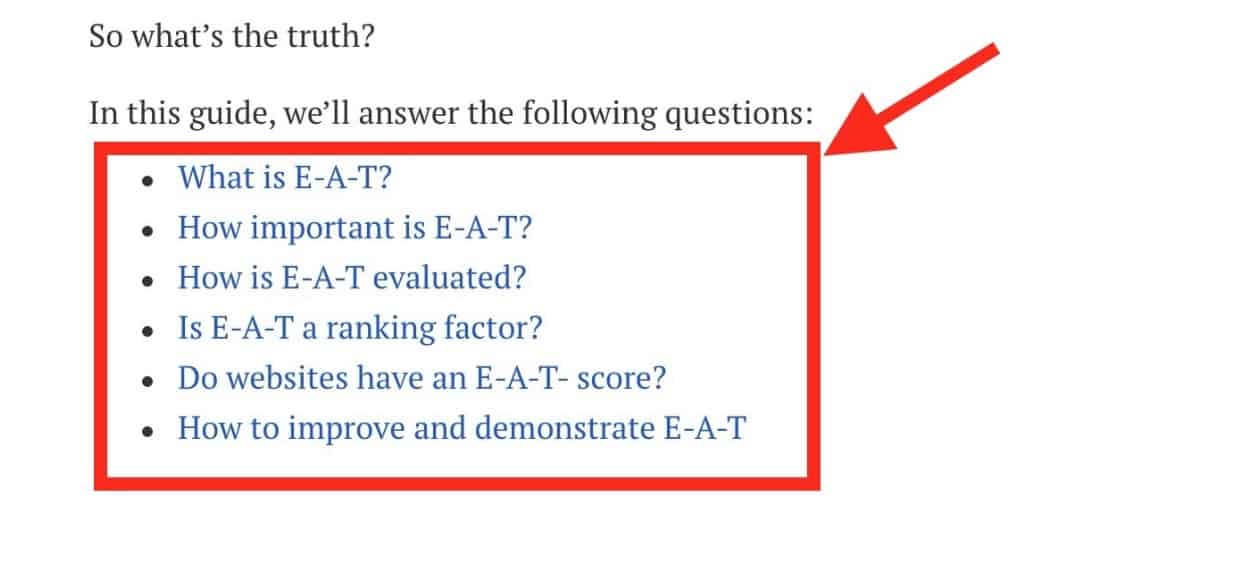
If you click, say, “Is E‑A-T a ranking factor?”
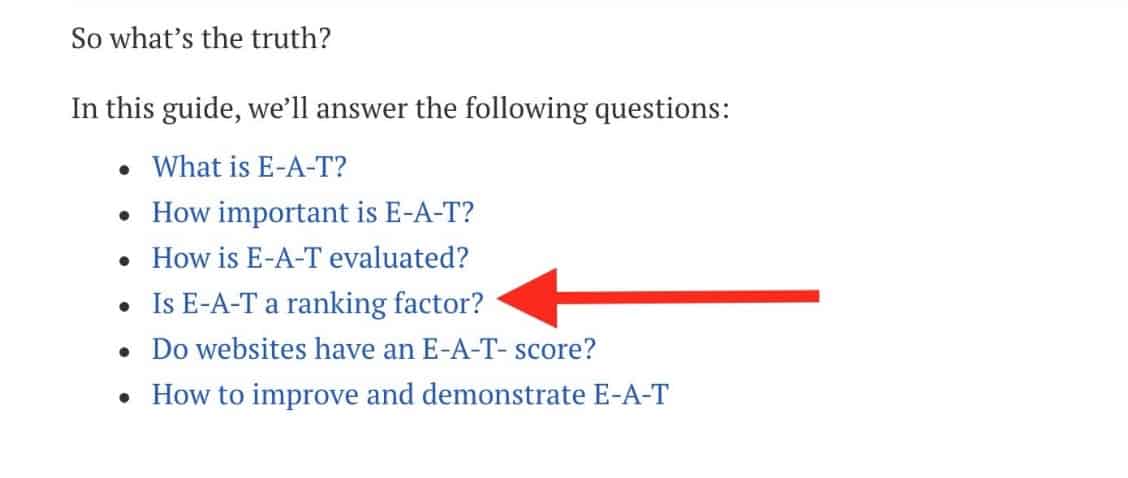
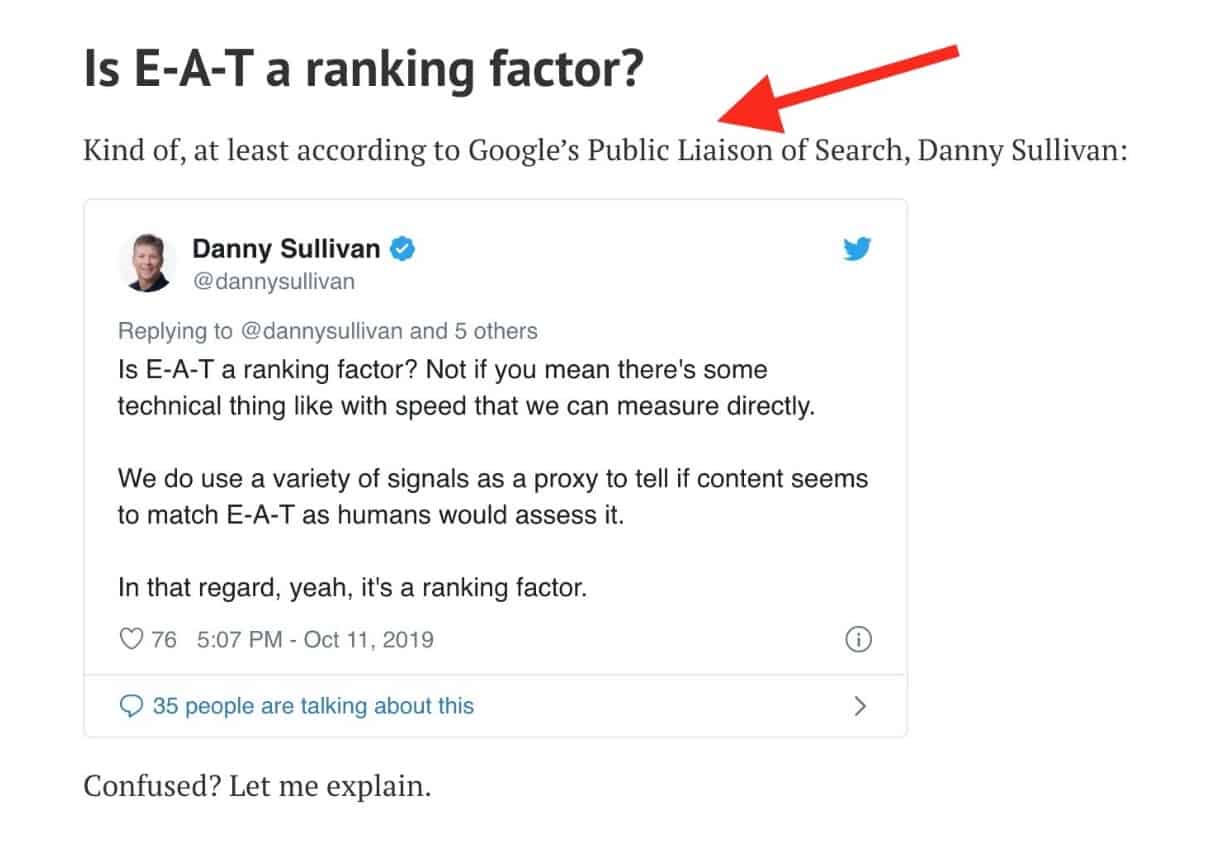
It’ll bring you to the section of the post that answers exactly that question. This method allows you to get a jump link within the search snippet taking you to the answer of the question within the page (on your site).
3. Use Plain Language
You want to use plain language while answering questions because it’s going to increase the odds of getting into PAA (People Also Ask). Your answers need to be correct and easy-to-understand.
4. Avoid Sales Language
If you create a piece of content with too much sales language, you can rest assured that you won’t get to PAA because it makes no sense to Google to advertise your ad copy for free. So you most definitely need to avoid excessive promotional language if you want to gear up your page or post for PAA.
5. Add semantic-rich search terms
In a nutshell, you want to mention your keyword in the question and use the same keyword (or its SEO synonym) right below the question in your answer. In other words, you want to Include the complete questions and answers in a tightly themed web page.
6.Use Q&A Schema
Though it’s not a guarantee but using the Q&A schema (https://schema.org/FAQPage) won’t hurt and can also increase the chances of getting into PAA.
Useful links
- Google’s “People Also Ask” (Related Questions): What They Are, and Why You Should Care (Updated)
- Infinite “People Also Ask” Boxes: Research and SEO Opportunities
- How to Use Google’s New “People Also Ask” Feature 101
- Targeting featured snippet and ‘People also ask’ SERP features
- The explosion of PAA: Answering questions is the new way to dominate search
- How to Target, Optimize and Track Rankings for ‘People Also Ask’ (PAA)
- People Also Ask Boxes and Related Questions
- Scraping ‘People Also Ask’ boxes
- How To Appear In The People Also Ask Box
-

Linux Web Hosting Explained: Why It’s The Best OS for Website Hosting
As a rule of thumb, you’re going to have to decide between two types of hosting for your website: Windows hosting or Linux hosting. This post will shed some light in terms of their features and which one is actually best. Without further ado, let’s see what they are all about and which one is the best way to go. (more…)
-

Offline Marketing For Local Online SMEs
As the owner of an SME in the modern era, it’s inevitable that you will focus a lot of your marketing attention on digital matters. After all, millions of people find products and services with the touch of a few buttons. Likewise, the vast majority will research local companies before committing to a transaction. (more…)
-

Page Load Speed Optimization
This is a listicle post that contains all sorts of useful links on WordPress and Shopify speed optimization.
Useful Links for Page Speed Optimization
Google PageSpeed Insights: The Truth About Scoring 100/100
How to Speed Up Your WordPress Website in 2020 (Simple Guide)
How to speed up a website in 2020: a technical checklist for tackling page speed optimization
How to Improve Page Speed from Start to Finish (Advanced Guide)
Page Speed Optimization: Metrics, Tools, and How to Improve — Best of Whiteboard Friday
Image SEO: Ranking higher using images -

Baby Website Templates for WordPress
If you plan on launching a brand new store for kids, or some other type of baby-oriented online business, and especially if you plan on revamping your old site – you’ve got to check out the following baby website templates.
Most probably you are not a web designer yourself. So here’s a problem – you won’t be able to design a mind-blowing design yourself, no matter how much time you spend learning your Photoshop. And hiring a professional web designer to create a new site from scratch is quite expensive.
That said, you can take a look at Mothercare, which has both awesome products and amazing store design.
-
Using WordPress for e-commerce: Pros and Cons
E-commerce has opened plenty of new opportunities for thousands of entrepreneurs today. Over the last few years, the e-commerce market has witnessed significant growth as more and more consumers prefer online shopping.
As per Statista, over 1.8 billion consumers around the world bought things online in 2018. To make the most of e-commerce growth, most small businesses are starting their online store to reach more customers. And why not, e-commerce platforms like WordPress, Magento etc. have made it very easier and simpler.
More than one-third of the websites today are build on WordPress. For e-commerce, the WordPress provides an innovative plugin called WooCommerce. This plugin is also open source like WordPress, and can be used for free.
However, one question that has always risen among the e-commerce businesses—is WordPress good for e-commerce? Is it better than other e-commerce platforms?
To clear the doubts and answer these questions, we have listed both the pros and cons of using WordPress for e-commerce. Let’s begin with the pros.
Advantages of using WordPress for e-commerce
1. Free and easy to use
Currently, WordPress is the most popular content management system (CMS) because of its simple and quick installation process. Its WooCommerce plugin allows conversion of a website into an e-commerce store without any technical expertise.
If users need any help during installation, the platform provides an installation wizard for it. Furthermore, it is available for free.
2. Customization
WooCommerce plugin allows users to customize the storefront as per their requirement, without putting much time and effort into it. Even the themes can also be personalized to give the storefront a desired look and feel.
The product attributes can be edited and changed, and other plugins can also be used to integrate more functionalities.
3. Easier management of products and inventory
The webstore created using WooCommerce can be used to sell both digital and physical products or services. Users can add new products regularly, categorize these products, and manage things easily.
For smoother inventory management, the platform comes with a user-friendly user interface (UI). This UI can be used to keep a track of stocks and management of regular inventory.
4. Support for multiple currencies and payment gateways
WooCommerce provides geolocation support to allow retailers accept multiple currencies. The support for multiple payment gateways and shipping options helps in attracting customers from various locations and countries. The customers can pay in their suitable currency and tax rate. This can accelerate the sales for online retailers.
5. Web analytics
Whether it is running a blog or an e-commerce store, the analytics is critical to analyze the performance of website, which products are being visited and sold, what’s driving traffic, and what’s not right.
For that, the WooCommerce facilitates use of an extension called WooCommerce Google Analytics. This extension can be used to not only track the basic user activity, but also the events, sessions, and important data like product views and actions on shopping cart.
6. SEO-friendly
WordPress is good for search engine optimization (SEO) as it provides extensions and plugins like Yoast SEO. This helps you to improve your rankings on Google and other search engines by providing relevant suggestions. This way, you can improve the SEO on your own.
Disadvantages of using WordPress for e-commerce
1. Limited support for e-commerce issues
Since users have to install WooCommerce to start the e-commerce store, the support for plugin is not as good as for the platform itself. If they get stuck or the things go wrong with the storefront, there will be a need to approach third-parties or experienced WordPress developers to get things fixed.
2. Theme should be compatible with WooCommerce plugin
There are hundreds of free and premium themes available on WordPress repository that can be easily downloaded and installed on the site in no time. However, if the WooCommerce is used to design the store, then the used theme should support the plugin.
Hence, the website owners need to hunt for the right e-commerce theme for WordPress that is reliable and trustworthy. Otherwise, the site might crash and cause errors.
3. Security issues
When it comes to security and data privacy, usershave to rethink and redefine their strategy to ensure that everything remains safe. Because of WordPress’s popularity, the cybercriminals are targeting the platform increasingly.
They keep on finding the flaws in WordPress to hack the websites on this platform. That is the reason WordPress releases updates on a regular basis. The WordPress plugins also get updates to avoid such issues.
The thing here is that you will need to check regularly if any updates are available for WordPress, plugins, as well as themes. If the things are not updated, the site remains somehow vulnerable.
4. Limited functionalities for big e-commerce stores
While WordPress allows customization of several features and things, but still there is a room for a lot of things to be improved. Big e-commerce stores sometimes need advanced or specific features which can’t be added. It’s because the WordPress API puts some limitations even for the developers.
5. Untrustworthy themes and plugins
Online retailers can’t afford to risk the data and security of their stores. To ensure that they are using the secure and high-quality themes, they have to use the themes and plugins from the reliable and well-known sources only.
While there are numerous themes and plugins available for free, not all of them are trustworthy. The free and cheap themes and plugins don’t really provide support if the issues arise. These products have to be used very carefully.
Wrapping up:
If you are looking to use WordPress for your e-commerce business, then it’s essential that you consider both the pros and cons of doing it. If you think you can handle the limitations effectively, then WordPress is good for you. But if you can’t manage the security, plugins, and themes on your own, then it’s better to think again.
Let us know if you have any query.
-

How to Validate a Product Idea
Let me get right to the point. You will never know for sure if your idea will actually work out, but if you properly validate your product, you will build up your confidence and inspiration to work on the product. Even if your validation fails, you still get a whole lot of valuable data from the experience.
As Mark Zuckerberg once suggested:
The first thing you want to do to correctly validate a product is to describe your idea in one page.
Then think again and describe it in one paragraph.
That done, give it one more time and describe your product idea in just one sentence.
As Einstein once said:
“If you can’t explain it simply, you don’t understand it well enough”.
Before we even get started and finally try to validate a product of yours, you want to make sure that you validate one idea per time. Otherwise, your findings may turn out to be too skewed and ambiguous in the best case scenario. Plus validating even one idea can be messy enough, let alone doing that with multiple ideas.
The Misleading Inventor Approach

It’s extremely tempting to take the inventor approach (because you may consider yourself a visionary like Steve Jobs or something) and create a product that has no alternatives out there. Though it may sound really cool and promising (but let’s face it, you’re not Steve Jobs by any stretch of the imagination), you may land in really hot water with that course of action.
So if you validate a product and there are similar products on the market, that means that other people already did some research for you and you can just rely on that. Long story short, if you can find paid products (products people actually voted with their hard cash for), you can rest assured that there’s a potential audience for your product.
Odds are, you may be discouraged by multiple free YouTube videos that explain and show what you wanted your product to help with. Thing is, you should not take it as a negative factor because your product is something that people can easily use for effortlessly achieving their target as opposed to YouTube videos whose sole reason of existence is to promote other stuff.
If you validate a product and find a whole lot of products with exactly the same features (pretty much the same thing you want to create), you can always niche out and make something with a twist so that it’s tailored for a specific type of audience. For example, instead of a course on WordPress SEO, it may be a course on WordPress SEO for Mom Bloggers or something else to that effect.
Time It Takes to Create a Product

Whatever I’m going to say next, you need to take it with a grain of salt because the answer to this question is actually “It depends”. There are all sorts of factors that can speed up or slow down the process of creating your product, such as your familiarity with the topic, how fast you validate a product, your 9-5 job, your family conditions, and the list goes on and on.
With that in mind, there’s one thing that usually holds true: once you set up a specific step-by-step process (usually after creating a few similar products), you can drastically decrease the time you need to create new products. Some people streamline their system so neatly that it takes them a week to create a brand new product (video course, e-book, etc).
Validation

You may go really gung-ho about your product idea, but the thing is that you really need to validate a product before you proceed with your product creation. Doing so will guarantee that all your efforts (both time and investments) are not for nothing. Getting your idea validated will also inspire you to work on your product and that will, in turn, help you to do your best when it comes to the quality of your work.
Mild Validation

Mild validation (as opposed to hard validation) does not require your audience to pay anything. You just need to use different tools to see if there’s a potential demand for what you have to offer.
The downside is that if you validate a product with mile method, it does not guarantee that your audience will actually buy something with hard cash, but it’s a good starting point to see if it makes sense to proceed with hard validation later down the road.
Ahrefs.com
You can use Ahrefs.com not only for straight forward SEO things (such as keyword research, etc) but also for product idea validation. Other than that, it’s also possible to use the toolset even to brainstorm for product ideas in general or product sections (course episodes, etc). Let’s take a closer look at what exactly I mean.
Here’s how you can use Ahrefs.com
Product idea validation
First off, you need to go to ‘Keywords explorer’. You can just enter your generic term (say ‘WordPress SEO’) and see if it has enough monthly searches for a separate product (1,000+ monthly searches). If the amount of monthly searches is less you can use the topic not for a separate product (course) but as a small part of another product (course section or even just for a course episode).
Ideas for Course Episodes
In case you already know that you want to create a course (or any other product), but you’re not really sure what episodes (sections, etc) it should have, you still can use the ‘Keyword explorer’ tool, but in this case everything that has 100+ monthly searches is worth your attention. You want to make sure that you use all the options from the ‘Keyword ideas” drop-down menu.
Check out Your Competitors
If you already know your product idea and even competitors (and their course landing pages or just sites) you most definitely want to make use of the ‘Content Gap’ tool at Ahrefs.com. That’s because the tool allows you to see what you’re missing out on in terms of topics covered when compared to your competitors.Plus you can just generate topics for your product if you don’t specify your site domain name in the Content Gap tool.
Data-Driven Ideas for Your Product Promotion
Other than generating topic and product ideas, you’ll be able to use the tools at Ahrefs.com to find out about what domains your competitors get links from (plus what people say about their products), what keywords they rank for in organic search results and Google Ads, what pages on their domains are the most popular ones and what pages attract most backlinks.
You can additionally use the following tools for generating ideas:
Soovle.com
Ubersuggest.io
Answerthepublic.com
Alsoasked.comYou can learn more about keyword research at https://ahrefs.com/blog/keyword-research/
Google.com Validation

The first thing you may want to do to validate a product idea is Google around for your course idea. First off, you want to try if Google Autocomplete suggests anything interesting when you enter your product idea. Other than that, you can also check Google by entering your product name (topic) and one of the following: forum, course, tutorial.
If you can find multiple blogs, forums, courses, and tutorials on the topic, that may mean that there are a few thousand of people that are looking for a solution that you’re about to offer to the world. Otherwise, Google would not show any results in autocomplete if they were not popular,
While doing your research on Google, you also may want to check the “Searches related to” on your search results page. You need to scroll down to the very bottom to see the section. You can use the suggested phrases as guides to how else you can research your topic idea on Google.
Google AdWords Validation (PPC)
While checking your product idea on Google, you also want to take a close look if anything relevant popups in paid ads. You want to do that because if somebody is already running ads for your target keyword, that means they already did some research and it makes sense for them to even run paid ads. That’s a very strong signal that proves your idea’s viability.
Google Trends

You want to use Google Trends to validate your idea in general. Say, if you want to create a video course on WordPress SEO, you may want to use just “WordPress” as your search term just to see if WordPress is as popular as before. You may want to compare your general terms with alternative ones.
Say, I’m on the fence whether to create a course about “WordPress SEO” or “Magento SEO”. In order to understand the trend, I can compare “WordPress” trends vs. “Magento” trends. In this particular case, the graph makes it pretty clear that there’s by a long shot more people interested in WordPress than in Magento.
That said, it does not mean for sure that I need to ditch my Magento SEO course idea, but it gives me one more insight on what to keep in mind while making up my mind what I need to focus on. In a nutshell, Google trends allow you to see general … trends. And it works best specifically for that purpose.
Google trends also allow you to change the location (in case you consider a specific area for your product). Also, you can specify your time range and choose your category. Other than that, you can see trends for Image Search, YouTube, etc.
You can also check the “Interest by region” map to see where your potential audience and clients may be located. And finally, you can use the “Related query” section to see which topics are gaining popularity. That can give you a better understanding of what exactly may be in demand when it comes to your product idea.
Once you can clearly see that the general market is there, you can niche down and search for more specific things (such as “WordPress SEO” vs “Magento SEO”). Long story short, if you can see some level of popularity for your topic (even if it’s just 5 or so), that means that there’s still some market around that topic
Google Keyword Planner and the Alternatives

Google’s Keyword Planner is a great tool when you do Google AdWords (paid ads), but it’s not exactly the case when it comes to checking how many people search for your keyword (search volume). It’s still cool to use Keyword Planner for generating ideas, but you most definitely want to use other tools if you need to check for how many times exactly your keyword is searched for.
If you still want to use GKP, you want to consider the following caveats when you estimate potential interest for your product: rounded averages, traffic buckets, hidden keywords, combination inconsistencies, and strange recommendations. All these issues make Google Keyword Planner almost useless for search volume checking.
Since taking a closer look at these issues of Keyword Planner’s granularity (or its absence) would be totally beyond the scope of the post, you can learn more about the caveats in the Google Keyword Planner’s Dirty Secrets post on Moz.com. You want to keep in mind that the data you find in GKP can be anything from approximate and incomplete to downright misleading.
Say, you still decided to use GKP and found some searches for your keyword, but how many searches are enough? The amount should be at least 1K searches per month, but ideally, you want it to be something around 10K (or even 100 000 if you have the budget) because in that case, you can pretty much rest assured that there’s a live and kicking market for the product.
If you need more granularity in terms of how many people actually search for something you want to create your product about, you may want to use the following alternative tools: ahrefs.com (Keyword Explorer) or Moz.com (Keyword Explorer). The latter gives lower search volumes, which means you can use it to get the most realistic numbers.
YouTube.com

Being the second largest search engine out there, you can’t ignore this video sharing platform. Ideally, you want to find relevant YouTube videos with many views (at least a few thousand), likes (at least 100+) and comments (10+) because you can use those details to both validate the viability of your product idea and see what people like or hate about that particular video.
iTunes

You can just launch your iTunes, login and go to Podcasts so that you can search for your product idea. Once you can find around 50 relevant and at least adjacent podcasts (even if they are not exactly in the same niche), you are one step more confident that your product idea is actually viable.
If you can’t find podcasts dedicated to your product idea (topic), but you still were able to find separate podcasts episodes, that does the trick as well. What matters is that the topic or idea is known enough so that people dedicate at least podcast episodes to it. That said, this method may not work for some industries, but you still need to know that this method is out there.
Stitcher.com

The approach that you should take on Stitcher.com is pretty much exactly the same that you used for iTunes. Chances are, you’ll even find pretty much the same podcasts that you were able to find via iTunes. With that in mind, you can use Stitcher.com to get additional proof that your product idea actually makes business sense and there’s a live and kicking market for it.
Buzzsumo.com

It’s a very versatile tool and you can use it for all sorts of things when it comes to content marketing, but you can also use the tool to see if your product idea makes sense, if there are influencers that share similar content, you can find competitors that create similar products, and you can use Buzzsumo.com for generating ideas on what your, say, course should cover.
Once you login to Buzzsumo.com, you can see 3 mains sections: content research, influencers, and monitoring. You can use all of them but I’ll focus on content research and influences because it makes the most sense when it comes to product validation. So the first tool that you want to use is content research. You’re there by default once you log in.
If you type in your product topic (in my case “WordPress SEO”) and you can see a lot of shared relevant content, you’re totally onto something. If you can see around tens of pages with relevant results (in my case it’s 54 pages), you can consider this validation step successful and complete.
As with many other validation methods, this tool is also great for detecting what you need to include in your product because it’s popular and people like it. Just by looking at the topmost results, I can easily say that I’ll include the following topics in my course: “Yoast SEO Alternative”, “WordPress SEO Plugin by Squirrly”, “Poor Man’s WordPress SEO Plugin”, etc.
You can sort your results by date, content type, language, country (TLD), word count, etc. These filters can really be useful if you’re looking to fine-tune your search results. Other than that, you can sort by social platforms. For example, you can sort the search results by Reddit engagements. Also, you can see what backlinks the article has and who exactly shared the article.
You can also use their Question Analyzer to search a database of millions of real questions asked on forums and e-commerce sites, including Amazon Q&A, Reddit, and Quora. You can use those questions as ideas about what episodes or lessons to include in your product if you’re working on a course of some kind.
You can use the “Influencers” tool to find out about either just people who like and tend to share relevant content (in case you use the “Search Content Shared” tab) or you can detect professionals or actual competitors for your would-be product. That will happen most likely when you use the “Search Bios” tab.
If you can find both people who share relevant content and people who create it, that’s a good sign because that means that there are tons of people interested in what you may want to offer when you roll out your product. You don’t really want to be the only one on the market because that can mean that there’s actually no market for your product.
And finally monitoring. You can use the tool to keep track of who mentions relevant content that you may want to use for your product. You can just create an alert by clicking the “Create New Alert” button. You can monitor brand mentions, competitor mentions, content from a site, keyword mentions, backlinks or keeping track of an author.
If you know of a product that is a competitor of something you want to create, you can use the ‘Brand Mentions” feature to track the product by its brand name. Thus you’ll be able to know when the product gets advertised or what link building techniques are in use. That will allow you to use the same approach or at least be in the know where you miss out and what you need to fix.
Competitor Mentions are pretty much like brand mentions, but for your competitors. You’ll be able to monitor all your major competitors so you can easily compare & produce reports on the dashboard.
The “Content from a website” feature allows you to monitor the content created by a website. You can easily identify breakout stories going viral. You can also use the share threshold to get alerts when a piece of content surpasses a certain number of engagements. In a nutshell, you can use the tool to make sure that you don’t miss out on any content that works for your competitors.
Keyword Mentions. You want to use it to follow a topic or keyword you care about like “WordPress SEO”. This feature from Buzzsumo makes it possible to surface more content than regular searches. Plus you can get daily digests straight to your inbox.
The “Backlinks” tool allows you to track when somebody links to a website. You can effortlessly identify link building strategies your competitors use and receive instant alerts when you or a competitor gets a link. This is great to ensure that you’re not stagnating when your competitors are actively creating tons of backlinks for promoting their product.
If you know the author of a competitive product and you want to track when he or she gets mentioned, you most definitely want to use the “An Author” tool because it does exactly that. For example, I’m going to keep track of all the major creators of WordPress SEO courses, which I identify during my product validation process.
All in all, Buzzsumo is an awesome tool for validating your product ideas in terms of checking if people share similar content on social media. Other than that, Buzzsumo allows you to see how active the market is and how the existing products are being promoted both specifically on social media and on the web in general.
Skillshare.com

You can just go to https://www.skillshare.com and login (you can do it with Facebook as well) before you can search the platform. Now you can just search for the topic that you want to create your product about. If you can find at least a few courses (like 10+) on the topic, that’s another good sign that testifies that your product idea makes sense and there are potential clients for it.
You want to check each of the courses and see what people are asking or complaining about. You need to make note of that for your further research. You can find what people like and what people want with this approach. Other than that, you may want to see the number of students enrolled in the courses. That also allows getting a better idea of how much sense your idea makes.
Udemy.com

It also makes sense to run your product ideas against Udemy.com because it’s a huge platform with all kinds of courses. If there are courses on your topic (at least 5), that means there’s a potential audience for you as well. Once you find relevant courses, you want to check how many students got enrolled within a year. That will allow you to see the dynamics of the topic.
Other than that, you also want to check what reviews those courses have, what the students like and what they complain about. Once you find something that the students liked, you want to make sure that you have that thing in your course. If you found what people didn’t like about the course, you need to keep that in mind while creating your own product.
In case you want to create a course on exactly the same topic, that’s also OK because your course will not be the same anyways. For starters, you have a different background and you’ll most likely explain stuff in a unique way. Plus you can just look through the existing courses and create your own that is by a long shot better because the available courses may be not so exhaustive and in-depth.
On a side note, if you create a video course for Udemy, you want to make sure that you use your keyword both in the title and the subtitle of your course because Udemy’s search engine really pays attention to that. Other than that, it will help you with ranking your Udemy course page on Google and other search engines.
You can even go the extra mile and create a free course to test the waters even more. If you go that route and actually add your video course to Udemy.com, you want to most definitely make sure that you collect your students’ email addresses. You can do that by offering additional .pdf downloads, which you provide once the person enters his or her email address in a form.
Marketing Insights (Udemy.com)
You can also use the Udemy Marketing Insights tool, which allows you to better understand if your course idea would work out specifically on Udemy.com. You need to go to Udemy.com, log in, expand the “Instructor” drop-down menu and select the “Instructor Dashboard” option. Now you just need to click the “Marketing Insights” tab.
Now you need to type in your course topic, hit “Enter” and see if Udemy has such a topic category. In my case, the topic is not existing, but I have suggestions for related Udemy topics. Once you click one of the topics, you can see “Student demand” (high in my case), “Number of courses” (high in my case as well), “Median monthly revenue” and “Top monthly revenue”.
Though the fact that both the student demand and the number of courses are high, it’s actually a good thing because it proves that students are interested in the topic in general and instructors create a lot of similar courses. And the revenue details give you a general idea about what you can expect if you create your own course on Udemy.com.
You can also scroll down and see more useful details, such as Search volume trend (that allows to see the topic trend over time), Top search keywords (you can use these as ideas for your course lessons or episodes), and Other topics of interest, which you can use either for course lesson ideas or even for a separate course idea.
Lynda.com

It’s a huge educational platform, which you can also use for validating your product idea. If you can find a video course on a topic that is really relevant to your idea, that’s a very good signal because the people behind Lynda.com do their research when it comes to figuring out if it makes sense to create certain courses.
You can sort your search results by playlists, learning paths and courses videos. As you can see in my particular case, I have just one course that is dedicated specifically to SEO, but there are multiple videos on the topic (around 20 items). As a rule of thumb, if you can find 10+ videos that are relevant to your topic that’s a good result.
Other than that, you can sort your search results by skill level, duration, subjects (6 for SEO), software (33 items for WordPress), companies and authors. The bottom line is that you can fine-tune your search results in a way that gives you a clear picture if your product idea makes sense or not.
As with other educational platforms, it makes sense to see course details in terms of its release (or update) date and the number of views (the more the merrier). Plus the “Contents” section in the right-hand sidebar allows you to see what the course episodes are about. You can use those as inspiration for your own course.
Free Course

Since the course is free, the signal is still weak because it does not entail any hard cash payments, but if you succeed in getting students enrolled to your free course (on Udemy.com or whatnot), that would be another point that supports your product’s idea viability. You just need to keep in mind the following caveat.
The main reason why this signal is still weak is that some people sign up just for free stuff and it does not mean that they’ll be interested in your paid product later down the road. Just because they never buy paid products on the web. You can use this method just to check if there’s at least some potential out there.
In case you really want to filter out that sort of people, you can make the course paid. You want to keep your price to a minimum in this case because the main reason here is not to get rich overnight but to simply get rid of the prospects that just never buy stuff online. You may price it at $11 so that you can at least participate in Udemy’s promotion if you host it with the platform.
Amazon.com

Since Amazon is a humongous resource of all kinds of things, that would be really stupid not to use it. Here’s how you can do that. You can just use the search feature to look for your topic word (idea) and see if there are any recent publications (ebooks, etc) on the topic. If you can find that, it’s one more really good sign that you are onto something really workable.
You especially want to pay attention to the items with good Amazon rating because you may use them as an idea resource of what you need to include in your own product (ebook, course, etc). You also want to check customer reviews because it will give you tons of things that you need to keep in mind while working on your own product (what to do and what not to do).
Amazon is good for one more thing as well. You want to check out specifically bestsellers (top book authors) in the fields that are relevant to your niche. The main reason you want to see specifically bestsellers is to make note of how they are entitled. You should give it a thought if it’s possible to name your product similar to that because the title clearly sells well.
Talk to People

If you know where your target audience hangs around and you can just talk to them, that’s something that you most definitely don’t want to ignore. You want to ask them out about what kind of issues (most crucial and nagging ones) they have when it comes to dealing with the thing you want to create your product about.
Send an Email to Your List

This technique entails sending your newsletter to your list and asking if the course idea sounds interesting in general. It goes without saying that you need to take their replies with a grain of salt as well because they can respond positively just because they don’t really want to hurt your feelings. With that in mind, you can do it in a bit different way.
You can just ask them what are their biggest challenge when it comes to the topic that you want to create your product about. For example, if you want to create a WordPress SEO course, your question may be something along the lines of “What is your biggest challenge when it comes to specifically WordPress SEO?” Thus their replies may be more genuine.
Blog Post About Your Product Idea

If you have a blog with a considerable amount of readers, you can also validate your idea by publishing a blog post. The blog post should be pretty much of the same topic you want to create a product about. If that blog post gets intensively shared and commented, that’s a really good sign. Speaking of blog posts …
In the same blog post, you may want to share your idea about a future product and even share a prototype of some sort. If your idea is to create a video course, that a prototype, in this case, could be either a free episode of that course or just an outline of the topics that you’re going to cover in your would-be course.
Run a Survey (paid)

In case you don’t have a newsletter list, you can just run an online survey using one of the available services out there. You will most likely need to invest in this technique, but that totally makes sense to do that because it’s way better to invest a little now and see if there’s a potential as opposed to invest a whole lot of time and discover that nobody wants your product when it’s done.
Since some people don’t really like how the word “problem” sounds and what it entails, you may want to use “challenge” instead. So, you may want to use a similar question in your survey: “What’s your biggest challenge when it comes to [your-product-idea]?”. For example, “What’s your biggest challenge when it comes to WordPress SEO?”
Another way to ask your question would be: “What would you wish you knew when you were starting as a [your-product-idea] or [your-industry-name]?” For instance: “What would you wish you knew when you were starting as a WordPress site owner when it comes to SEO?” You can mix and match how you ask your questions to see what works best for specifically your case.
Once you get replies to your survey, be sure to take note of the language they use (the words they describe their challenges with). You want to use those exact words when you create or describe your product later down the road. Doing so will help you both in SEO (visibility in search engines) and attracting the right audience.
You can start from here
https://www.wordstream.com/blog/ws/2014/11/10/best-online-survey-tools or here https://www.pcmag.com/article2/0,2817,2494737,00.asp
As a side note, you may also want to run a survey with your previous course students if you already created a course before. You can just ask them what kind, of course, they would be interested in. Also, you can offer coaching (1-hour free coaching), which you can use to detect their pain points and use that for creating your new product.
Ask Around in Facebook Groups and Other Social Media Platforms

In our day and age, there’s a Facebook group for pretty much everything. You can just go to Facebook.com and search for relevant groups (“WordPress SEO”, etc in my case). If it’s a closed group, you will be prompted to answer a few questions before you can send your request. If you’re able to find around 25 groups or so, your ideas passed validation.
Once you join a group, you want to look around or even ask people about the topic you need some insight about. Plus you also want to see if there are recent comments or updates, which would testify that the group is active and people are intensively participating and looking for answers related to topics that have something to do with your product idea.
Twitter Advanced Search

The same approach holds true for Twitter. You can just go to Twitter’s advanced search and enter your keyword (topic) just to see if there are any recent relevant discussions on top relevant accounts. If people are actively discussing your topic in the broadest sense, it’s already a good sign as well. Here’s a useful video on how else you can use Advanced Search on Twitter.
LinkedIn.com

When it comes to LinkedIn.com, you can do the same (use the search feature to find any relevant groups) as you did for Facebook. LinkedIn also allows joining such groups. Once you join relevant groups, you want to look around and see that people talk about so that you can detect pain points.
Upwork.com

If people post jobs on the topic, that means there’s a demand to answer certain questions on that topic. Upwork.com is a great tool if you need ideas (for your course episodes, etc) because people often search for assistance with actual issues they stumble upon while doing something. The biggest benefit is that issues people need assistance with are up-to-date.
Reach Out to Past Clients

If your topic is relevant to something that you did for your past clients, you don’t want to miss out on this opportunity either. If your clients are happy with your services, they will be more than willing to get back to you with more details. That especially holds true if you’re willing to do for them in return.
On a side note, if you have a chance to reach out to users of other similar products, you most definitely need to do that and ask what they like or dislike about the product so that you know what you need to do the same (or better) and what you need to steer clear of. In a nutshell, you want to inquire about the pros and cons of that product so that you know what to keep in mind.
Free Skype Coaching

You can just offer your potential audience free Skype coaching (for like 30 mins or so) so that you can talk about what bothers them when it comes to the actual topic of your product ideas. If you talk to a few people, you’ll start seeing patterns, which you can use as separate episodes or lessons for your course or whatever your product is.
If the person you talk to says that he or she does not like the idea, you really need to follow-up immediately and ask why exactly. That will allow you to pinpoint problems your idea has. Once you know the issues your idea has, you can go ahead and tackle them before your product actually sees the light of day.
You can reach out to your potentials audience either by Skype or in any other suitable way, but one-to-one calls or chats are not something you can do in bulk, right? So the question is how many people you actually need to talk to so that you can see if there’s an actual audience for your product.
It goes without saying that you need to take the following suggestion with a grain of salt, but here you go. Basically, you want 10% of the people you talk to. That means if you talked to 100 people, at least 10 (10%) should sign-up. In case talking to 100 human beings face-to-face is not right up your alley, you can talk to just 50 and in that case, at least 5 should sign-up (10% out of 50).
If you fail your validation, you most definitely should not take it personally. Plus it’s a great way to find out what is actually wrong with your product idea. You can just ask why exactly they don’t like the idea (or even something along the lines of “Why do you hate my stuff?”). Odds are, you’ll get some valuable tidbits that you need to work on in order to improve your product.
If the person says that your product idea is perfectly fine, but it’s just not good for him or her for some reason or another, you should ask if they know somebody who could be interested in what you have to offer. That allows to both give you another possible prospect and wrap up your call on a more positive note.
As a matter of fact, even if the person himself expresses interest in your product idea, you still want to ask if he knows someone else (like his friend, relative or colleague) who could also be interested in your product. This will most likely work if you were able to really convince and inspire with your would-be product.
Search for Popular Videos on Youtube.com

If there are popular (thousands of views) videos on YouTube about the topic you have an idea about, it’s another good sign that you’re moving in the right direction. You may also want to check the comments under those videos because they make turn out to be real gold nuggets when it comes to what people like or don’t like about the videos.
Ubersuggest.io

You can use the tool to generate more ideas for lessons of your course, types of your services, etc. Also, it’s good for general brainstorming and quickly checking your ideas in Google Trends. On a side note, this tool is also great for keyword research for natural SEO or Google AdWords. You may also want to use other similar tools if you need more ideas on your product portions (lessons, episodes, etc).
Reddit.com

It’s a great community of people who discuss all sorts of things. What you want to do is find a thread where people talk about your industry (e.g. “WordPress SEO”) and participate by being helpful. You want to find big subreddits (communities) around your topic. The bigger, the better in this case for sure.
A word of caution: most members of the Reddit community are not big fans of any self-serving stuff. You want to look around what people talk about, what kind of challenges and issues they’re having so that you can both help them out and jot down ideas about how your product could fix them.
Forums

Though forums are not that popular nowadays, that still may make sense to validate your idea on industry forums. For starters, it’s a good thing if you can find your industry forums in the first place. That would mean that there’s at least some audience that may be interested in your product when you launch it.
You may use the following combinations (just replace [your-product-idea] with your own and paste them in Google search):
inurl:forum “How do I [your-product-idea]?”
inurl:forum “Why is it [your-product-idea]?”
inurl:forum “Please help with [your-product-idea]”
inurl:forum “I need [your-product-idea]”
Etc.For example, inurl:forum “WordPress SEO” gave me 62,700 results in Google. It goes without saying that “WordPress SEO’ is a very popular search term, but you need to get at least half of the amount (around 30,000) while using all the Google search combinations specified above.
Quora.com

You can also use the Q&A platform to see if people asked any questions about your idea. That’s a great sign if you can find a lot of traction, which means multiple recent questions and answers on the topic. If you can contribute by answers to some questions, that’s even better. You can use Quora to come up with new ideas for your product (course episodes, features to add, etc).
CraigsList.org

You can use the site for validating your product idea in broad terms as well. For example, if your product idea is creating a WordPress SEO course, you may search craigslist.org for just “WordPress” and see if there are multiple ads on the topic. The reasoning behind this method is simple: if there are ads on the topic, there are folks who may need your product.
Flippa.com

To validate that your idea is a good one, you can just go to https://flippa.com/ and see if there are any domains containing your product idea. For instance, I was able to find the following domains for sale in my case wordpressseo.me and wordpressseo.info, which means somebody already was trying to make use of an exact match domain to win in the market. That’s a good sign right there.
That said, it may be a bit tricky with specifically “WordPress SEO” because if you use “WordPress” in your domain name, it’s against the law and the results you see on Flippa can be influenced by that. For instance, people may be sending domain names with the “WordPress component because they just don’t want to mess around with WP lawyers 🙂
FAQs

In case you are lucky enough to find FAQ pages on industry sites or your competitors’ sites, you most definitely want to check them out. It’s a great way to come up with ideas for your product episodes because frequently asked questions pretty often represent pain points of your target audience and you want to find solutions for those pain points in your own product.
Complaints

Complaints are sort of a godsend when it comes to figuring out what is missing in similar products. You want to take note of each of them and make sure to do the homework so that you don’t repeat someone else’s mistakes. Plus you’ll be able to suggest your brand new product to the people you did those complaints about your competitor’s product.
You should pay close attention to the language of those complaints as well. You will be able to use that while creating your product and describing its benefits. In order to find complaints, you want to google around for “I hate [your-product-idea]”, etc. If there’s a review system available, you want to see what exactly 2-3 star reviews are all about.
Audible.com

Since audible audiobooks are based on actual hardcover books, odds are, the publishers already did due diligence and got proof that it makes sense to work on that book in the first place. Having that said, you should use this method with more broad terms. Instance search not for “WordPress SEO” but rather “WordPress” and “SEO” separately. It’s an especially good sign if you can see fresh audiobooks on your topic.
Hard Validation

Hard validation involves paying by your audience. Tim Ferris suggests not to ask people if they’d buy your product but instead ask them to buy and see if they actually do that. That’s because what people say and what people eventually and actually do are different things. There’s nothing more sure-fire that your product validation with hard cash.
Though mile validation is worth doing as well, the level of confidence that you gain when you do hard validation is incomparable because the latter entails making at least a few sales, even though it’s just for testing purposes. In a nutshell, nothing beats getting money up-front! Once you succeed with hard validation, it will really motivate you to follow through.
Patreon

Patreon is a membership platform that allows getting regularly paid for doing what you like doing. If you can find similar products on the platform with a considerable amount of patrons (paying subscribers). You can rest assured that your product idea gets another positive sign in terms of its viability.
Though it’s best to use Patreon for hard validation, you can also just use the search feature on the platform and see if other people on the platform are able to generate some funds.
Webinars

You can run a paid webinar (around $20) about a section of your would-be course. At the end of the webinar, you can just tell the attendants that they’ll get 50% off for the full-blown course you’re currently working on. Doing so allows you to see if the course idea ignites interest. If they attend your paid webinar, it’s interesting for them and it’s another successful validation.
Bite-sized product (free)

You can test your product ideas with a bite-sized offer. Sort of a primer. You can just create a small bite-sized version of the course, product or whatever and just see if people want that thing. You can charge like $7-$11 for the primer just to filter out those that just use free stuff and never buy anything.
You want to do that for two main reasons. The first reason is to just test the market and see if there’s actual demand for the product you want to create. The second one is getting feedback from the people who buy your bite-sized product. You’ll be able to get a whole lot of insight and feedback by testing the waters like that.
“Fake product” validation (paid)
In a nutshell, you create a landing page of a product that does not exist yet in order to see if people are actually going to go to your page and “buy” the product. Here are the exact steps we’re talking about here:
Create a landing page that offers to buy your product (again, the product is non-existent at this point).
Drive traffic to the landing page with the help of Google AdWords just to see if people are actually going to click the “Buy” button.
Once the users that came to your “fake product” landing page click the “Buy” button, your page shows a message that goes something like: “Sorry, the product (course, etc) is not ready as of now (yet), but we’ll send you a free copy when the course is ready.Using this product validations method allows you to gather all the traffic data you can get (what Google AdWords ads worked, what buttons worked better, etc). But the most important data is that those visitors actually clicked the “Buy” button, which means there were ready to buy. In turn, that means there’s a real market of people out there are ready to give you their money.
As long as you get around like 20 people that were ready to buy, you can suspend your Google AdWords campaign (which can cost you around $100) and get started with creating your actual product. In terms of what you should charge for that “fake” product, that can be something around 30% of the actual price.
Other Paid Traffic Options

You may also use other paid traffic options for the same purpose (just to see if people will actually buy your “fake” product. You can use paid Facebook Ads, Twitter, LinkedIn, Pinterest, etc. That really makes sense to use a specific platform (say, LinkedIn) if you got confirmation that your target audience is on that specific social media platform. Otherwise, your results may be too skewed.
Pre-Register/Pre-Order (paid)
You can use this method if your product (course, etc) is self-hosted (if you don’t use platforms like Udemy.com, etc). You can just ask your audience to pre-register (send a newsletter blast, etc). You should have an audience that actually trusts you in order to use this method. In other words, this method won’t work for all situations.
You can use Gumroad.com for this method because they handle charging cards and delivering content, which should give your audience a piece of mind in case they don’t trust you that much. What’s cool about the tool is that they verify credit cards without charging them until the due date. Other than that, you can change your due date if you complete your product faster.
Crowdfunding Platforms

You can use sites like https://www.kickstarter.com/ or https://www.indiegogo.com/ just to name a few for raising money for your course. You can do something similar as Alexander Tushinsky did for his “Learn WordPress!” course idea. Using this method also makes it possible to get massive exposure and feedback, but there’s a caveat that comes with this method as well.
Thing is, you need to invest in creating a really professional and attractive page (with an introductory video, though-through landing page, how much money you need, etc) on the crowdfunding platforms because otherwise your fundraising campaign just won’t get off the ground. Alternatively, you can just check if other people successfully gathered money for a similar project.
Pricing

While deciding how to price your product, you want to check your competitors in the first place. As a matter of fact, if you did all the validation methods (or even just most of them), you should have a pretty clear idea about prices in this particular industry.
Huge discounts are ok as long as people actually buy your stuff.
Useful links

The product launch playbook: 25 tips and strategies for a flawless launch
Validating your idea BEFORE you build anything
Start a Million-Dollar Business This Weekend (Part 1) -

Squarespace SEO for Really Awesome Sites Out There
If you have a Squarespace site and you’d like to know how to improve your SEO on Squarespace, read on and get to know all the basics of Squarespace when it comes to SEO. It’s best if you already have an active Squarespace account because in that case you can really follow through and learn by example, but if you don’t have an account, that’s ok as well. So let’s see how to SEO Squarespace. (more…)
-
Snovio Email Finder Review: Easy Tool to Find Prospects on the Web
Snovio email finder is a tool that you can install as a Chrome extension to help you find email addresses on any website you visit. It is a very useful tool to have as a marketer, sales executive, human resource manager, or business owner. The extension is free to install, and once you have it, you can search for email addresses from any website, corporate webpage or social network including LinkedIn, Facebook, and Twitter. As a lead generation tool, Snovio email finder is quite convenient, fast and very easy to use.
(more…)