
In today’s video, we’re diving deep into an insightful teardown of the website for APPLE & BEARS Natural Sustainable Cosmetic, a brand that masterfully captures the essence of effective and sustainable web design. Our exploration begins with the site’s headline, ingeniously focused on benefits rather than features. This strategic choice immediately engages you by clearly showcasing the commitment of APPLE & BEARS to providing natural, sustainable cosmetic solutions. It answers the crucial question: “What’s in it for me?” with a powerful message about the value of eco-friendly beauty products. (more…)
Category: Review
-

ImageEngine Magento Extension
Do you have a Magento site that looks awesome and has all the features you need, but there’s still something that’s holding you back in terms of page load speed? More often than not, images are to blame in such situations because they take up a considerable amount of your page size and consequently result in your site taking forever to load… (more…)
-
Snovio Email Finder Review: Easy Tool to Find Prospects on the Web
Snovio email finder is a tool that you can install as a Chrome extension to help you find email addresses on any website you visit. It is a very useful tool to have as a marketer, sales executive, human resource manager, or business owner. The extension is free to install, and once you have it, you can search for email addresses from any website, corporate webpage or social network including LinkedIn, Facebook, and Twitter. As a lead generation tool, Snovio email finder is quite convenient, fast and very easy to use.
(more…) -

The Real3d Flipbook Plugin Review
Have you ever wondered how to make your site much more adorable with the elements that add the feeling of real 3d objects? If you want to make your menu or something like that truly amazing, you should add the possibility of flipping pages just like in the real book. Making this thing is much easier than you probably have thought with the WordPress Plugin that is called Real 3D FlipBook. (more…)
-

Monstroid Update
Most likely, you have heard already about Monstroid WordPress Theme. This is something that will help you to bring your company website to a new level. A lot of you probably remember how is it was to select your very own and so much desirable website design. I bet you found the one that you were looking for. Here we are to announce updated and best-selling multipurpose theme. Specially dedicated team of IT geeks worked really hard so you will be impressed. (more…)
-

Business Checklist: How to Move Offices without the Stress
Moving house can be stressful enough, but when you are trying to move your business as well, the whole thing can be even more hectic. After all, you not only have to manage your business supplies because you also have to manage your customers and any orders that you have to fulfill that day as well.
-

10Web.io Review: Your One-Stop WordPress Solution
This is a review of 10web.io. All-in-one solutions are all the rage today. The popularity of various SaaS (software as a service) platforms proves that. This popularity is not a surprise, solutions like these obliterate unnecessary hassles and worries.
-

Starting a Business Without Much Cash: Can It Be Done?
It’s true, in business you need to spend money to make money. Getting your business venture set up can be pricey, but if you go about things in the right way it is possible to get started without much cash. Here are a few ways you can go about it. (more…)
-

Infrastructure: The Key To Building A Business That Will Last
Starting an online business is a fantastic journey to go on, and it could well be the start of something huge for you. However, once you have gotten over the initial hurdles of setting up a website and getting your first few customers, it’s time to up the ante and make sure that your business is set up for maximum growth. Below are a few ways to make sure that your business infrastructure is not hindering your growth.
Receiving orders
If there is one thing that you will be striving for when trying to grow your business, it is getting more orders in. However, as the traffic on your website increases, it is important to make sure that your website is able to handle the orders being generated.
Obviously, you will have utilised SEO to get those customers onto your page to begin with, but lots of people trying to access one page can cause some difficulties. Consider using a Content Delivery Network to speed up loading times, and make sure you have an excellent way of keeping track of processing orders and so on.
Shipping
The more orders you get, the more you need to ship out. But you can’t rely on doing all the postage and packing yourself like when you were small-time. Somewhere like Red Stag Fulfillment can help you to speed up and grow your fulfillment process, meaning that you can keep on top of that big list of orders to be dealt with.
Production
If you are a product based business, you will absolutely need to think about stepping up your production process. If you are creating handcrafted products, then there will only be so much you can make in a day, and your prices should represent the amount of time taken to create the product.
If, however, you are able to automate your process, then this will allow you to create a huge number of your product within a given timeframe. The initial expense might be quite considerable, but the savings you will make over the long-term will be significant. You need to ensure that you are able to keep up with demand.
Feedback
One of the most important, yet forgotten aspects of growing a business is customer feedback. You need to know that you are offering an exceptional service for your customers, and the only way to be sure of that is to ask them. Put together a short survey that they can complete in a few minutes to provide useful feedback.
You can offer the chance to be entered into a prize draw to give them an incentive to complete the form. By gaining this information, you can analyse your current business model and see what areas you can improve on and what areas you excel in. It is equally important to know your strengths and weaknesses; this will allow you to position yourself in the market effectively.
Conclusion
There you have it, a few excellent ways to ensure that your infrastructure is up to the task of keeping up with your expanding business.
What are your thoughts?
-

Cybersecurity to Protect Your Customer Data
When a customer brings your business their custom, you enter into an agreement with them, whether this agreement is written or not, that you will do all you can all the time to protect any data they provide you. You enter into this agreement because it is the right thing to do. You also enter into this agreement because, by doing the opposite and not protecting your customer data, you will land yourself in trouble with the law.
So, make sure you are taking your business’s cyber security seriously; specifically, make sure you taking the cybersecurity advice found below into consideration in order to add a better layer of protection to your customer data.
Embrace identification verification technology
Today, as unfortunate as this is, the world is rife with cyber criminality. And, no matter what you do or what is done in general to counter prevent it, it will still happen. But, you can prevent it from impacting your business, which is really all you can do, by embracing what is known as identification verification technology.
What pieces of this technology, such as Jumio’s Netverify, would offer you is the chance to ensure that absolutely everybody that accesses your business servers and online data is permitted to do so. And, when this kind of permission granted access procedure is in place when it comes to your business you will instantly stop cyber criminals hacking into your data unseen and unbeknownst to you, and subsequently your customer data will be protected from them.
When you do embrace such technology, however, this means that you will have to change your signing up and logging in protocol. Well, how would you expect the identify verification technology that you embrace to grant you and your trusted employees access to your business’s data after it has performed biometric facial recognition on you and them if your faces aren’t stored in its memory in the first place? This means that whenever you hire a new employee, their face will have to be added to the technology’s memory.
Govern and train those that use your business computers to do so correctly
Those that use your business’s computers and have direct access to your data should be focussed on in your attempt to boost your cybersecurity and stop your customer data from being hacked, leaked or exploited.
The first thing that you should be doing when focussing on your employees’ usage of your computers is to govern them on the proper usage of them. And, first and foremost, this means laying down the law in regards to what can and cannot be accessed on them, especially when they are connected to the Internet.
You see, some websites and some connections are not as secure as others, and if they were to access a dangerous one they would put not your data — not theirs — in serious jeopardy and leave it open to an attack by a cybercriminal. And, to further the protection of your business’s online connections, you should go as far as to ban your employees from connecting their smartphone devices to your office’s Internet connection.
You see, quite simply, the enemy could very much lie within your business in regards to opening the gateway for cyber criminals through the way certain smartphone apps work and connect — this is evidenced in the fact that, at its height of popularity, Pokemon Go, when accessed in the workplace, was giving unknown third parties the chance to openly impact a business’s data.
So, govern your employees and anybody else in your business that uses your computers and accesses its data on how to do so properly. And, to take this even further, you should even consider offering training on the subject as well, such as that that is offered by StaySafeOnline.
If you’re a business owner then taking heed of the advice above is definitely something that you should be doing, especially if you are an online business novice. It is something that you should be doing because without cybersecurity your customer data is likely to be attacked, and if that’s attacked your business is attacked and if that is attacked then you, as a business owner and as a person, are attacked. So, don’t let any attacking take place and make sure your business is as cyber secure as it can possibly be.
-

Email Verification Service Review
This email verification service review post is sponsored.
Being an SEO guy or gal out there, you want to make sure that the emails that you send reach their targets. It goes without saying that you will be doing a whole lot of outreach if you want to do high-quality link building in our day and age. And that involves hunting for email addresses, which may turn out to be wrong or just incomplete. That’s exactly where email verification comes into play.
You can try how the service works just by going to ZeroBounce and entering your email address you’re not sure about. Once you click the submit button, you’ll get access to the following details: status, sub-status, account, domain, disposable, toxic, first name, last name, and gender.
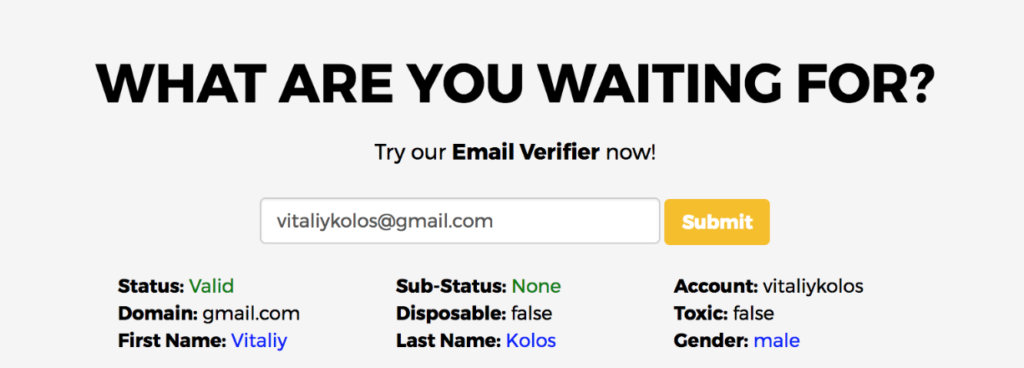
As you can see even this data is great when it comes to email addresses that you find but you’re still not sure about. The status of the email clearly lets you know if it’s a valid email address and it makes sense to even further work with it. If the status value is invalid, you can just move on to the next email address that you want to use for your outreach.
I’d like to specifically point out the importance of knowing the first and last name of the person you’re trying to reach. If you don’t use the person’s name in your email message, odds are, the person will consider your message to be just another spam email. In that case, it doesn’t really matter how cool and awesome your actual email message is because nobody will ever read it.
Another interesting and useful feature is “Disposable”. Sometimes people just create disposable email addresses for specific reasons (for example for registering for a service that is known to send out tons of spam, etc). Such temporary emails are also used for masking real email addresses.
Benefits of Registering for ZeroBounce
Once you register for a ZeroBounce account, you’ll have access to even more interesting features that will make your email blast campaign by a long shot more efficient and to the point. Let me go through at least some of them so that you can better understand what exactly the service has to offer.
Email Bounce Detection
You most definitely want to know what email addresses just bounce off your messages because you’re both wasting your efforts and money because newsletter providers charge you for the overall amount of email addresses you have in your newsletter list. Using the email bounce detection feature you can just free up spots for email addresses that actually receive your stuff.
Email Data Append
You’ll be able to easily append crucial missing data to your emails. We’re talking first of all about first and last names, using which can make or break your email newsletter campaign. Other than that, the tool allows you to append location, city, state/region and country if the registration IP is available. Long story short, these features allow to make your message more natural.
Toxic Domain Detection
Some domains are known for abuse, spam, and bot created emails. The toxic domain detection feature makes it possible to effortlessly identify such domains and make sure that you don’t waste your time and funds on such dead-end things. Once you find such toxic domains, the best way to handle them is getting rid of them and moving on.
Bottom Line
The email validation features that I highlighted above are just a few and ZeroBounce has way more to offer. I just mentioned those that seem important at first sight for an SEO or digital marketing person who does email marketing or outreach for link building reasons. You can just sign-up for free and see how exactly the service benefits specifically your outreach campaigns.
-

SlideDeck Review
Sliders are one of the most popular features that are most commonly being used by leading media websites today. They have become an essential element of web designing lately. It is the best way to showcase the wonderful gallery your website already has in the most creative manner. (more…)
-

HumCommerce Review
The high amount of traffic. Unbelievable increase in sales. Expected revenue. If these are the things you’re looking from your eCommerce store, conversion rate optimization is the technique you should be wary of.
Right from understanding how visitors are interacting with your store to figuring out where they’re falling off the funnel, there’s a lot for you to keep a tab on. However, for all of these tasks to be executed appropriately, you’d need proper data.
And, for data, you’ll have to make use of analytics. In the present scenario, thanks to available tools, amassing required data isn’t a tough task anymore. HumCommerce is one such all-in-one analytic tool that intends to assist you in boosting your conversion rates.
In this one single tool, there’s a lot that you’ll find, such as heat maps, funnel analysis, screen recordings, and much more. Basically, HumCommerce merges traditional analytics with behavioral analytics to offer you the best results.
So, here’s an in-depth review of this tool. Let’s dig in and know more about its tendencies and competences.
What Does HumCommerce Do?
To begin with, HumCommerce works as a general analytics tool but offers something more than Google Analytics does. You can easily integrate it into your WooCommerce (or Magento, Prestashop, X-Cart and other leading e-commerce stores) store to set goals and gain required data seamlessly.
To ensure more flexibility, this tool offers you an opportunity to create your own conversion funnels and set objectives. Another effective feature lets you search keywords right from Google Search Console and execute conversion rate optimization adequately.
And then, it allows you to track behavioral analytics of your customers by creating heat maps, recording sessions, and analyzing forms.
HumCommerce Features in A Nutshell
HumCommerce comprises an extensive range of features, proficient enough in providing you required insights for conversion rate optimization. So, here is an overview of some of them:
Track User Activity
This set of features comprises user actions on forms or web pages, heatmaps, users’ flow, and full recordings of user sessions. You’ll get a chance to see what every visitor is doing on your store in detail. This data will surely help you tweak and edit your site to get more conversions and revenue accordingly.
Track Keywords, A/B Testing & Form Analytics
With these features, you can simply track forms, web pages, and keywords. HumCommerce, after connecting with your webmaster tool, can offer you updates on such keywords that can bring you a higher rank on search engines.
Marketing Reports
While running an eCommerce store, it’s quite important to track trends and their results in the industry. With this tool, you get access to data that can be combined in one report and analyzed accordingly.
Real-time Maps & Visitor Logs
You get an opportunity to keep a tab on your visitor logs and gain insightful data. Where your visitors are accessing your site from, what they’re doing on your site, how long they’re staying, what is it that they’re purchasing, when are they abandoning, and much more can be found from this feature.
Sales Performance by Product Performance & Traffic Sources
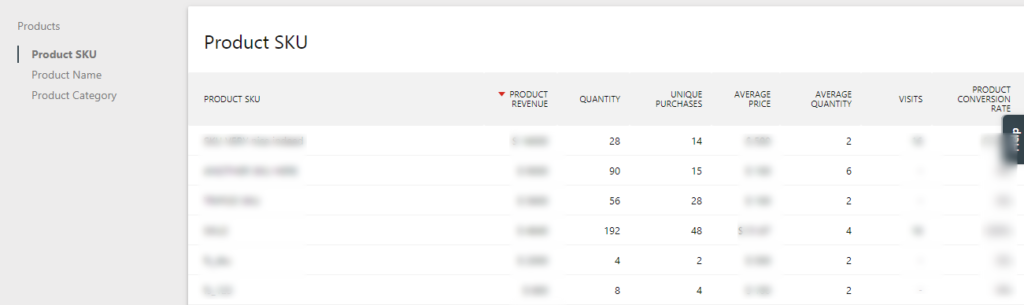
For your business to grow adequately, it’s important to know the kind of products that are performing and the source of traffic from where visitors are coming. In this way, knowing what’s working out for you and what’s not would be beneficial for you.
Site Search Insights & Crawling Errors
When it comes to indexing pages, products, and categories of your eCommerce store, you’ll be able to see if there are crawling errors in search engi
-
nes. It’s quite important as you get to fix errors instantly. Moreover, you’ll get to know what people are searching for to provide them with an amazing experience.
- Clicking on an outbound link
- Visiting a specific URL/li>
- Downloading a file/li>
- Sending an event/li>
- Scroll
- Click
- Move
- URLs to trigger recordings
- Number of sessions to use
- Sampling rate
- An option to get keystrokes
- An option to clarify minimum session time
How to Setup HumCommerce With WordPress Website?
In the inventory of WordPress, you’ll find a dedicated plugin that makes setting up HumCommerce quite simple. Once you’ve installed and activated this plugin, visit the
HumCommerce area in the dashboard and type in the Site ID that you would have got from the HumCommerce interface.The best thing about this plugin is that it comes with its own dashboard and allows you to operate everything from there.
What Does HumCommerce Dashboard Do?
Once you’re done with setting up the tracking code of this tool, you’ll get to do almost everything from the dashboard. Following are some of the effective functionalities that you can make use of-
1.General Analytics
First and foremost, you can get your hands on general analytics that you’d have got while using Google Analytics, such as:
Visitors – operating systems, devices, locations, and more
Acquisition – search engines, referrers, social media, etc
Behaviour – site search, exit pages, entry pages, link click along with other featuresOne of the considerable things that you’ll find here is the detailed visitor log. It syncs with your site recordings and heatmaps automatically. And then, you can even have a look at a detailed visitor profile, showing all the necessary details regarding users’ visits along with their eCommerce activities and lifetime revenue.
Furthermore, it even tracks downloads by default and outbound links. This tracking system is done by default from the day one by HumCommerce.
eCommerce Analytics
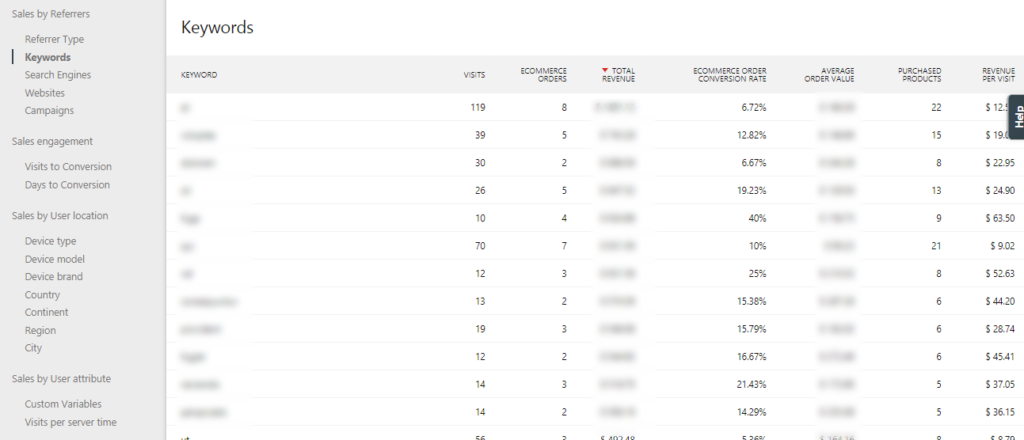
Moving forward, HumCommerce, after connecting to your WooCommerce store, also offers a dedicated eCommerce analytics area. Here, you can keep a tab on eCommerce log that allows you to see what exactly is happening at the store.
Right from successful orders to abandoned carts, there are several stats and data that can be found in this specific area. You can even view products and sales data along with an overview of everything else.
Creating Funnels & Goals
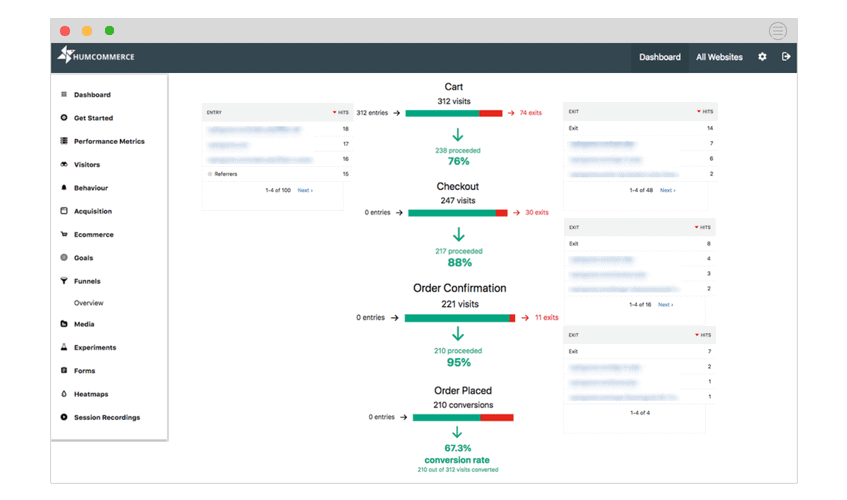
While beginning with an eCommerce store, your primary goal would be to get orders and sales, isn’t it? Keeping that in mind, this area on the HumCommerce dashboard allows you to add your goals to make conversion rate optimization easier.
With certain options, you even get to trigger your goal completions, such as:For instance, if your goal is to get signups for your email list, you can simply trigger this goal whenever someone clicks on the signup confirmation page. On top of that, once you’ve defined the completion of your goal, you can even create a funnel on that page.
Creating Heatmaps
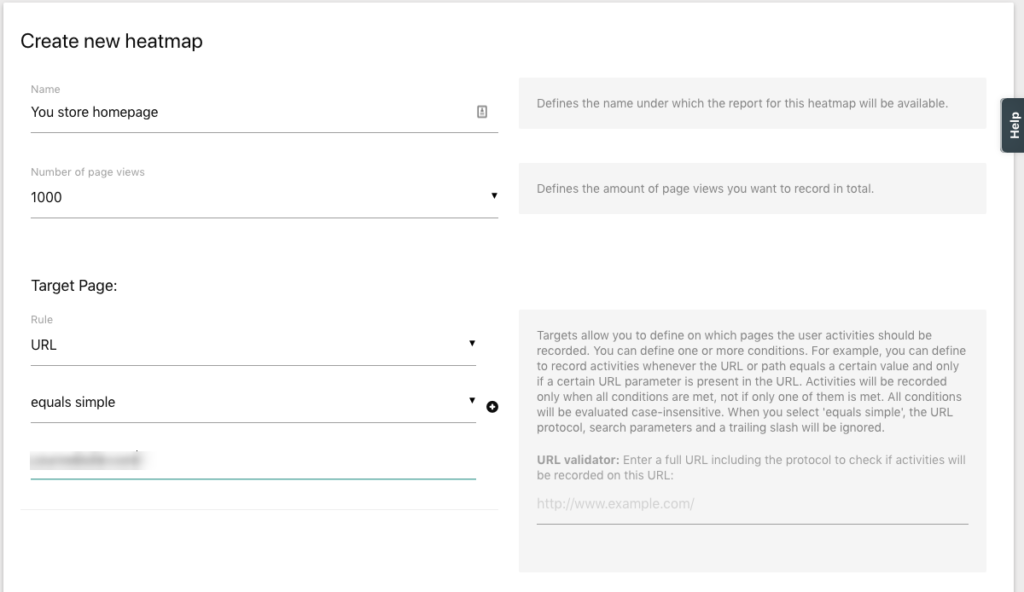
Heatmaps are termed useful because they help you viewing movement, clicks, and scroll data of your users. Although they wouldn’t be detailed in comparison with screen recordings, however, heatmaps are proficient enough in providing an aggregate data of thousands of visitors at once.
While creating heat maps, you can easily select the numbers of page views that you’d want to analyze and the URLs you’ll want to use. And then, you can even select sample rates and other basic settings.
If you want to exclude certain content from heatmap screenshots, you get all the freedom to do so. Then, you can use this feature to view:-
And, you can even switch between different types of devices for better insights.
Visitor Session Recordings
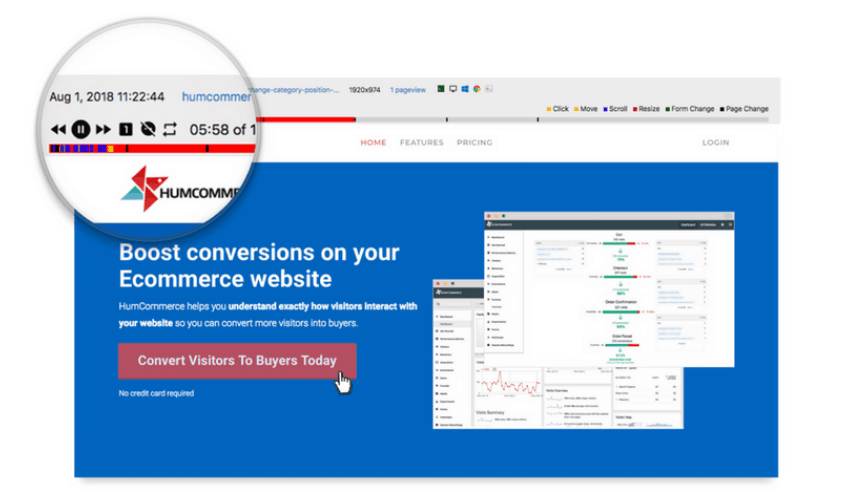
If you’re looking for more information than what heatmaps are giving you, it’s better to rely on screen recordings. It’s quite the opposite of heatmaps as this section offers more data and insights. Creating a screen recording might be similar to that of heatmaps. You get to choose:
There are even some additions to this area, such as:
Similar to heatmaps, you even get an opportunity to conceal certain data accordingly.
Analyzing Forms
In the area of Forms, this tool allows you to create form analytics. You can select whether or not to track every form on the eCommerce store or just specific ones. And, you also get a chance to keep a tab on form conversions by page visits and not by submissions.
Furthermore, you can even watch out for fields that are taking more to fill and those that have the highest dropping rate. Here, you can also have a look at the overall form conversion rate.What Is the Cost of HumCommerce?
To make things exhilarating and optimization easier for you, HumCommerce offers a full-featured plan absolutely free of cost. However, there are certain limitations to it, such as:
1,000 page views per month
Data storage for only six months
Screen recordings up to 50 every month
But, if you’re receiving a high number of traffic on your eCommerce store, you can think of going with a PRO or Business plan. Go through the HumCommerce pricing.Final Thoughts
Undoubtedly, HumCommerce offers you access to several analytics so as to make conversion rate optimization easier. Moreover, it even eliminates the necessity to use a lot of tools at once. For instance, instead of using Google Analytics and a heat map tool differently, you can just rely upon HumCommerce to execute the same tasks and gather the same data.
One of the best things about this tool is that it comes with a free plan and a plugin for easy WordPress setup. So, even if you aren’t a tech-savvy and doesn’t know a lot of things about such tools, installing and using HumCommerce wouldn’t be a tough task.
So, let us know which tools you’ve been using and if HumCommerce can replace all of them for you?
-

SEO PowerSuite Review (Video)
This review post is exclusively personal and highlights what I really love about the brand new features that SEO PowerSuite has to offer. Most of the new features that I’m going to mention in the article will make your life way easier from an SEO standpoint and not only (because you’ll be able to save more time for your family or whatever is your personal priority at this point in time. (more…)
-

OnAir WordPress Theme Review
This is a review of OnAir WordPress Theme. Radio might be an old fashioned thing to some, but the new technologies let it evolve rapidly. Nowadays, online streaming, podcasting and online radio stations are on the rise of popularity. They are fun and often really useful to listen to, and with the tools like OnAir2 WordPress theme they are easy and fun to create.
Everything You Need to Launch an Online Radio Station
This fully responsive theme with modern design and well thought through layout comes full of awesome features. Let’s take a closer look at these features and the benefits they offer!
Customization options
The theme comes with 11 custom post types and 7 custom widgets. These are really cool features, they provide extra customizability. Along with the drag-and-drop editor, pre-built page templates, 14 custom shortcodes, fully customizable colors and fonts, and visual composer they make OnAir2 a very easy to customize theme indeed.

Mobile-friendly radio player
OnAir2 is built to provide your listeners with the best user experience, naturally it is fully responsive. And naturally it features mobile friendly radio player functionality. The player supports unlimited channels, MP3 stream, Icecast and SHOTcast. There also is a popup player that offers continuous play. And the theme allows for displaying the song titles, which is simply fantastic.

Podcast functionality
Podcasts are all the rage now, people love them. OnAir provides every bit of necessary functionality to help you create professional quality podcasts. The theme makes it easy to create podcasts and let your audience download them and listen to whenever and wherever they want to.
The theme is fully compatible with YouTube, SoundCloud and MixCloud. And it provides a fully integrated MP3 player. Simply put – you do not need any coding skills to implements these things on your website.
Show pages and schedules
OnAir2 is seriously awesome when it comes to the show pages. It allows to sort the shows by category or music genre and display the pages in grid or masonry style. You can entertain your visitors with related stories, top tracks, previous episodes and even offer them a newsfeed. The show pages also feature an automatic timetable.
The theme also offers awesome show schedules that enable you to create daily, weekly and monthly schedules with no hassle at all. The schedules come with brilliantly easy time and date selection, simple tables and sliders.
Quick Video Review of the OnAir WordPress Theme
Want to hear more about this awesome WordPress theme? Go ahead, the video below will tell you all about it!
What do you think about the theme?
